
1. Introduction
The Walfront HT-1202 Digital Water Quality Tester is a versatile instrument designed for accurate measurement of pH and mV values, along with temperature, in various aqueous solutions. This device is suitable for a wide range of applications including environmental monitoring, wastewater treatment, chemical laboratories, pharmaceutical research, fermentation processes, chemical engineering, and water supply analysis. Its high measurement accuracy and user-friendly design make it an essential tool for professionals and enthusiasts alike.

Image 1.1: Walfront HT-1202 Digital Water Quality Tester
2. Product Features
- Wide Measurement Range: Measures pH from 0 to 14 with a 0.01 resolution and mV from -415mV to 415mV.
- High Accuracy: Provides pH measurements with an accuracy of up to ±0.05pH and mV measurements with ±0.1% FS.
- Temperature Compensation: Features automatic temperature compensation for accurate readings across a range of 0℃ to 60℃.
- Large LCD Display: Equipped with a large LCD that simultaneously displays pH or mV and temperature. The backlight activates automatically for clear viewing in various lighting conditions.
- Automatic Power-Off: Includes an automatic power-off function after 4 minutes of inactivity to conserve battery life.
- Calibration Check: Incorporates a calibration check function to validate instrument performance and ensure reliability.

Image 2.1: Key components of the HT-1202 Digital Water Quality Tester
3. Package Contents
Upon opening the package, please verify that all the following items are included:
- 1 x Walfront HT-1202 Digital Water Quality Tester
- 1 x Combined Electrode
- 1 x Package of Standard Buffer Reagents (for calibration)
- 1 x Electrode Soaking Liquid
- 1 x Instruction Manual
- 1 x Black Carrying Case

Image 3.1: HT-1202 tester and its accessories

Image 3.2: HT-1202 kit in its protective carrying case
4. Setup
4.1 Battery Installation
- Locate the battery compartment cover on the back of the device.
- Slide or unclip the cover to open the compartment.
- Insert the required batteries (typically AA, refer to the compartment label for exact type and polarity) ensuring correct orientation.
- Close the battery compartment cover securely.
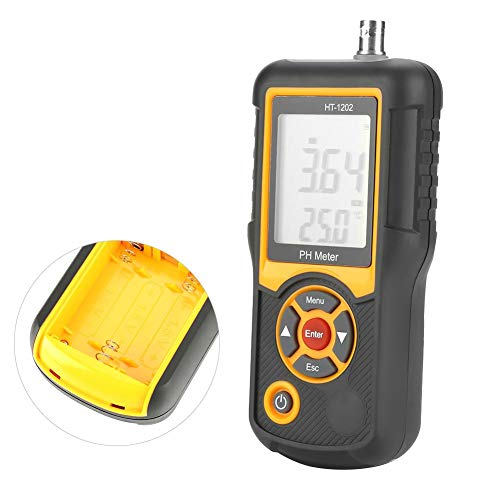
Image 4.1: Battery compartment of the HT-1202
4.2 Electrode Connection
- Carefully remove the protective cap from the combined electrode.
- Connect the electrode cable to the host interface port located at the top of the HT-1202 tester. Ensure a firm and secure connection.
4.3 Initial Preparation
- Electrode Soaking: Before first use or after prolonged storage, soak the electrode in the provided electrode soaking liquid for at least 30 minutes to ensure optimal performance.
- Buffer Solution Preparation: When preparing buffer solutions for calibration using the provided reagents, use distilled water that has been boiled for 15-30 minutes and then cooled. This process removes dissolved carbon dioxide, which can affect pH accuracy. Avoid prolonged exposure to air during cooling to prevent re-absorption of carbon dioxide.
5. Operating Instructions
5.1 Power On/Off
- To power on the device, press the Power button. The LCD backlight will automatically activate.
- The device will automatically power off after 4 minutes of inactivity to save energy. To manually power off, press and hold the Power button.
5.2 Calibration
Regular calibration is crucial for maintaining the accuracy of your HT-1202 tester. Use the provided standard buffer reagents to prepare calibration solutions (e.g., pH 4.00, pH 6.86, pH 9.18).
- Power on the meter.
- Rinse the electrode with distilled water and gently blot dry with a clean tissue.
- Immerse the electrode into the first standard buffer solution (e.g., pH 6.86).
- Press the Menu button to enter calibration mode. Follow the on-screen prompts to select the appropriate buffer value.
- Press Enter to confirm. The meter will automatically recognize the buffer and calibrate. Wait for the reading to stabilize and for the calibration indicator to confirm completion.
- Repeat the process for other buffer solutions (e.g., pH 4.00 and pH 9.18) as needed for multi-point calibration.
- After calibration, rinse the electrode thoroughly with distilled water.
5.3 Measurement
- Ensure the meter is calibrated and the electrode is clean.
- Immerse the electrode into the sample solution to be tested. Ensure the electrode tip is fully submerged.
- Gently stir the solution to ensure homogeneity and allow the reading to stabilize.
- Read the pH or mV value and temperature displayed on the LCD screen.
- After measurement, rinse the electrode with distilled water and replace the protective cap.

Image 5.1: HT-1202 in operation
6. Maintenance
6.1 Electrode Care
- Always keep the electrode tip moist. Store it in the provided electrode soaking liquid or a suitable storage solution when not in use. Never store the electrode dry.
- Rinse the electrode thoroughly with distilled water before and after each measurement to prevent cross-contamination and residue buildup.
- If the electrode becomes dirty or readings become sluggish, clean it according to the electrode manufacturer's instructions (typically involving a mild cleaning solution).
6.2 Battery Replacement
When the low power indicator appears on the screen, replace the batteries promptly to ensure continuous and accurate operation. Refer to Section 4.1 for battery installation instructions.
6.3 Storage
Store the HT-1202 tester and its accessories in the provided black carrying case in a cool, dry place, away from direct sunlight and extreme temperatures. Ensure the electrode is properly stored with its protective cap and soaking solution.
7. Troubleshooting
- No Power / Display Off: Check battery installation and ensure batteries are not depleted. Replace if necessary.
- Inaccurate Readings:
- Recalibrate the meter using fresh standard buffer solutions.
- Ensure the electrode is clean and properly soaked.
- Verify that the temperature compensation is functioning correctly.
- Check for any damage to the electrode.
- Slow Response Time: The electrode may be dry or dirty. Clean and re-soak the electrode.
- Low Power Indicator: Replace batteries immediately.
8. Specifications
| Parameter | Value |
|---|---|
| Measurement Range (pH) | 0.00 - 14.00 pH |
| Measurement Range (mV) | -415mV - 415mV |
| Resolution (pH) | 0.01 pH |
| Resolution (mV) | 1 mV |
| Accuracy (pH) | ±0.05 pH |
| Accuracy (mV) | ±0.1% FS |
| Temperature Compensation Range | 0℃ - 60℃ |
| Measured Solution Temperature | 5℃ - 60℃ |
| LCD Display | Three and a half digits |
| Automatic Power-Off | 4 minutes |
| Product Dimensions | 6.5 x 2.95 x 1.34 inches (165 x 75 x 32 mm) |
| Weight | Approx. 1.54 Pounds (692 g) |
| Manufacturer | Walfront |

Image 8.1: HT-1202 product dimensions
9. Environmental Conditions for Use
To ensure optimal performance and longevity of the instrument, adhere to the following environmental conditions:
- Ambient Temperature: 5℃ - 40℃
- Relative Humidity: ≤85% RH (non-condensing)
- Vibration: Operate in an environment free from vibrations that could affect performance.
- Corrosive Gases: Ensure the surrounding air is free from corrosive gases.
- Magnetic Interference: Avoid other magnetic field interference outside the Earth's magnetic field.
10. Warranty and Support
For information regarding warranty coverage, technical support, or service inquiries for your Walfront HT-1202 Digital Water Quality Tester, please refer to the contact information provided with your purchase documentation or visit the official Walfront website. Keep your purchase receipt as proof of purchase for any warranty claims.