
1. Introduction
This manual provides detailed instructions for the installation, operation, and maintenance of the YWBL-WH 2-Channel Bluetooth Relay Module. This module is designed for wireless control of various electrical devices via Bluetooth, compatible with iOS and Android platforms. Please read this manual thoroughly before using the product to ensure proper function and safety.
2. Safety Information
Always observe the following safety precautions to prevent injury or damage to the device:
- Ensure the power supply voltage and current are within the specified limits (DC 6.5-25V or DC 5V).
- Do not connect two power sources simultaneously.
- Disconnect power before making any wiring connections or disconnections.
- Avoid touching live components.
- This device is intended for indoor use in a dry environment.
- If you are unsure about any installation steps, consult a qualified electrician.
3. Product Overview
The YWBL-WH 2-Channel Bluetooth Relay Module allows for remote control of two independent circuits. It features a compact design and is built around the TI CC2541 Bluetooth chip.
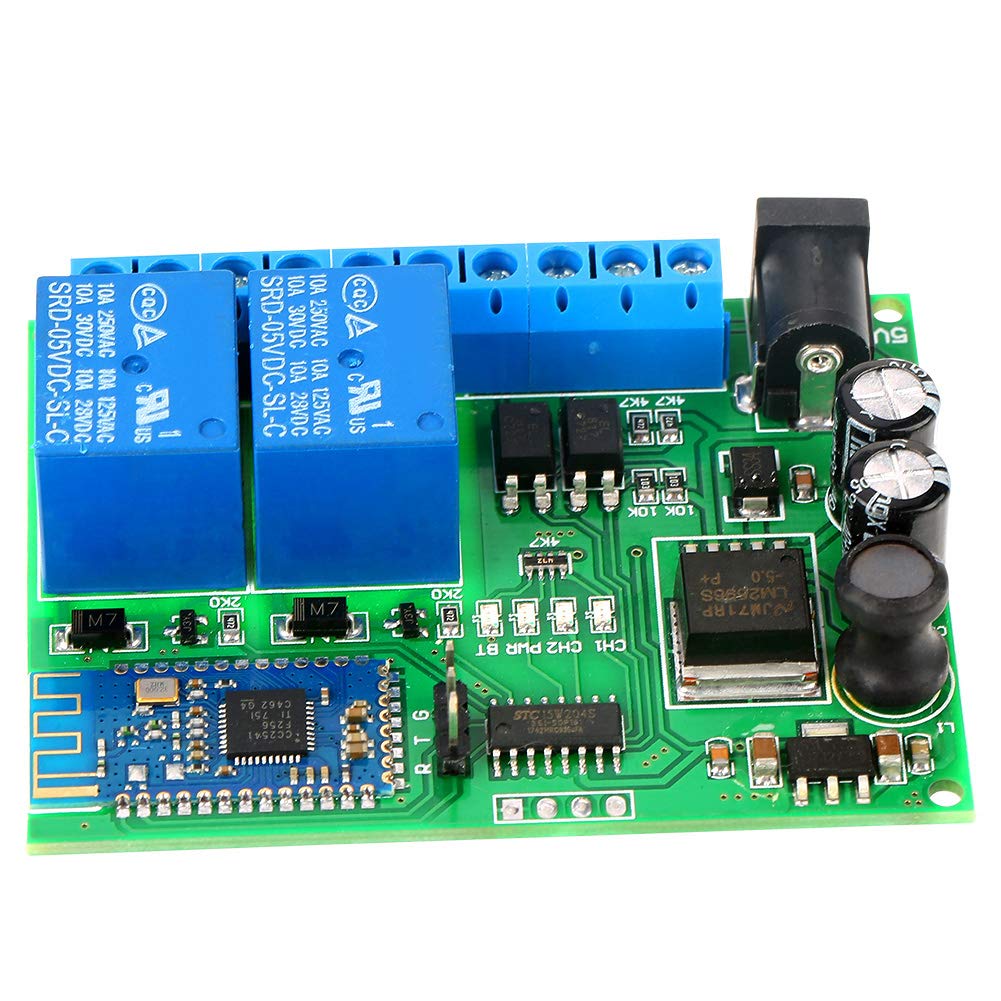
Figure 3.1: Top view of the YWBL-WH 2-Channel Bluetooth Relay Module.
3.1 Key Components
- Relays: Two independent relays (SRD-05VDC-SL-C) capable of switching 10A at 250VAC, 10A at 30VDC, or 10A at 125VAC.
- Bluetooth Module: Integrated module based on the TI CC2541 chip for wireless communication.
- Power Input: DC power jack and screw terminals for flexible power connection.
- Terminal Blocks: Screw terminals for connecting external devices to the relays.

Figure 3.2: Detailed top-down view of the module, highlighting the relays and Bluetooth chip.

Figure 3.3: Close-up of the DC power input jack.

Figure 3.4: Close-up of the relay terminal blocks.
4. Specifications
| Feature | Value |
|---|---|
| Product Dimensions (L x W x H) | 8 x 4 x 1 cm |
| Weight | 50 grams |
| Manufacturer | YWBL-WH |
| Model Number | YWBL-WHb607uc9ygi |
| ASIN | B07TTSTSGV |
| Country of Origin | China |
| Connector Type | Solder |
| Contact Type | Normally Open |
| Current Rating | 76 mA (2 relays open) |
| Mounting Type | Chassis Mount |
| Coil Voltage | 25 Volts (DC) |
| Minimum Switching Voltage | 6.5 Volts (DC) |
| UPC | 707300655632 |
5. Setup
5.1 Power Supply Connection
The module supports dual power input options, but only one should be used at a time:
- Option 1: DC 6.5-25V via the DC power jack or VIN/GND screw terminals.
- Option 2: DC 5V via the 5V/GND screw terminals.
Ensure the correct voltage is applied to avoid damage to the module.
5.2 Wiring External Devices
Connect the devices you wish to control to the relay terminal blocks. Each relay has three terminals: Normally Open (NO), Common (COM), and Normally Closed (NC). Refer to the markings on the board for correct connections.
- COM: Common terminal for the relay.
- NO: Normally Open. The circuit is open when the relay is de-energized and closes when energized.
- NC: Normally Closed. The circuit is closed when the relay is de-energized and opens when energized.
For most applications, you will connect your load between the COM and NO terminals.
6. Operating Instructions
6.1 Bluetooth Application
To control the relay module, you will need a compatible Bluetooth application on your smartphone or tablet. The module supports:
- Android 4.3 or higher
- iOS 8 or higher (for iPhone 4S or newer)
The manufacturer provides a Bluetooth application, or you may use a third-party application capable of sending simple instructions to control the relays.
6.2 Control Modes
The module supports five primary control instructions:
- Click: A momentary action where the relay activates briefly and then deactivates.
- Self-locking: Toggles the relay state with each command (e.g., first command turns it ON, second command turns it OFF).
- Interlock: When one relay is activated, the other relay is automatically deactivated. This is useful for preventing simultaneous operation of two conflicting devices.
- Relay Open: Explicitly opens the relay circuit.
- Relay Closed: Explicitly closes the relay circuit.
Refer to your Bluetooth application's interface for how to send these specific commands to the module.
7. Maintenance
The YWBL-WH 2-Channel Bluetooth Relay Module requires minimal maintenance:
- Keep the module clean and free from dust and moisture.
- Avoid exposing the module to extreme temperatures or direct sunlight.
- Do not attempt to disassemble or modify the module, as this may void any warranty and could lead to damage or malfunction.
8. Troubleshooting
8.1 Common Issues
- Module not powering on:
- Check power supply connections and ensure the voltage is within the specified range (DC 6.5-25V or DC 5V).
- Verify that only one power source is connected.
- Cannot connect via Bluetooth / "No compatible app":
- Ensure your smartphone/tablet meets the minimum OS requirements (Android 4.3+, iOS 8+).
- Verify Bluetooth is enabled on your device.
- Try restarting both the module (by cycling power) and your smartphone/tablet.
- If using a third-party app, ensure it is designed to communicate with TI CC2541-based Bluetooth modules and can send the correct control instructions.
- Relays not responding:
- Confirm successful Bluetooth connection.
- Check the wiring of the external devices to the relay terminals.
- Ensure the control commands sent from the app are correct for the desired action (e.g., 'Relay Closed' to activate).
9. Warranty and Support
For warranty information and technical support, please refer to the documentation provided at the time of purchase or contact your vendor. Keep your proof of purchase for any warranty claims.