
Introduction
This manual provides comprehensive instructions for the setup, operation, and maintenance of your SMART BAND 115plus Smart Fitness Band. Please read this manual carefully before using the device to ensure proper function and to maximize your experience.
Safety Information
- Do not expose the device to extreme temperatures or direct sunlight for extended periods.
- Avoid strong impacts or dropping the device.
- Keep the device away from children.
- Consult a medical professional before starting any new exercise regimen, especially if you have pre-existing health conditions.
- The device is IP67 waterproof, meaning it is resistant to splashes and brief immersion. It is not suitable for diving or prolonged submersion. Do not use in hot water.
Package Contents
Verify that all items are present in your package:
- 1 x SMART BAND 115plus Smart Fitness Band
- 1 x User Guide
Product Overview
The SMART BAND 115plus is a smart fitness tracker designed to monitor various health and activity metrics. It features an LCD colorful screen display and a built-in USB charging dongle.

Image: The SMART BAND 115plus displaying a distance reading of 2.05 Km. This image illustrates the device's primary display and its red strap.
Key features include:
- Heart Rate Monitor
- Pedometer/Step Counter
- Distance and Calorie Tracking
- Sleep Monitor
- Call and SMS Notifications
- Alarm Clock, Sedentary Reminder, Remote Camera, Anti-lost functions
- Gesture Control
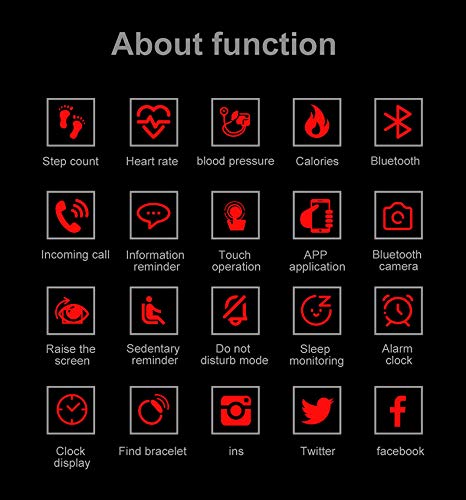
Image: A grid of icons depicting the various functions of the fitness band, including step count, heart rate, blood pressure, calories, Bluetooth, incoming call, information reminder, touch operation, app application, Bluetooth camera, raise screen, sedentary reminder, do not disturb mode, sleep monitoring, alarm clock, clock display, find bracelet, Instagram, Twitter, and Facebook notifications.
Setup
1. Charging the Device
The 115plus smart band features a built-in USB dongle for charging. No separate charger is required.
- Carefully remove both sides of the strap from the fitness tracker to reveal the USB dongle.
- Plug the device directly into any standard USB port (e.g., on a laptop, computer, or USB wall adapter).
- Charge the device for approximately 2 hours for a full charge. A 15-minute charge is recommended upon first receipt.
A full charge provides up to 7 days of standby time or normal usage.
2. App Download and Installation
To utilize all features of your fitness band, you need to download and install the companion application.
- Download the application named 'Yoho Sport' from your device's app store (APP Store for iOS or Google Play for Android).
- Alternatively, scan the QR code provided in the physical user guide (if available) to directly access the app download.
- Install the 'Yoho Sport' app on your smartphone.
3. Pairing with Your Smartphone
Ensure your smartphone's Bluetooth is enabled before proceeding.
- Open the 'Yoho Sport' application on your smartphone.
- Navigate to the device pairing section within the app.
- The fitness band's Bluetooth name is "MS1020". Select this device from the list of available Bluetooth devices in the app.
- Once connected, a Bluetooth logo will appear on the fitness band's screen, indicating a successful connection.
The 115plus smart sports band is compatible with Android (version 4.4 and above) and iPhone (iOS 7.1 and above).
Operating Instructions
Basic Navigation
The fitness band typically operates with a single touch-sensitive area on the screen. Tap to cycle through different display modes and functions.
Activity Tracking (Pedometer, Distance, Calories)
The band automatically tracks your daily activities. No need for a mobile phone to calculate walking steps, distances, and calories. Data is synchronized with the 'Yoho Sport' app when connected.
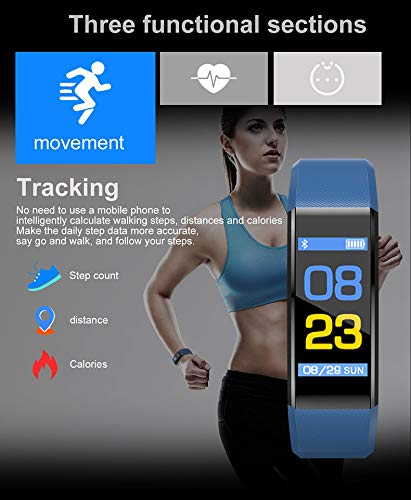
Image: The SMART BAND 115plus displaying its movement tracking capabilities, including step count, distance, and calories burned. The image shows a blue band and a graphic of a person exercising.
Heart Rate Monitoring
The 115plus fitness tracker supports continuous heart rate monitoring. Heart rate changes are detected by built-in motion and heart rate sensors.

Image: The SMART BAND 115plus displaying a heart rate of 90 Bpm on its screen, alongside a smartphone screen showing a detailed heart rate history graph and current heart rate data. This illustrates the device's heart rate monitoring function and app integration.
Tips for monitoring heart rate during exercise: The app provides data to help plan exercise time and intensity according to your heart rate.
Sleep Monitoring
The device automatically monitors your sleep patterns. View detailed sleep data in the 'Yoho Sport' app.
Call and SMS Notifications
When connected via Bluetooth to your smartphone, the fitness band will display incoming call and message notifications on its screen.
Note: These functions require the fitness band to be actively connected to your smartphone via Bluetooth.
Other Functions
- Alarm Clock: Set alarms through the 'Yoho Sport' app.
- Sedentary Reminder: Receive alerts when you have been inactive for too long. Configure settings in the app.
- Remote Camera: Use the band as a remote shutter for your smartphone camera.
- Anti-lost Function: The band can alert you if you move too far from your connected smartphone.
- Gesture Control: Raise your wrist to automatically illuminate the screen.
Maintenance
Water Resistance (IP67)
The SMART BAND 115plus has an IP67 waterproof rating. This means it is protected against dust ingress and can withstand immersion in water up to 1 meter for 30 minutes.

Image: The SMART BAND 115plus submerged in water, illustrating its IP67 waterproof capability. The image emphasizes that the device is suitable for washing hands, rain, and general water exposure, but warns against hot water.
- It is suitable for daily use, such as washing hands, rain, and light splashes.
- Do not use the device in hot water, saunas, or steam rooms.
- Avoid prolonged submersion or high-velocity water activities like diving.
Cleaning
Wipe the device and strap regularly with a soft, damp cloth. Avoid using harsh chemicals or abrasive materials.
Troubleshooting
- Device not turning on: Ensure the device is fully charged. Plug it into a USB port for at least 15 minutes.
- Cannot connect to smartphone:
- Ensure Bluetooth is enabled on your smartphone.
- Make sure the 'Yoho Sport' app is open and running.
- Check if the band is within Bluetooth range of your phone.
- Restart both the fitness band (if possible) and your smartphone.
- Forget the device in your phone's Bluetooth settings and try pairing again through the app.
- Notifications not appearing:
- Confirm the band is connected to your phone via Bluetooth.
- Check notification settings within the 'Yoho Sport' app to ensure they are enabled for desired applications.
- Verify that your phone's notification permissions allow the 'Yoho Sport' app to access notifications.
- Inaccurate step count/heart rate:
- Ensure the band is worn snugly on your wrist, about one finger's width above your wrist bone.
- Clean the heart rate sensor on the back of the device.
- Note that the accuracy of the step pedometer is approximately 95%.
Specifications
| Feature | Specification |
|---|---|
| Model | 115plus |
| CPU | Telink TI8266 |
| Data Transmission | BLE4.0 |
| Memory | 16KB + 512KB |
| Charging Interface | USB (Built-in dongle) |
| Screen Size | 0.96 inches |
| Strap Size | 250 x 19.4 x 11.9 mm |
| Strap Material | TPU |
| Net Weight | 25 grams |
| Battery Type | Lithium Polymer |
| Battery Capacity | 180 Milliamp Hours |
| Charging Time | Approximately 2 hours |
| Standby Time | Up to 7 days |
| Waterproof Rating | IP67 |
| Compatible OS | Android 4.4+, iOS 7.1+ |
| App Name | Yoho Sport |
| Bluetooth Name | MS1020 |
Warranty and Support
For any questions or support regarding your SMART BAND 115plus, please refer to the contact information provided by your retailer or the manufacturer.
The product typically includes a warranty. Please refer to the warranty policy provided at the time of purchase for details on coverage and duration.
Note: If you have any questions, please feel free to contact us; we will respond within 24 hours.


