
1. Introduction
The Waterpulse Portable Dental Flosser V400 is a cordless oral irrigator designed to provide effective interdental cleaning and gum massage. It utilizes a pressurized stream of water to remove plaque and food debris from between teeth and below the gumline, promoting improved oral hygiene. This manual provides essential information for the safe and effective use, maintenance, and troubleshooting of your device.

Image: The Waterpulse V400 Portable Dental Flosser, shown alongside its retail packaging and a selection of interchangeable nozzle tips, highlighting its compact design and accessories.
2. Safety Information
- Do not immerse the device in water.
- Ensure the charging port is dry before connecting the charging cable.
- This device is intended for oral cleaning only. Do not use it for any other purpose.
- Keep out of reach of children.
- Consult your dentist before use if you have had oral surgery or have severe periodontal disease.
- Use lukewarm water for irrigation to avoid discomfort.
- Do not direct the water stream into the eyes, nose, or other sensitive areas.
- Stop use and consult a professional if you experience pain or excessive bleeding.
3. Package Contents
Please check the package to ensure all items are present:
- Waterpulse V400 Oral Irrigator Unit
- 4 x Standard Nozzle Tips
- USB Charging Cable
- Travel Case/Storage Bag
- User Manual (this document)

Image: A complete set of Waterpulse V400 components, including the main unit, four different nozzle tips, a USB charging cable, and a storage bag, arranged neatly on a surface.
4. Product Features and Components
The Waterpulse V400 is designed for user convenience and effective cleaning. Key components include:
- Nozzle Tip: Directs the water stream. Replaceable and interchangeable.
- Nozzle Release Button: Press to remove or change nozzle tips.
- Power Switch: Slides up/down to turn the device on or off.
- Mode Indicator Lights: Three lights indicating different pressure settings.
- Water Tank: 240ml capacity for water or mouthwash. Detachable for easy cleaning.
- Charging Port: Located at the bottom, for USB charging.
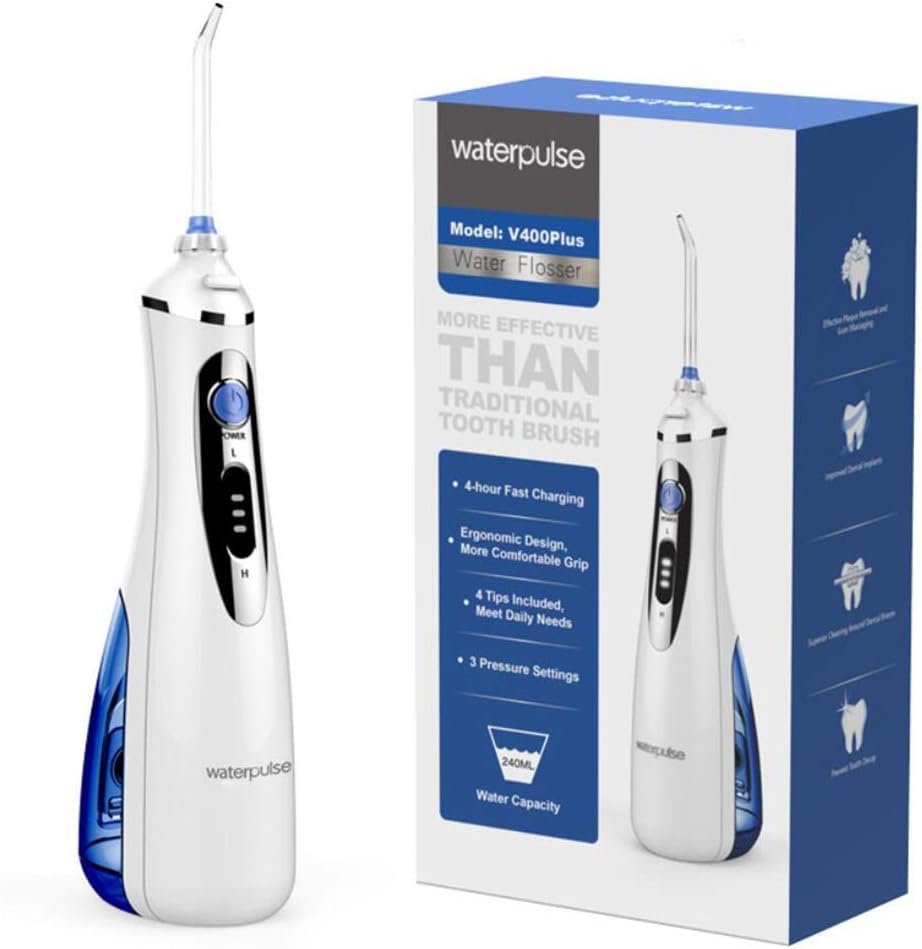
Image: A detailed view of the Waterpulse V400's power switch, showing its slide mechanism and the adjacent indicator lights for pressure settings.
5. Setup
5.1 Charging the Device
- Ensure the device is turned off.
- Locate the charging port cover at the bottom of the unit and open it.
- Connect the USB charging cable to the device and a suitable USB power adapter (not included).
- The indicator lights will show charging status. A full charge typically takes approximately 4 hours.
- Once fully charged, disconnect the cable and securely close the charging port cover to maintain water resistance.
5.2 Attaching a Nozzle Tip
- Select the desired nozzle tip.
- Insert the tip into the opening at the top of the flosser handle until it clicks securely into place.
- To remove, press the nozzle release button and pull the tip out.
5.3 Filling the Water Tank
- Twist the water tank counter-clockwise to detach it from the main unit.
- Fill the tank with lukewarm water. You may also add a small amount of mouthwash if desired. Do not exceed the maximum fill line.
- Reattach the water tank by aligning it with the main unit and twisting clockwise until secure.
6. Operating Instructions
- Power On: Slide the power switch upwards to turn on the device.
- Select Pressure Setting: The device features three pressure settings. Press the mode button (usually integrated with the power switch or a separate button) to cycle through the settings (indicated by the lights). Start with the lowest setting and increase as comfortable.
- Positioning: Lean over a sink. Place the nozzle tip into your mouth, aiming it at the gumline at a 90-degree angle.
- Flossing: Turn on the device. Guide the water stream along the gumline, pausing briefly between teeth. Allow the water to flow into the sink.
- Complete Cleaning: Continue until you have cleaned all areas of your mouth, including front and back surfaces of teeth, and around any dental work like braces or implants.
- Power Off: Slide the power switch downwards to turn off the device.
- Empty Tank: After each use, empty any remaining water from the tank.
7. Maintenance and Cleaning
7.1 Cleaning the Main Unit
- Ensure the device is turned off and unplugged from charging.
- Wipe the exterior of the unit with a soft, damp cloth. Do not use abrasive cleaners or immerse the unit in water.
- Allow the unit to air dry completely before storing or recharging.
7.2 Cleaning the Water Tank
- Detach the water tank from the main unit.
- Rinse the tank thoroughly with warm water.
- For deeper cleaning, you can use a mild soap and a soft brush. Rinse thoroughly to remove all soap residue.
- Allow the tank to air dry completely before reattaching.
7.3 Cleaning Nozzle Tips
- Remove the nozzle tip from the unit.
- Rinse the tip under running water.
- For optimal hygiene, it is recommended to replace nozzle tips every 3-6 months, or sooner if they become damaged.
8. Troubleshooting
| Problem | Possible Cause | Solution |
|---|---|---|
| Device does not turn on | Low battery; Power switch not engaged | Charge the device fully; Ensure power switch is slid completely upwards. |
| Weak water pressure | Low battery; Nozzle clogged; Water tank empty | Recharge the device; Clean the nozzle tip; Refill the water tank. |
| Water leakage | Water tank not properly secured; Nozzle tip not fully inserted | Ensure water tank is twisted clockwise until secure; Push nozzle tip until it clicks into place. |
| Device stops during use | Battery depleted; Water tank empty | Recharge the device; Refill the water tank. |
9. Specifications
- Model: V400
- Power Source: Rechargeable Battery
- Voltage: 4.5V
- Water Pressure: 70~110 PSI
- Water Tank Capacity: 240ml
- Nozzles Included: 4 Pcs
- Dimensions (approx.): 238mm (Height) x 68mm (Width) x 99mm (Depth)
- Material: Plastic, Silicone
- Special Features: Portable design

Image: A diagram illustrating the key dimensions of the Waterpulse V400 Portable Dental Flosser, including its height, width, and depth, for reference.
10. Warranty and Support
For warranty information, technical support, or service inquiries, please refer to the contact details provided with your purchase documentation or visit the official Waterpulse website. Please retain your proof of purchase for any warranty claims.