
RCYAGO Coffee Scale with Timer
RCYAGO Coffee Scale with Timer - Instruction Manual
Model: Coffee Scale with Timer
1. Introduction
Thank you for choosing the RCYAGO Coffee Scale with Timer. This high-precision kitchen scale is designed to provide accurate measurements for various culinary needs, including coffee brewing, baking, and general food weighing. It features an LCD backlight display, a built-in timer, and a tare function for enhanced usability.
2. Product Features
- Accurate Measurements: High-precision sensors ensure accuracy from 0.1 oz / 1 g up to 3000g/ml.
- Multiple Units: Supports 5 different units of measurement: OZ, LB, G, ML, G/ML.
- Large LCD Display: Features a green backlight for easy readability, even in low light conditions.
- Built-in Timer: Timer function up to 99 minutes and 59 seconds, ideal for precise coffee brewing.
- Tare Function: Allows you to subtract the weight of a container for net weight measurement.
- Auto-Off Function: Automatically turns off after 180 seconds of no operation to conserve battery.
- Safe Silicone Mat: Protects the weighing pan from spills and heat, easy to clean and disassemble.
- Protective Cover: Hard plastic cover protects the scale from dust and can also be used as a weighing tray.
3. Setup
3.1 Battery Installation
The scale is powered by 2 AAA batteries (included). To install or replace batteries:
- Open the battery compartment cover located on the underside of the scale.
- Insert 2 AAA batteries, ensuring correct polarity (+/-).
- Close the battery compartment cover securely.
3.2 Silicone Mat Placement
Place the provided silicone mat on the weighing platform. This mat offers heat resistance and prevents items from slipping, making it ideal for hot items like coffee carafes.

Image: Close-up of the scale showing the waterproof silicone pad and non-slip mat.
4. Operating Instructions
4.1 Controls Overview
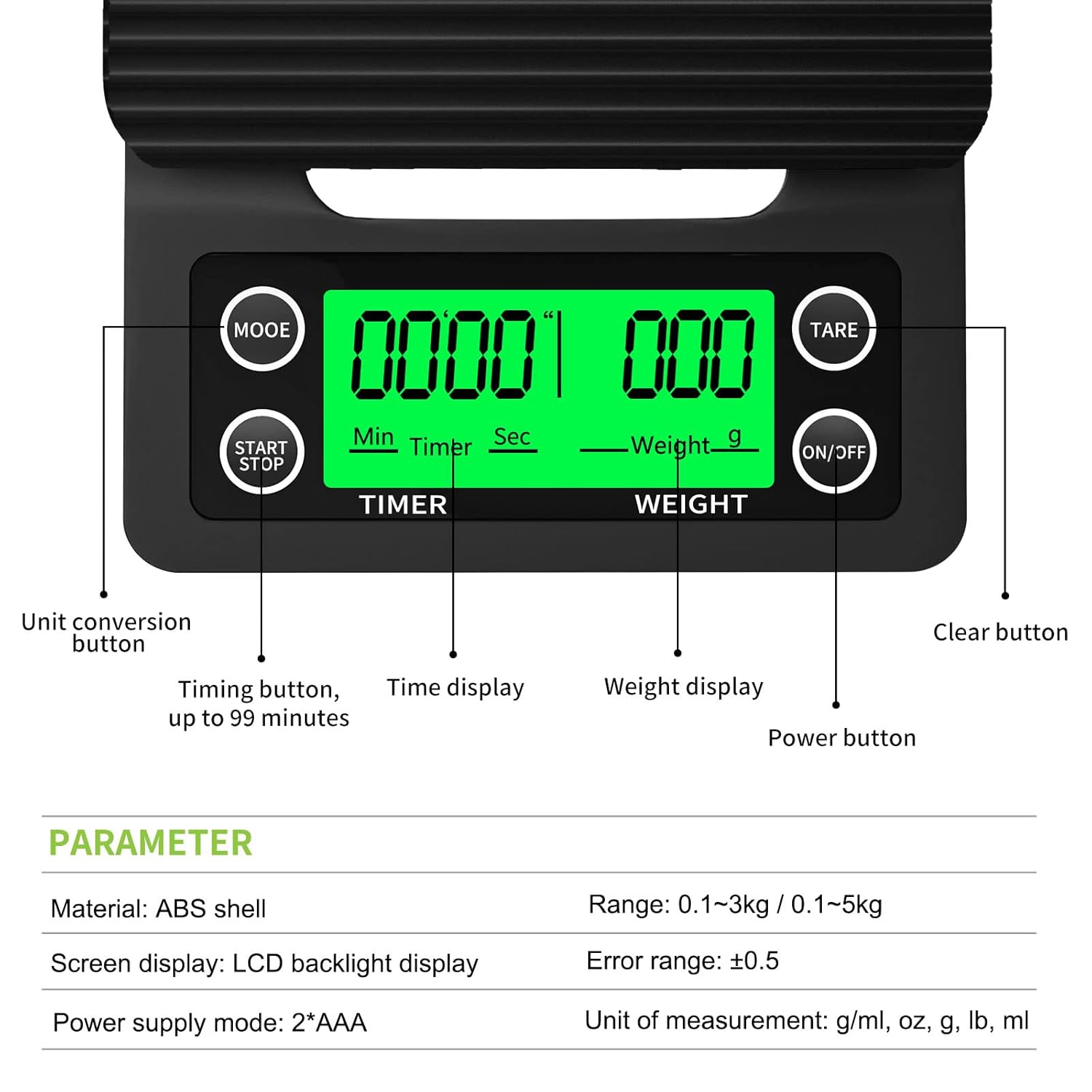
Image: Diagram illustrating the functions of each button and display area on the scale.
- ON/OFF Button: Press to turn the scale on or off.
- MODE Button: Press to cycle through different units of measurement (G, ML, OZ, LB, G/ML).
- TARE Button: Press to reset the display to zero, subtracting the weight of any container.
- START/STOP Button: Controls the built-in timer.
4.2 Power On/Off
Press the ON/OFF button to turn the scale on. The LCD display will light up. Press and hold the ON/OFF button for a few seconds to turn the scale off.
4.3 Unit Conversion
With the scale on, press the MODE button repeatedly to switch between the available units: grams (G), milliliters (ML), ounces (OZ), pounds (LB), and grams/milliliters (G/ML).

Image: Demonstrating how to change measurement units using the MODE button.
4.4 Tare Function
The tare function allows you to weigh items in a container without including the container's weight. Place an empty container on the weighing platform, then press the TARE button. The display will reset to zero. You can then add your ingredients to the container, and only their weight will be displayed.
4.5 Timer Function
The built-in timer is useful for precise brewing methods like pour-over coffee. Press the START/STOP button to begin the timer. Press it again to pause, and a third time to stop. The timer can count up to 99 minutes and 59 seconds.
4.6 Auto-Off Function
To conserve battery life, the scale will automatically turn off after 180 seconds (3 minutes) of inactivity. If the timer is running, the scale will not auto-off until the timer reaches 99 minutes and 59 seconds or is manually stopped.
4.7 Usage Examples
This versatile scale is suitable for a variety of applications:
- Coffee Brewing: Measure coffee grounds and water precisely for pour-over, espresso, or French press. Use the timer for optimal extraction.
- Baking: Accurately weigh ingredients like flour, sugar, and liquids for consistent results.
- Food Portioning: Control portion sizes for dietary needs or meal preparation.

Image: The scale in use for pour-over coffee, demonstrating its timer and weighing capabilities.

Image: Visual representation of the scale's versatility for different weighing tasks.
Video: Official RCYAGO video demonstrating the coffee scale with timer in action.
5. Maintenance
5.1 Cleaning
The silicone mat is removable and can be easily washed with soap and water. For the scale body, wipe it with a damp cloth. Avoid submerging the scale in water or using abrasive cleaners, as this may damage the electronic components.
5.2 Storage
When not in use, place the hard plastic cover over the weighing platform to protect it from dust and potential damage. Store the scale in a dry place at room temperature.
6. Troubleshooting
- Inaccurate Readings: Ensure the scale is placed on a flat, stable surface. Avoid placing it near strong electromagnetic fields or vibrations. Recalibrate if necessary (refer to specific calibration instructions if provided with your model, or contact support).
- Display Not Working/Flickering: Check battery levels and replace if low. Ensure batteries are installed correctly.
- Beeping Sound: The scale typically beeps with button presses. Some models allow disabling the beep by pressing the TARE button three times in a row. Note that the timer function may still beep every minute.
- Water Exposure: While the silicone mat offers some protection, the scale is not fully waterproof. Avoid excessive water exposure to prevent internal corrosion or malfunction.
7. Specifications
| Feature | Detail |
|---|---|
| Brand | RCYAGO |
| Weight Limit | 3 Kilograms (6.6 LB) |
| Readout Accuracy | 0.1 Grams |
| Display Type | LCD with Green Backlight |
| Units of Measurement | OZ, LB, G, ML, G/ML |
| Special Features | Timer, Tare Function, Auto-Off |
| Power Supply | 2 x AAA Batteries (included) |
| Material | Plastic (ABS shell) |
| Product Dimensions | 7.87 x 5.12 x 1.18 inches |
| Item Weight | 10.4 ounces (296 Grams) |
8. Warranty and Support
RCYAGO provides a 12-month warranty for this product. If you have any questions, concerns, or require assistance with your coffee scale, please contact RCYAGO customer support for exchange, refund, or return options.
Ask a question about this manual
Ask about setup, troubleshooting, compatibility, parts, safety, or missing instructions. Manuals+ will review the question and use this page’s manual context to help answer it.