
Introduction
This manual provides essential information for the proper installation, use, and maintenance of the Black and Decker 90606681 Replacement Dust Bags. These bags are designed to collect dust and debris generated during the operation of compatible Black and Decker power tools, ensuring a cleaner work environment and optimal tool performance. Please read these instructions thoroughly before installation and use.
Safety Information
Always prioritize safety when working with power tools and their accessories. Failure to follow safety guidelines can result in injury or damage to the tool.
- Ensure the power tool is disconnected from its power source before attempting to install or remove the dust bag.
- Wear appropriate personal protective equipment (PPE), including eye protection and a dust mask, especially when handling dust-generating operations.
- Do not use damaged or improperly installed dust bags. This can lead to dust leakage and reduced collection efficiency.
- Dispose of collected dust responsibly, following local regulations. Some dusts may be hazardous.
Compatibility
The Black and Decker 90606681 Replacement Dust Bags are compatible with the following Black and Decker power tool models:
- BDEQS300
- BDERO100
- BDERO600
Always consult your power tool's original owner's manual to confirm the correct part number for replacement dust bags.
Setup and Installation
Follow these steps to properly install the replacement dust bag on your compatible Black and Decker power tool:
- Disconnect Power: Ensure the power tool is unplugged from the electrical outlet to prevent accidental startup.
- Remove Old Dust Bag (if applicable): If a dust bag is currently attached, carefully remove it. Refer to your tool's manual for specific removal instructions.
- Inspect New Dust Bag: Examine the new 90606681 dust bag for any signs of damage or manufacturing defects.
- Attach Dust Bag: Align the plastic connector of the new dust bag with the dust port on your power tool. Push firmly until the bag is securely seated and locked into place. A click or firm resistance may indicate proper attachment.
- Verify Connection: Gently tug on the dust bag to ensure it is securely attached and will not detach during operation.
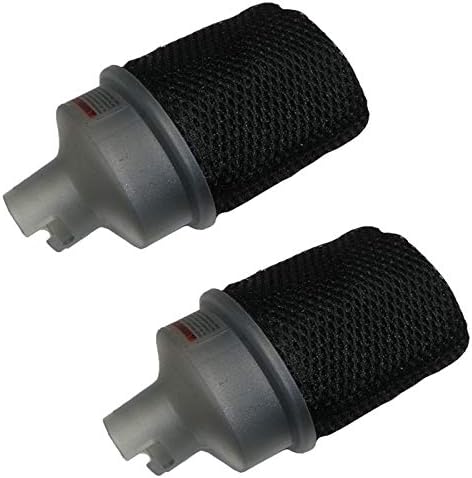
This image displays two Black and Decker 90606681 replacement dust bags. Each bag features a translucent grey plastic connector base designed for attachment to compatible tools, and a black mesh fabric bag for collecting dust and debris.
Operating with Dust Bags
Once the dust bag is securely installed, you can operate your power tool as usual. The dust bag will collect the fine particles generated during sanding or other operations.
- Monitor the dust bag regularly during use. A full bag will reduce collection efficiency and can lead to dust escaping into the air.
- Avoid overfilling the dust bag. This can strain the tool's dust collection system and potentially damage the bag.
Maintenance
Proper maintenance extends the life of your dust bags and ensures effective dust collection.
- Emptying the Dust Bag: When the dust bag appears full or dust collection efficiency decreases, disconnect the power tool from its power source. Carefully remove the dust bag and empty its contents into a suitable waste receptacle.
- Cleaning the Dust Bag: For optimal performance, periodically clean the dust bag. Tap the bag gently to dislodge fine dust particles. For more thorough cleaning, the mesh bag can often be rinsed with water. Ensure the bag is completely dry before reattaching it to the tool.
- Inspection: Regularly inspect the dust bag for tears, holes, or damage to the plastic connector. Replace the bag if any damage is found to maintain effective dust collection.
Troubleshooting
| Problem | Possible Cause | Solution |
|---|---|---|
| Poor dust collection | Dust bag is full or clogged. | Empty and/or clean the dust bag. |
| Dust escaping from tool | Dust bag not securely attached. | Re-attach the dust bag, ensuring it is firmly seated. |
| Dust escaping from tool | Dust bag is damaged (tear, hole). | Replace the dust bag with a new one. |
Specifications
- Part Number: 90606681
- Material: Paper/Mesh Fabric
- Color: Black
- Dimensions: Approximately 3 x 6 x 5.75 inches (Product dimensions, individual bag may vary slightly)
- Weight: Approximately 0.96 ounces (per bag)
- Compatibility: Black and Decker BDEQS300, BDERO100, BDERO600
Warranty
Replacement parts typically carry a limited warranty against manufacturing defects. Please refer to the original purchase documentation or contact the retailer/manufacturer for specific warranty terms and conditions applicable to this product.
Support
For further assistance, technical support, or to inquire about additional replacement parts, please refer to your power tool's original owner's manual or visit the official Black and Decker website. You may also contact the retailer from whom you purchased the dust bags.

