
DUCLUS PU5022
DUCLUS Mini Photo Studio Light Box Instruction Manual
Model: PU5022
Introduction
Thank you for choosing the DUCLUS Mini Photo Studio Light Box. This portable and foldable photography light tent kit is designed to help you capture high-quality, professional-looking images of small products. Featuring integrated LED lighting and multiple color backgrounds, it provides an optimal environment for clear and well-lit photographs. Please read this manual carefully before use to ensure proper setup and operation.
What's in the Box
- 1 x 9 inch light box
- 6 x backdrops (various colors)
- 1 x manual
- 1 x USB cable
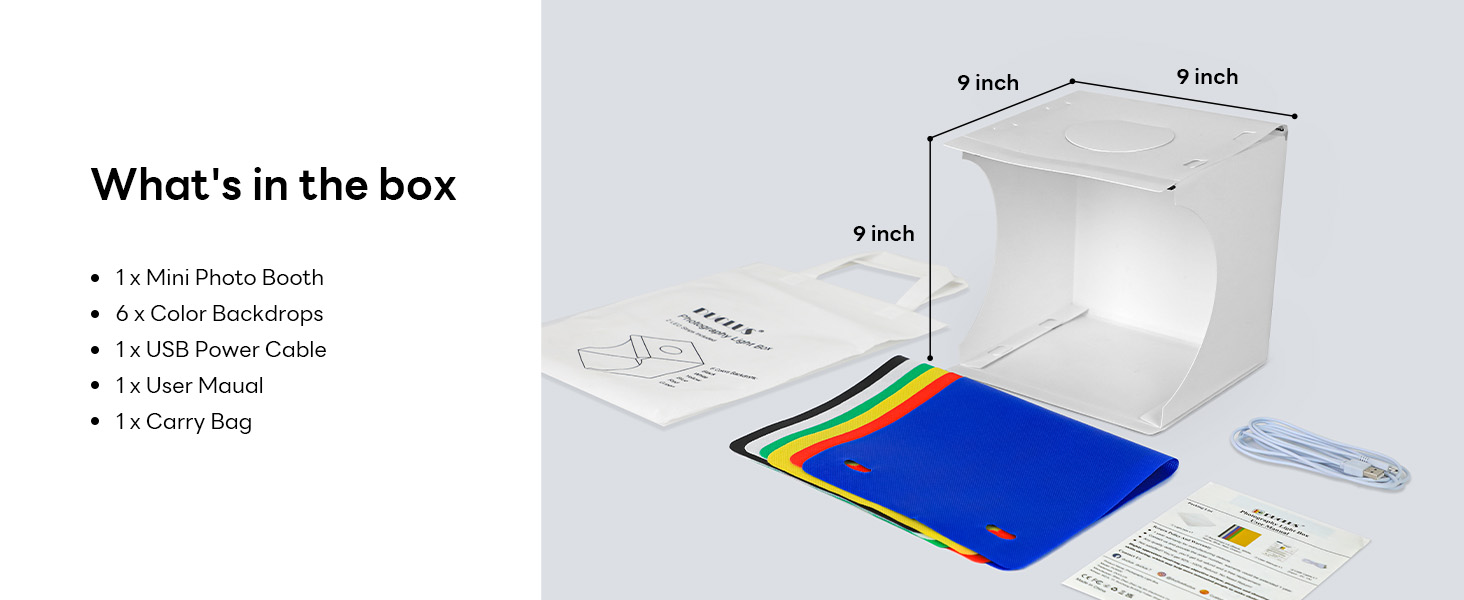
Image: All components included in the DUCLUS Mini Photo Studio Light Box package.
Setup Guide
- Unfold the Light Box: Carefully unfold the light box from its compact, flat-packed state.
- Fold Edges Along Creases: Fold all edges along the pre-defined creases to form the cubic structure.
- Insert Snap Buckles: Secure the shape by inserting the snap buckles into their corresponding slots.
- Attach Backdrop: Choose one of the 6 provided color backdrops and attach it inside the box using the integrated hooks or clips.
- Plug in USB Cable: Connect the USB cable to the LED light port on the light box.
- Connect to Power: Plug the other end of the USB cable into a compatible USB power source (e.g., wall adapter, power bank, computer USB port). Ensure the power output voltage does not exceed 5V.

Image: Visual guide for assembling the light box and connecting power.

Image: Examples of compatible USB power sources including wall adapters, power banks, and computers.
Operating Instructions
The DUCLUS Mini Photo Studio Light Box is designed for ease of use, providing optimal lighting for small product photography.
Key Features:
- High Brightness: Equipped with 2*20PCS high-quality SMD LED beads, providing ample brightness for clear shooting.
- Multi-angle Shooting: Features both a front horizontal shooting window and a vertical window on top, allowing for diverse shooting angles (e.g., front view, overhead view).
- No Strobe: Designed to eliminate strobe effects, ensuring high-quality professional pictures even with unprofessional shooting equipment.
- Instant Gallery: Simply connect the USB power, place your product, and begin shooting.
- Wide Application: Ideal for shooting small items such as jewelry, accessories, toys, watches, gadgets, and other small products.
Using the Light Box:
Once assembled and powered, the LED lights will illuminate. Place your product inside the light box on the chosen backdrop. Utilize the front opening for standard eye-level shots or the top opening for overhead shots. The consistent lighting helps minimize shadows and highlights details.

Image: The light box in operation, demonstrating product placement and smartphone photography.

Image: Illustrates both overhead ('Overlook shooting') and front ('Tile shooting') perspectives possible with the light box.

Image: Shows a photographer using the front opening and the overhead opening for different shot types.

Image: The light box can be used with smartphones, digital cameras, SLR cameras, and iPads for photography.
Maintenance
To ensure the longevity and optimal performance of your DUCLUS Mini Photo Studio Light Box, follow these simple maintenance guidelines:
- Cleaning: Gently wipe the surfaces of the light box and backdrops with a soft, dry cloth. For stubborn marks, a slightly damp cloth can be used, but ensure the surfaces are completely dry before folding or storing.
- Storage: When not in use, fold the light box back into its compact form and store it in the provided carry bag. Store in a cool, dry place away from direct sunlight and excessive heat.
- Handling: Handle the light box with care to avoid bending or creasing the material unnecessarily, which could affect its structural integrity over time.
Troubleshooting
If you encounter any issues with your DUCLUS Mini Photo Studio Light Box, please refer to the following common problems and solutions:
| Problem | Possible Cause | Solution |
|---|---|---|
| LED lights do not turn on. | No power, loose USB connection, or incompatible power adapter. | Ensure the USB cable is securely plugged into both the light box and the power source. Verify the power source is active. Use a USB power adapter with an output voltage of 5V or less. |
| Lights flicker or are dim. | Insufficient power supply or faulty USB cable. | Try a different USB power source or a different USB cable. Ensure the power source can provide sufficient current. |
| Light strip adhesive detaches. | Wear and tear or environmental factors. | Re-secure the light strip using strong double-sided adhesive tape or a suitable adhesive. |
| Box does not hold its shape well. | Improper assembly or material fatigue. | Ensure all snap buckles are correctly inserted and secured. If the material is fatigued, consider reinforcing the corners with tape for temporary stability. |
If the problem persists after trying these solutions, please contact customer support for further assistance.
Specifications
| Feature | Detail |
|---|---|
| Product Dimensions (Unfolded) | 9.06 x 8.66 x 9.45 inches (approx. 23 x 22 x 24 cm) |
| Item Weight | 10.9 ounces |
| Model Number | PU5022 |
| Manufacturer | DUCLUS |
| Color | White-9inch |
| Style | Portable, Folding |
| Material | Polyvinyl Chloride (PVC) |
| LED Lights | 2*20PCS high-quality SMD LED beads |
| Color Temperature | 5500K Standard |
| Color Rendering Index (CRI) | >= 95 |
| Power Input | Mini USB (supports up to 5V output) |
Warranty and Support
For warranty information and customer support, please refer to the product packaging or contact the seller directly. Keep your purchase receipt as proof of purchase for any warranty claims.
For additional resources and product information, you may visit the official DUCLUS store on Amazon: DUCLUS Store
Related documentsPU5022

Ask a question about this manual
Ask about setup, troubleshooting, compatibility, parts, safety, or missing instructions. Manuals+ will review the question and use this page’s manual context to help answer it.