
1. Introduction
This manual provides detailed instructions for the safe and effective use of your Nitecore EDC25 flashlight. The EDC25 is a high-performance, ultra-slim tactical EDC flashlight featuring a maximum output of 3000 lumens and convenient USB-C charging.
Please read this manual thoroughly before using the product and retain it for future reference.
2. Package Contents
- Nitecore EDC25 Flashlight
- Built-in Lithium-Ion Battery
- USB-C Charging Cable
- Lanyard
- User Manual
3. Product Overview
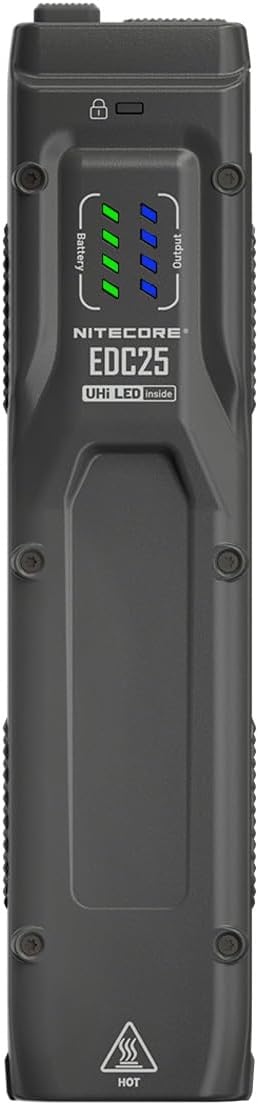
Figure 1: Front view of the Nitecore EDC25, highlighting the battery and output indicators.

Figure 2: Side view of the Nitecore EDC25, illustrating the USB-C charging port and pocket clip.

Figure 3: Top view of the Nitecore EDC25, displaying the control buttons.

Figure 4: Construction details of the EDC25, highlighting its lightweight and durable materials.

Figure 5: Explanation of the NiteLab UHI 20 LED technology.
4. Setup
4.1 Initial Charging
The Nitecore EDC25 comes with a built-in Lithium-Ion battery. Before first use, it is recommended to fully charge the device.
- Locate the USB-C charging port cover on the side of the flashlight (refer to Figure 2).
- Open the cover and connect the provided USB-C charging cable to the port.
- Connect the other end of the cable to a USB power source (e.g., USB adapter, computer USB port).
- The battery indicator lights (refer to Figure 1) will show the charging status. Once all indicators are solid, charging is complete.
- Disconnect the cable and securely close the USB-C port cover to maintain water resistance.
4.2 Lanyard Attachment
Attach the included lanyard to the designated lanyard hole on the flashlight for added security and ease of carrying.
5. Operating Instructions
5.1 Power On/Off
- To Turn On: Press and hold the power button (refer to Figure 3) for approximately 1 second.
- To Turn Off: While the flashlight is on, press and hold the power button for approximately 1 second.
5.2 Brightness Levels
The EDC25 features multiple brightness levels. While the flashlight is on:
- To Cycle Modes: Short press the mode button (the other main button, refer to Figure 3) to cycle through available brightness levels (e.g., Low, Medium, High).
- Instant Turbo: From any state (on or off), press and hold the mode button for instant access to the highest output (Turbo mode). Release to return to the previous state or turn off.
5.3 Special Modes (Strobe)
- Instant Strobe: From any state (on or off), triple-press the mode button to activate Strobe mode. Short press the mode button again to exit Strobe.
5.4 Lockout Function
To prevent accidental activation, the EDC25 features a lockout function.
- To Lock: While the flashlight is off, press and hold both the power button and the mode button simultaneously for approximately 2 seconds until the lockout indicator (refer to Figure 1) illuminates.
- To Unlock: While in lockout mode, press and hold both buttons simultaneously for approximately 2 seconds until the lockout indicator turns off.
5.5 Power Indicators
The battery and output indicators (refer to Figure 1) provide real-time information:
- Battery Indicator: Shows the remaining battery power.
- Output Indicator: May indicate the current brightness level or other operational status.
6. Maintenance
- Cleaning: Use a soft, damp cloth to clean the flashlight body. Avoid abrasive materials or harsh chemicals.
- Charging: Recharge the battery regularly, especially if the flashlight will not be used for an extended period, to maintain battery health.
- Water Resistance: Ensure the USB-C port cover is securely closed to maintain the flashlight's waterproof rating. Avoid submerging the flashlight if the cover is open or damaged.
- Storage: Store the flashlight in a cool, dry place away from direct sunlight and extreme temperatures.
7. Troubleshooting
- Flashlight not turning on:
- Check if the battery is charged. Connect to a USB-C power source.
- Ensure the flashlight is not in lockout mode. Refer to Section 5.4 to unlock.
- Verify that the power button is being pressed correctly (press and hold for 1 second).
- Flashlight not charging:
- Ensure the USB-C cable is properly connected to both the flashlight and the power source.
- Try a different USB-C cable or power adapter.
- Check the USB-C port for any debris or damage.
- Output is dim or inconsistent:
- The battery may be low. Recharge the flashlight.
- Ensure the lens is clean and free from obstructions.
- If issues persist, please contact Nitecore customer support.
8. Specifications
| Feature | Detail |
|---|---|
| Model | NC-EDC25 |
| Light Source | 2 x NiteLab UHi 20 LEDs |
| Maximum Output | 3000 Lumens |
| Power Source | Built-in Lithium-Ion Battery |
| Charging | USB-C Charging |
| Material | Aluminum Alloy |
| Color | Black |
| Dimensions (D x W x H) | 1.22" x 1.22" x 5.35" (31mm x 31mm x 136mm approx.) |
| Weight | 3.67 ounces (104 grams) |
| Water Resistance | Waterproof |
| Compliance | ANSI Standard Met |
| Recommended Uses | General use, outdoor activities, tactical or security purposes |
9. Warranty Information
Nitecore products are covered by a warranty from the date of purchase. Please refer to the official Nitecore website or your local distributor for detailed warranty terms and conditions. Retain your purchase receipt as proof of purchase.
10. Customer Support
For technical support, service, or further inquiries, please contact Nitecore customer service through their official website or the contact information provided with your product packaging.
Official Nitecore Website: www.nitecore.com