1. Product Overview
The Tangxi RPT 2K K-Head Repeater Box is designed to extend the communication range of two handheld walkie-talkies. It functions as a simple, portable relay system, allowing two radios to communicate over greater distances than they would individually. This device requires no external power supply and operates on a plug-and-play principle.
Key Features:
- Range Extension: Enhances communication distance for handheld radios operating in the 400-470MHz frequency range.
- No External Power: Operates without an external power source, making it highly portable.
- Plug and Play: Simple connection with no complex setup required.
- K-Head Compatibility: Designed for radios with K-head type connectors, including models like 5R, DM 5R, and GT 3TP, and other compatible brands.
- Two-Way Relay: Facilitates communication where one radio receives and the other transmits, effectively creating a relay.
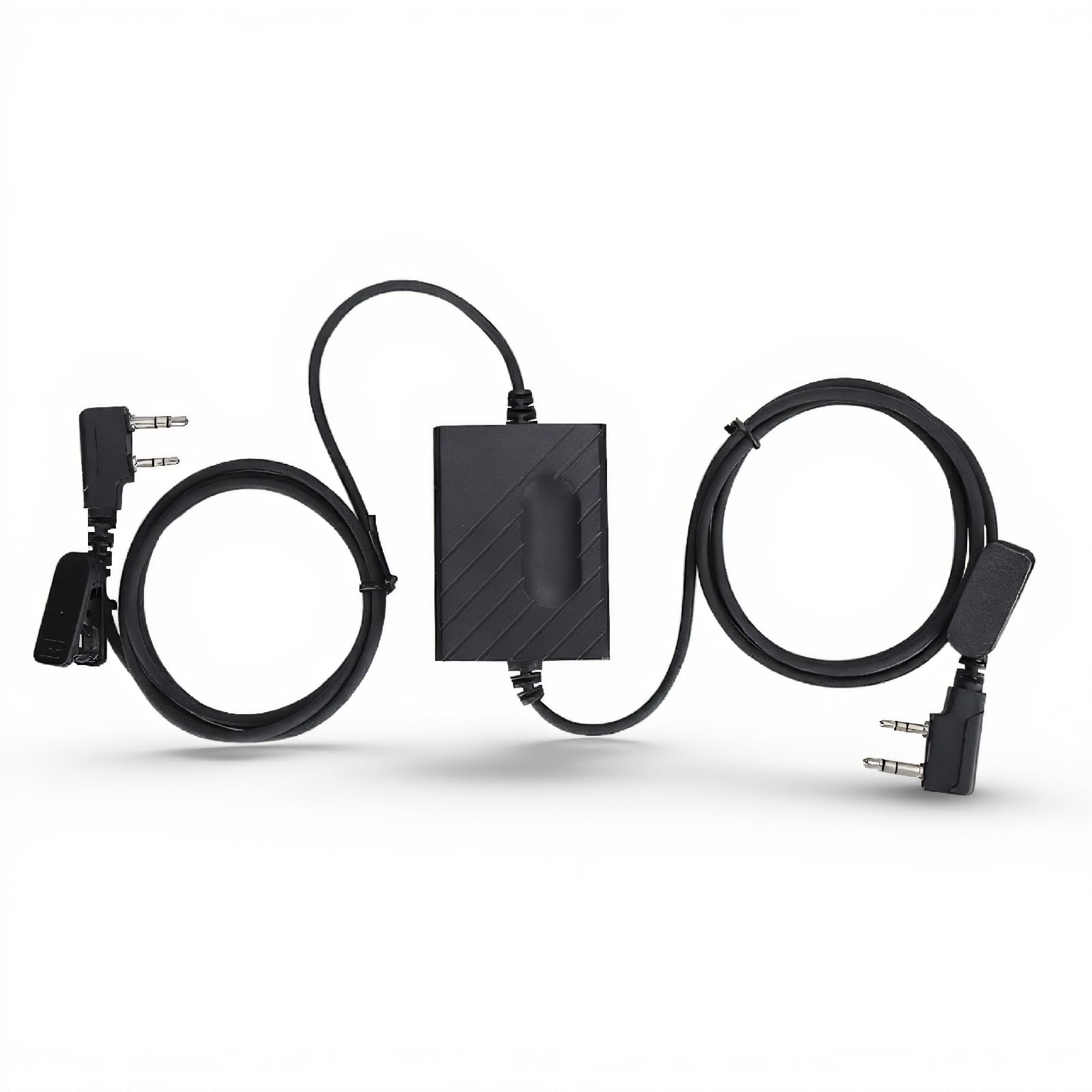
Image 1.1: The Tangxi RPT 2K K-Head Repeater Box, showing the main unit and its two K-head connector cables.
2. Setup Instructions
To set up the Tangxi RPT 2K Repeater Box, you will need two compatible handheld walkie-talkies, each equipped with a K-head connector for their external microphone/speaker ports.
2.1 Connecting the Radios
- Ensure both walkie-talkies are powered off before connecting.
- Connect one K-head cable from the repeater box to the external microphone/speaker port of the first walkie-talkie.
- Connect the second K-head cable from the repeater box to the external microphone/speaker port of the second walkie-talkie.
- The repeater box does not distinguish between input and output ports; either cable can be connected to either radio.

Image 2.1: Diagram showing two handheld walkie-talkies connected to the Tangxi RPT 2K Repeater Box.
2.2 Radio Configuration
For optimal performance, configure your walkie-talkies as follows:
- Volume: Set the volume on both walkie-talkies to maximum. This ensures clear audio transmission through the repeater.
- VOX (Voice Operated Exchange): Enable the VOX function on both radios. Adjust the VOX sensitivity to an appropriate level (e.g., level 5) to ensure the radio transmits only when audio is detected and stops transmitting promptly when audio ceases. Incorrect VOX settings can lead to continuous transmission or missed audio.
- Frequencies: Ensure the two walkie-talkies are set to different frequencies to avoid interference and allow for proper relay operation.

Image 2.2: The repeater box with its K-head connectors, highlighting the simple connection method.
3. Operating Instructions
Once connected and configured, the Tangxi RPT 2K Repeater Box will automatically facilitate communication between the two walkie-talkies.
- Relay Mode: The repeater box operates in a forwarding mode where if machine A receives a signal, machine B will transmit it, and vice-versa. This creates a cross-band or cross-frequency relay.
- Increased Range: By strategically placing the repeater box and its connected radios, you can significantly increase the effective communication range, potentially up to 10 km in open areas.
- Applications: This setup is useful for extending coverage in challenging environments such as underground mines, caves, basements, or for field construction and large event coordination.
3.1 Antenna Placement Considerations
Proper antenna placement is crucial for effective repeater operation:
- Antenna Separation: The transmitting (TX) and receiving (RX) antennas should not be set up at the same height or too close together, as this can cause interference and reduce communication distance.
- Minimum Distance: Maintain a distance of more than 5 meters between the two antennas to minimize interference.

Image 3.1: Diagram showing recommended antenna separation for optimal repeater performance.
3.2 Using with a Duplexer
If you possess a duplexer, you can utilize a single antenna for both transmitting and receiving, simplifying the setup and potentially improving performance by allowing the antenna to be placed at a sufficient height without interference issues.

Image 3.2: Diagram illustrating a repeater setup using a duplexer with a single antenna.
4. Maintenance
The Tangxi RPT 2K Repeater Box is designed for durability and requires minimal maintenance.
- Cleaning: Wipe the device with a soft, dry cloth. Avoid using harsh chemicals or abrasive cleaners.
- Storage: Store the repeater box in a cool, dry place away from direct sunlight and extreme temperatures when not in use.
- Cable Care: Avoid sharp bends or excessive pulling on the cables to prevent internal damage.
5. Troubleshooting
If you encounter issues with your Tangxi RPT 2K Repeater Box, consider the following troubleshooting steps:
- No Audio Pass-Through or Poor Audio:
- Ensure both walkie-talkies have their volume set to maximum.
- Verify that the K-head connectors are fully inserted into the radio ports.
- Check the cables for any visible damage.
- Radio Constantly Transmitting:
- This is often caused by incorrect VOX sensitivity settings. Adjust the VOX level on both radios (e.g., lower the sensitivity) until the transmission stops when no audio is present.
- Ensure there is no background noise triggering the VOX.
- Limited Range or Interference:
- Increase the physical separation between the antennas of the two walkie-talkies (ideally more than 5 meters).
- Ensure the antennas are not at the same height.
- Check for obstructions between the radios and the repeater, and between the repeater and the desired communication area.
- Verify that the radios are operating on appropriate frequencies for the environment.
- No Functionality:
- Confirm that both walkie-talkies are powered on and functioning correctly independently.
- Ensure the repeater box cables are securely connected to both radios.
6. Specifications
| Model Number | RPT 2K |
| Brand | Tangxi |
| Compatible Devices | Kenwood radios and most other brands with K-head connectors |
| Frequency Range | 400 - 470 MHz |
| Maximum Talking Range | 8 Kilometers (dependent on environment and radio power) |
| Cable Length | 90 cm (35.4 inches) for each side |
| Dimensions | 9.45 x 6.3 x 1.18 inches (approximate) |
| Item Weight | 2.82 ounces |
| Included Components | Relay Box |
7. Warranty and Support
For warranty information or technical support, please contact the seller or manufacturer directly. Keep your purchase receipt for any warranty claims.


