Overview
Key Features
- SECOP Compressor: Cooling range from 0°F to 50°F (-18℃ to 10℃) for freezing or refrigeration needs.
- Dual Mode Operation: Select between MAX mode for fast cooling or MIN mode for energy efficiency.
- Home & Car Use: Equipped with DC 12/24V and AC 110-240V power cables for versatile use.
- User-friendly Design: Features height suitable for truck tonneau covers, metal shell, thickened inner wall, foldable pull-down lock, convenient interior lights, and two removable wired baskets.
- 3-Level Battery Protection: Automatically powers off to prevent car battery depletion with selectable High, Mid, and Low settings.
Product Description
The ICECO VL45 Portable Refrigerator is a robust and versatile cooling solution designed for both home and vehicle use. Featuring a high-performance SECOP compressor, it offers a wide temperature range from freezing 0°F to refrigerating 50°F, ensuring your food and beverages stay fresh. Its durable metal construction, thickened inner walls, and secure locking mechanisms provide excellent insulation and reliability. The VL45 is engineered for convenience with independent AC and DC power ports, an intuitive control panel, and practical internal features like removable baskets and LED lighting. Its compact design is ideal for various applications, including fitting under truck tonneau covers, making it a perfect companion for road trips, camping, and other outdoor adventures.
Setup
Unpacking
Carefully remove the ICECO VL45 Portable Refrigerator from its packaging. Inspect the unit for any signs of damage that may have occurred during transit. Ensure all components, including power cables and baskets, are present.

Power Connection
The ICECO VL45 can be powered by either DC (12/24V) or AC (110-240V) sources. Locate the appropriate power input ports on the side of the unit. For home use, connect the AC cable to a standard wall outlet. For car or portable power station use, connect the DC cable to a 12V or 24V power source. Ensure connections are secure before powering on the unit.

Video 1: This video demonstrates the various features of the ICECO VL Car Fridge, including its robust design and power options.
Operating Instructions
Control Panel Overview
The control panel features a digital temperature display, temperature adjustment buttons (up/down arrows), a SET button for mode selection, and indicators for battery protection levels (High, Mid, Low) and compressor speed (MAX/MIN).
Temperature Settings
Use the up and down arrow buttons to set your desired temperature. The cooling range is from 0°F to 50°F (-18℃ to 10℃), allowing for both freezing and refrigeration.
Compressor Speed Modes (MAX/MIN)
Press the SET button to cycle through compressor speed modes. MAX mode provides rapid cooling, ideal for quickly bringing contents to temperature. MIN mode is more energy-efficient, suitable for maintaining temperature over longer periods.
Video 2: This video provides a detailed look at the ICECO VL Car Fridge, showcasing its features and operational modes.
Battery Protection
The unit features a 3-level battery protection system to prevent your vehicle's battery from being depleted. You can select between High, Mid, and Low settings using the SET button. The refrigerator will automatically power off when the battery voltage drops below the selected threshold.

Internal Organization
The ICECO VL45 includes two removable wired baskets for easy organization and access to your items. An interior LED light illuminates the compartment, making it easy to find contents in low-light conditions.

Maintenance
Cleaning
Regularly clean the interior and exterior of the refrigerator with a damp cloth and mild detergent. Avoid abrasive cleaners or solvents. Ensure the unit is unplugged before cleaning.
Heat Dissipation
To ensure optimal performance and longevity, maintain adequate clearance around the refrigerator's ventilation grilles. Do not block the air vents, as this can lead to overheating and reduced cooling efficiency.
Heat Insulation
The ICECO VL45 features a robust metal shell and a 60mm thickened inner wall for excellent heat insulation. This design helps maintain internal temperatures efficiently, reducing power consumption. Keep the lid securely latched to preserve cooling.

Troubleshooting
If your ICECO VL45 Portable Refrigerator is not functioning as expected, please refer to the following common issues and solutions:
- No Power: Check if the power cable is securely connected to both the unit and the power source. Ensure the power source (vehicle outlet, wall outlet, or battery) is active.
- Not Cooling: Verify that the temperature setting is appropriate for your needs. Check if the compressor speed is set to MAX for faster cooling. Ensure ventilation grilles are not blocked.
- Battery Protection Cut-off: If the unit stops working, the battery protection feature might have activated. Adjust the battery protection level (High, Mid, Low) to a lower setting if your power source can handle it, or recharge your battery.
- Unusual Noise: Ensure the unit is placed on a stable, level surface. Check for any obstructions around the fan or compressor area.
- Temperature Inaccuracy: If the displayed temperature seems incorrect, ensure the internal temperature sensor is not obstructed. Allow time for the unit to stabilize after initial setup or temperature changes.
For persistent issues, please contact customer support.
Specifications
| Specification | Value |
|---|---|
| Brand | ICECO |
| Model Number | 47QT |
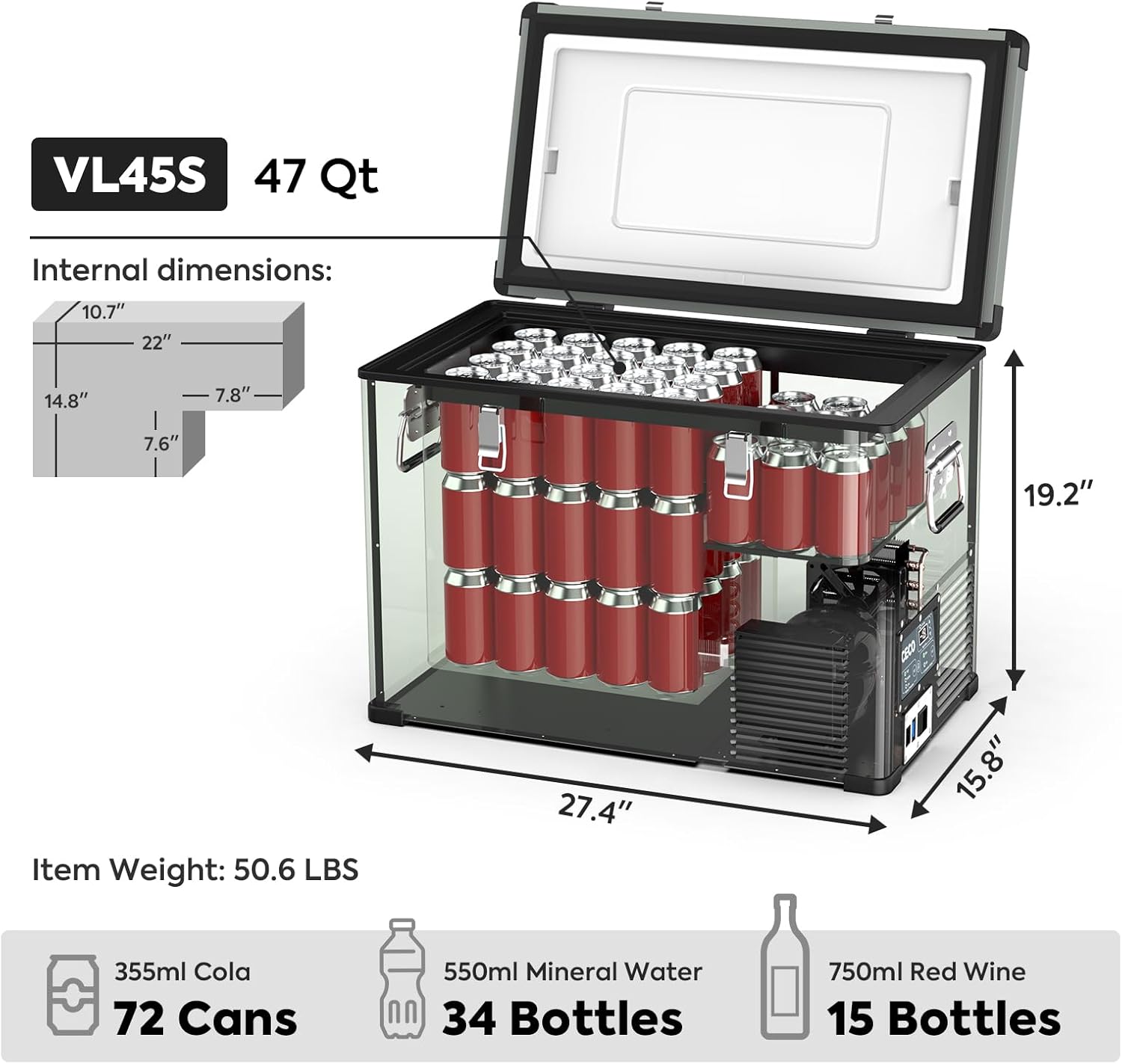
| Capacity | 45 Liters (47 Quarts) |
| Cooling Range | 0°F to 50°F (-18℃ to 10℃) |
| Power Input | DC 12V/24V, AC 110-240V |
| Compressor | SECOP Compressor |
| Product Dimensions | 15.8"D x 19.2"W x 27.4"H |
| Item Weight | 49.2 Pounds |
| Special Features | Portable, Car & Home Use, Battery Protection, LED Display, Low Noise |
Warranty & Support
The ICECO VL45 Portable Refrigerator comes with a 5-year warranty on the SECOP compressor and a 1-year warranty on all other parts.
For customer service and support, a phone line is available. Amazon messages will be answered within 24 hours, including on weekends.


