
Tobo TP4-025
Instruction Manual
Tobo Dobe TP4-025 Multifunctional Disk Storage Stand Kit
Model: TP4-025
1. Introduction
The Tobo Dobe TP4-025 Multifunctional Disk Storage Stand Kit is designed to enhance your gaming setup by providing organized storage for game disks, a vertical stand for your console, and a charging dock for two controllers. This versatile accessory is compatible with PlayStation 4 (PS4 Pro, PS4, PS4 Slim) and Xbox ONE S consoles.
This manual provides detailed instructions for assembly, operation, and general maintenance to ensure optimal use of your storage stand.
2. Product Features
- Multifunctional Design: Combines a PS4 dual controller charging station, game disk storage, and a console stand holder into one unit.
- Controller Charging: Allows two PS4 controllers to be charged simultaneously. The charging station is removable for individual and portable use.
- Game Disk Storage: Holds up to 12 gaming discs (PS4 games, DVDs, or Blu-ray discs).
- Console Stand: Designed to securely hold PS4 Pro, PS4, or PS4 Slim consoles vertically, promoting better ventilation.
- Space-Saving: Helps organize your gaming area by consolidating accessories and media.
- Easy Assembly: Composed of five large plastic parts for straightforward assembly and dismantling.
3. Package Contents
Please verify that all items listed below are included in your package:
- 1 x PS4 Disk Storage Tower (main stand components)
- 1 x PS4 Dualshock Controller Charger Dock
- 1 x Micro USB Cable
Note: PS4 console and controllers are not included with this product.
4. Setup and Assembly
The TP4-025 storage stand is designed for easy assembly. It consists of five main plastic components that interlock to form the complete unit.
- Unpack all components from the packaging.
- Identify the base plate and the two side panels with disk slots.
- Align the slots on the side panels with the corresponding pegs or grooves on the base plate. Gently push them together until they click into place.
- Attach the top support bar, ensuring it connects securely to the upper part of the side panels.
- Place the dual controller charging dock onto the designated area at the top of the assembled stand. Ensure it sits firmly.
- Connect the Micro USB cable to the charging dock. This cable will draw power from your PS4 console's USB port.
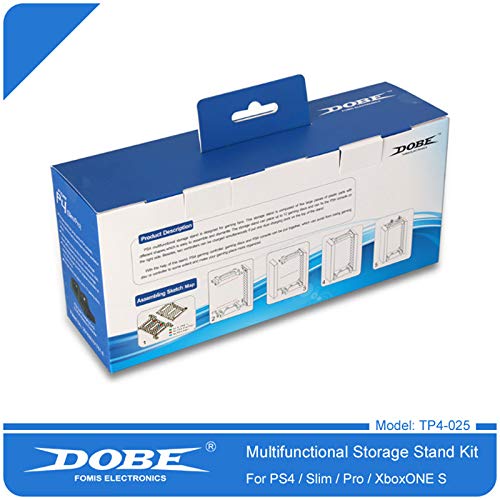
Figure 4.1: Product packaging illustrating the assembly sketch map.
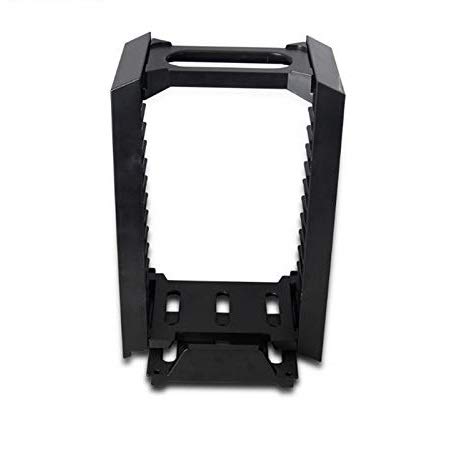
Figure 4.2: The fully assembled multifunctional storage stand.
5. Operating Instructions
Once assembled, the TP4-025 stand offers several functionalities:
5.1. Game Disk Storage
- Insert your PS4, DVD, or Blu-ray game disks into the designated slots on the side panels of the stand. The stand can hold up to 12 disks.
- Ensure disks are inserted with the spine facing outwards for easy identification.
5.2. Console Placement
- Carefully place your PS4 Pro, PS4, or PS4 Slim console vertically into the dedicated slot on the right side of the stand.
- The stand provides stability and helps improve airflow around the console's ventilation areas.
5.3. Controller Charging
- Connect the Micro USB cable from the charging dock to an available USB port on your PS4 console.
- Place up to two PS4 Dualshock controllers onto the charging ports of the dock. Ensure they are properly seated for charging to begin.
- The charging dock can be removed from the stand and used independently if desired.

Figure 5.1: The storage stand in use, holding games and a console.
6. Maintenance
To ensure the longevity and proper functioning of your storage stand, follow these simple maintenance guidelines:
- Cleaning: Use a soft, dry cloth to wipe down the stand regularly. For stubborn dirt, a slightly damp cloth can be used, followed by immediate drying. Avoid abrasive cleaners or solvents.
- Placement: Place the stand on a stable, flat surface to prevent tipping. Ensure it is not exposed to direct sunlight, excessive heat, or moisture.
- Handling: Avoid dropping the stand or subjecting it to strong impacts, which could damage the plastic components.
7. Troubleshooting
If you encounter any issues with your TP4-025 storage stand, please refer to the following common solutions:
- Controllers not charging:
- Ensure the Micro USB cable is securely connected to both the charging dock and a powered USB port on your PS4 console.
- Verify that the controllers are correctly seated on the charging ports.
- Try using a different USB port on your console or a different Micro USB cable to rule out cable or port issues.
- Stand feels unstable:
- Check that all five plastic components are securely interlocked and fully assembled as per the instructions in Section 4.
- Ensure the stand is placed on a flat, level surface.
- Disks do not fit:
- Ensure you are inserting standard PS4, DVD, or Blu-ray cases. The stand is not designed for non-standard or oversized cases.
If the issue persists after attempting these solutions, please contact customer support for further assistance.
8. Specifications
| Attribute | Detail |
|---|---|
| Model Number | TP4-025 |
| Compatibility | PlayStation 4 (PS4 Pro, PS4, PS4 Slim), Xbox ONE S (for console stand), PS4 Dualshock Controllers (for charging) |
| Disk Capacity | Up to 12 game disks (PS4, DVD, Blu-ray) |
| Controller Charging | 2 PS4 controllers simultaneously |
| Power Source (Charging Dock) | USB (via PS4 console) |
| Material | ABS Plastic |
| Dimensions (Approx.) | 9.45 x 7.87 x 1.18 inches (Package Dimensions) |
| Weight (Approx.) | 8.8 ounces |
9. Warranty and Support
For information regarding warranty coverage, technical support, or replacement parts, please refer to the manufacturer's official website or contact their customer service department directly. Keep your purchase receipt as proof of purchase.
Ask a question about this manual
Ask about setup, troubleshooting, compatibility, parts, safety, or missing instructions. Manuals+ will review the question and use this page’s manual context to help answer it.