
Introduction
Thank you for choosing the Silvercrest Automatic Robot Vacuum Cleaner, Model B07TJQ7C7C. This wireless robotic vacuum is designed to provide efficient and convenient floor cleaning for your home. With its intelligent navigation and powerful suction, it helps maintain a clean living environment with minimal effort.
Key features include a 14.8 Volt power supply, a low noise level of 70 dB, and a compact design weighing approximately 3.1 kilograms. The package includes essential components such as side brushes, a remote control, and a rechargeable battery, ensuring you have everything needed for immediate use.

Figure 1: The Silvercrest Automatic Robot Vacuum Cleaner, showcasing its sleek design and control panel.
Setup
1. Unboxing and Initial Charge
Carefully remove all components from the packaging. Ensure all accessories listed in the 'What's in the Box' section are present. Place the robot vacuum on its charging station. For optimal battery life, fully charge the device before its first use. The charging indicator light will provide status updates.
2. Installing Side Brushes
Locate the two side brushes. Align each brush with its corresponding slot on the underside of the robot and press firmly until it clicks into place. Ensure they are securely attached for effective cleaning.
3. Positioning the Charging Station
Place the charging station against a wall in an open area, ensuring there are no obstacles within 1 meter (3 feet) to the sides and 2 meters (6 feet) in front of the station. This allows the robot to easily locate and dock for charging.

Figure 2: The robot vacuum cleaner positioned near furniture, demonstrating its compact size and ability to navigate.
Operating Instructions
1. Starting a Cleaning Cycle
Press the 'Clean' button on the robot's top panel or on the remote control to start a cleaning cycle. The robot will automatically begin cleaning and return to its charging station when the battery is low or the cleaning cycle is complete.
2. Using the Remote Control
The included remote control allows you to manually direct the robot, select specific cleaning modes (e.g., spot cleaning, edge cleaning), and schedule cleaning times. Refer to the remote control's specific button functions for detailed operation.
3. Smartphone App Control
For enhanced control, download the official Silvercrest app on your smartphone. The app allows you to start/stop cleaning, view cleaning maps, set virtual boundaries, and receive notifications. Follow the in-app instructions for pairing your device with the robot.
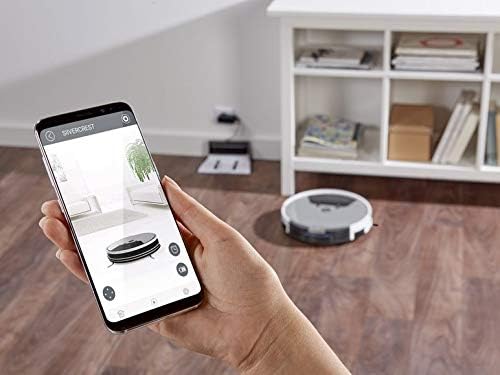
Figure 3: A user interacting with the Silvercrest smartphone application to control the robot vacuum cleaner, demonstrating remote operation capabilities.
Maintenance
Regular maintenance ensures optimal performance and extends the lifespan of your robot vacuum cleaner.
1. Emptying the Dustbin
After each cleaning cycle, or when the dustbin full indicator illuminates, remove and empty the dustbin. Press the release button, pull out the dustbin, and discard collected debris.
2. Cleaning/Replacing the Filter
The robot uses a cartridge filter. Tap the filter gently to remove loose dust. For thorough cleaning, use the provided cleaning tool or a soft brush. Replace the filter every 3-6 months, or more frequently depending on usage, to maintain suction power.
3. Cleaning Brushes
Regularly inspect and clean the main brush and side brushes. Remove any tangled hair or debris using the cleaning tool. The side brushes can be detached for easier cleaning.
4. Cleaning Sensors
Wipe the cliff sensors and bumper sensors on the underside and front of the robot with a clean, dry cloth. Clean charging contacts on both the robot and the charging station to ensure proper connection.
Troubleshooting
If you encounter issues with your robot vacuum, refer to the following common solutions:
- Robot not charging: Ensure the charging station is plugged in and the robot is properly docked. Clean the charging contacts on both the robot and the station.
- Robot getting stuck frequently: Clear obstacles from the cleaning path. Ensure cables, rugs with long fringes, or small objects are removed from the floor.
- Poor cleaning performance: Empty the dustbin, clean or replace the filter, and clean the main and side brushes. Check for blockages in the suction inlet.
- Robot not connecting to app: Ensure your Wi-Fi network is 2.4GHz. Restart the robot and your router. Follow the app's pairing instructions carefully.
- Unusual noises: Check brushes for tangled hair or debris. Ensure all components are correctly installed.
If the issue persists, consult the full troubleshooting guide available on the manufacturer's support website or contact customer service.
Specifications
| Feature | Detail |
|---|---|
| Brand | Silvercrest |
| Model Number | B07TJQ7C7C |
| Voltage | 14.8 Volts |
| Noise Level | 70 dB |
| Item Weight | 3.1 Kilograms |
| Dimensions (Packaging) | 46 x 40 x 15 cm |
| Connectivity | Wireless (Smartphone Compatible) |
| Filter Type | Cartridge |
| Included Components | Side brushes, Remote control, Battery |
Warranty and Support
Warranty Information
This product comes with a standard manufacturer's warranty. Please refer to the warranty card included in your product packaging for specific terms, conditions, and duration. Keep your proof of purchase for warranty claims.
Customer Support
For technical assistance, troubleshooting not covered in this manual, or warranty inquiries, please contact Silvercrest customer support. Contact details can typically be found on the manufacturer's official website or on the product packaging.
Note: Always refer to the latest information provided by the manufacturer for the most accurate and up-to-date support details.


