
1. Introduction
This manual provides detailed instructions for the safe and efficient operation of your DLYFULL UT4 USB Multi-Charger. Please read this manual thoroughly before use and retain it for future reference.
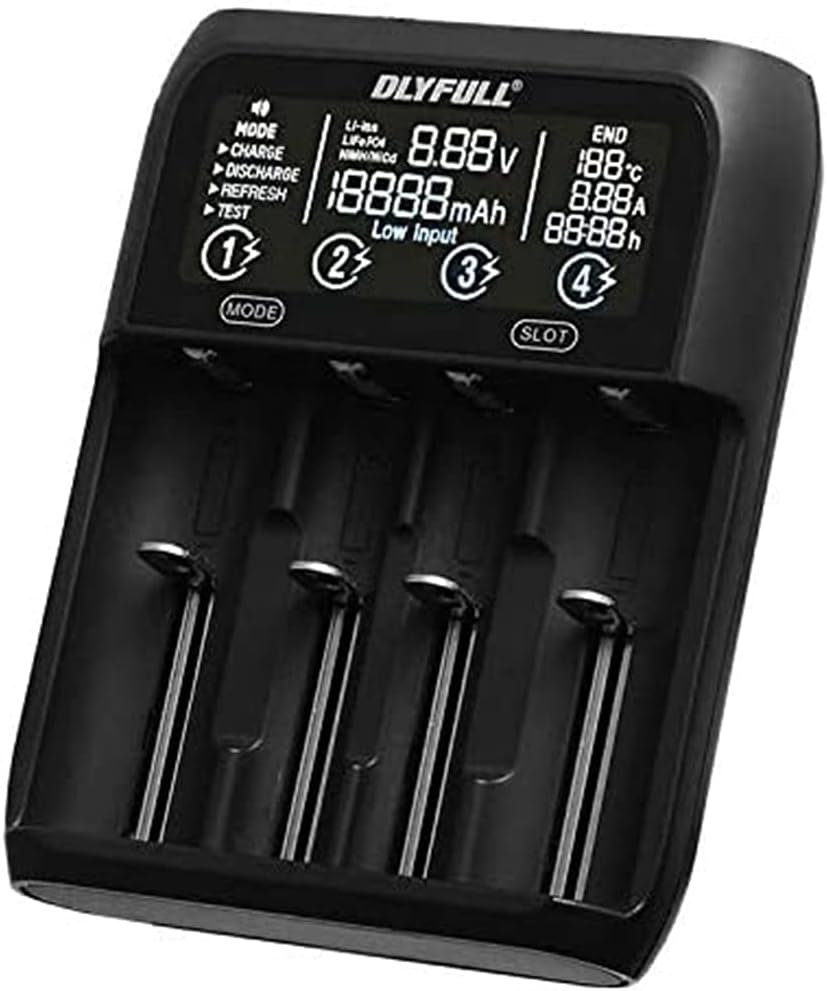
Figure 1: Front view of the DLYFULL UT4 USB Multi-Charger, displaying battery status and charging modes.
2. Safety Information
To prevent injury or damage to the charger and batteries, always observe the following safety precautions:
- Use only compatible batteries as listed in the specifications.
- Do not attempt to charge non-rechargeable batteries.
- Do not expose the charger to water, high humidity, or extreme temperatures.
- Keep out of reach of children.
- Do not disassemble or modify the charger.
- Ensure proper ventilation during charging.
3. Package Contents
Verify that all items are present in the package:
- DLYFULL UT4 USB Multi-Charger
- USB Type-C Cable (may vary by region)
- User Manual (this document)
4. Setup
4.1 Connecting the Power Supply
- Connect the provided USB Type-C cable to the input port on the back of the DLYFULL UT4 charger.
- Connect the other end of the USB Type-C cable to a compatible USB power adapter (DC 5V / 2A recommended, not included).
- The charger display will illuminate, indicating it is ready for use.

Figure 2: Rear view of the DLYFULL UT4 charger, highlighting the USB Type-C input and USB-A output ports.
5. Operating Instructions
5.1 Inserting Batteries
The DLYFULL UT4 features four independent charging slots. Insert compatible rechargeable batteries into the slots, ensuring correct polarity (+ and -). The charger will automatically detect the battery type and display its current voltage.
5.2 Selecting Operating Modes
The charger supports various operating modes. Use the "MODE" button to cycle through available options for the selected slot. Use the "SLOT" button to select which battery slot to configure.
- CHARGE: Standard charging mode.
- DISCHARGE: Discharges the battery to a safe level before recharging (useful for Ni-MH batteries to reduce memory effect).
- REFRESH: Charges, discharges, and then recharges the battery to optimize capacity and extend battery life.
- TEST: Measures the actual capacity of the battery.
5.3 USB Output Function
The charger can also function as a power bank to charge external devices. To use this feature:
- Ensure a charged battery is inserted into Slot 1.
- Connect your external device (e.g., smartphone) to the USB-A output port on the back of the charger.
- The charger will provide up to 5V / 2A output.

Figure 3: The DLYFULL UT4 charger in use, demonstrating battery insertion and showing included battery sleeves.
6. Maintenance
- Clean the charger with a dry, soft cloth. Do not use abrasive cleaners or solvents.
- Keep the charging slots free from dust and debris.
- Store the charger in a cool, dry place when not in use.
7. Troubleshooting
- Charger not powering on:
Ensure the USB Type-C cable is securely connected to both the charger and a working power source. Verify the power source provides DC 5V / 2A.
- Battery not charging:
Check that the battery is inserted with correct polarity. Ensure the battery is compatible with the charger. Try cleaning the battery contacts and charger terminals.
- "Low Input" message on display:
This indicates the input power supply is insufficient. Use a power adapter that provides at least DC 5V / 2A.
8. Specifications

Figure 4: Original specifications table for the DLYFULL UT4 charger.
| Feature | Detail |
|---|---|
| Model | UT4 (Multi-Charger) |
| Input | DC 5V / 2A (USB Type-C) |
| USB Output | 5V / 2A Max (from Slot 1) |
| Ni-MH Charging Current | 1A (for 1.48V batteries) |
| Ni-MH Discharge Current | 350mAh |
| Operating Temperature | 0℃ to 40℃ |
| Li-ion Max Protection Voltage | 4.20V ± 0.05V |
| Ni-MH Max Protection Voltage | 1.53V ± 0.05V |
| Compatible Batteries |
|
| Certifications | CE, RoHS |
| Color | Black |
Note: Up to two Ni-MH batteries of size AA can be set simultaneously.
9. Warranty Information
Specific warranty details for the DLYFULL UT4 USB Multi-Charger are not provided in this document. Please refer to the product packaging, the official DLYFULL website, or contact your retailer for warranty terms and conditions.
10. Customer Support
For technical assistance, troubleshooting, or general inquiries regarding your DLYFULL UT4 USB Multi-Charger, please visit the official DLYFULL website or contact their customer support channels. Contact information may also be available on the product packaging.