1. Introduction
The ICECO GO20 Dual Zone Portable Refrigerator is a versatile and efficient cooling solution designed for both home and automotive use. Featuring a high-quality SECOP compressor, it offers rapid cooling and the flexibility of dual-zone temperature control, allowing for simultaneous refrigeration and freezing. Its robust design ensures stable operation even in challenging conditions, making it ideal for outdoor adventures, road trips, and daily use.

Figure 1.1: The ICECO GO20 Dual Zone Portable Refrigerator, showcasing its interior capacity and app control feature.
2. Safety Information
Please read all safety information carefully before operating the appliance.
For comprehensive safety guidelines and warnings, please refer to the official Safety Information PDF document available for download: Safety Information (PDF).
- Ensure the power source matches the appliance's voltage requirements (12V/24V DC or 110V/240V AC).
- Do not immerse the appliance in water or expose it to excessive moisture.
- Keep ventilation openings clear of obstructions to prevent overheating.
- Avoid placing hot items directly into the refrigerator/freezer. Allow them to cool first.
- When operating in a vehicle, ensure the unit is securely fastened to prevent movement during transit.
- The design includes a child-friendly feature to prevent finger pinching when closing the lid. However, always supervise children around the appliance.

Figure 2.1: Child-friendly anti-pinch design of the lid hinge.
3. Features
- High-Quality SECOP Compressor: Ensures efficient and rapid cooling, maintaining temperatures from 0°F to 50°F (-18℃ to 10℃).
- Flexible Dual-Zone Design: Easily switch between single and dual-zone modes by removing the detachable partition. Two independent digital controllers allow separate temperature settings for each zone.
- Home & Car Use: Equipped with a 2.5m cigarette lighter cable and an AC adapter for versatile power options (12V/24V DC and 110V/240V AC).
- APP Control: Conveniently monitor and adjust settings via a dedicated smartphone application.
- Anti-Bump Compressor: Designed for stable operation, even at a 40° tilt, making it suitable for off-road and uneven terrains.
- Anti-Touch Screen Lock: Minimizes accidental changes to settings.
- Award-Winning Design: Recognized with the German Red Dot Design Award and IDEA International Design Excellence Award.

Figure 3.1: High-quality SECOP compressor with a 5-year guarantee.

Figure 3.2: Fast cooling performance demonstration.
4. Setup
- Unpacking: Carefully remove the refrigerator from its packaging. Inspect for any shipping damage.
- Placement: Place the unit on a stable, level surface. Ensure adequate ventilation around the appliance, especially the compressor side. Avoid direct sunlight or heat sources.
- Initial Cleaning: Before first use, wipe the interior and exterior with a damp cloth and mild detergent. Dry thoroughly.
- Power Connection:
- For Car Use (12V/24V DC): Connect the provided 2.5m cigarette lighter cable to the refrigerator's DC input and then to your vehicle's 12V/24V power outlet.
- For Home Use (110V/240V AC): Connect the AC adapter to the refrigerator's AC input, then plug the adapter into a standard wall outlet.
- Initial Power On: Press the power button on the control panel to turn on the unit. The display will illuminate.

Figure 4.1: Auto-switching between car (12V/24V) and home (110V/240V) power sources.
5. Operating Instructions
5.1 Control Panel Overview
The control panel features a digital display and buttons for power, temperature adjustment, and screen lock.

Figure 5.1: Control panel with anti-touch screen lock feature.
5.2 Temperature Setting
- Press the ON/OFF button to turn the unit on or off.
- Use the Up (∧) and Down (∨) arrows to adjust the desired temperature for each zone. The display will show the current and target temperatures.
- The unit will automatically adjust to reach and maintain the set temperature.
5.3 Dual Zone Operation
The GO20 features a detachable partition plate, allowing you to configure the unit as a single large zone or two separate zones (refrigerator and freezer).
- To use as Dual Zone: Insert the partition plate into the designated slot. Each side can then be set to a different temperature using its independent digital controller.
- To use as Single Zone: Remove the partition plate. The unit will operate as one large cooling compartment.

Figure 5.2: Flexible dual-zone configuration with detachable partition.
5.4 App Control
Download the ICECO app from your smartphone's app store to control the refrigerator remotely. The app allows you to:
- Monitor current temperatures in both zones.
- Adjust target temperatures.
- Switch between cooling modes.
- View battery protection settings.
Video 5.1: An overview of the ICECO GO20 Dual Zone Portable Refrigerator, demonstrating its features and app connectivity.
5.5 Operation on Inclines
The robust SECOP compressor allows the ICECO GO20 to operate stably even when tilted up to 40 degrees, making it suitable for various outdoor and vehicle environments.

Figure 5.3: The ICECO GO20 can operate reliably at angles up to 40 degrees.
6. Maintenance
- Cleaning: Regularly clean the interior and exterior with a soft cloth and mild detergent. Do not use abrasive cleaners or solvents. Ensure the unit is unplugged before cleaning.
- Ventilation: Periodically check and clean the ventilation grilles to ensure proper airflow and prevent dust buildup, which can affect cooling efficiency.
- Storage: If storing the unit for an extended period, ensure it is clean and dry. Leave the lid slightly ajar to prevent odors and mold growth. Store in a dry, well-ventilated area.
- Power Cord Care: Inspect power cords and adapters regularly for any signs of damage. Do not use if damaged.
7. Troubleshooting
| Problem | Possible Cause | Solution |
|---|---|---|
| Unit does not turn on. | No power supply; faulty cable; power outlet issue. | Check power connections. Ensure the power outlet is functional. Try a different cable if available. |
| Cooling performance is poor. | Insufficient ventilation; excessive ambient temperature; door not sealed properly; overfilled. | Ensure proper ventilation around the unit. Avoid placing in direct sunlight. Check lid seal. Do not overfill. |
| Temperature display is inaccurate. | Temperature sensor issue. | If persistent, contact customer support for assistance. |
| Cigarette lighter plug disconnects easily. | Loose connection or strong spring in plug. | Ensure the plug is fully inserted. If the issue persists, consider securing the connection with electrical tape or using a different 12V socket if available. |
| Unit struggles to maintain temperature in vehicle. | Vehicle battery protection settings; low voltage from vehicle. | Check the refrigerator's battery protection setting (usually adjustable via app or control panel). Ensure your vehicle's 12V outlet provides stable power. Consider using a power station or a true sine wave inverter if available. |
8. Specifications
| Specification | Detail |
|---|---|
| Brand | ICECO |
| Model Info | 20L (GO20WDS) |
| Item Weight | 25.5 pounds |
| Product Dimensions | 22.4 x 12.6 x 12.4 inches (56.9 x 32 x 31.5 cm) |
| Cooling Range | 0°F to 50°F (-18℃ to 10℃) |
| Capacity | 21 Quarts (20 Liters) |
| Refrigerator Fresh Food Capacity | 10.5 Quarts |
| Freezer Capacity | 21 Quarts |
| Noise Level | 43 dB |
| Installation Type | Freestanding |
| Voltage | 12V/24V DC, 110V/240V AC |
| Wattage | 50.00 W |
| Defrost System | Electric defrost |
| Door Hinges | Up |
| Lighting | LED |
| Material Type | ABS |
| Certification | ETL |
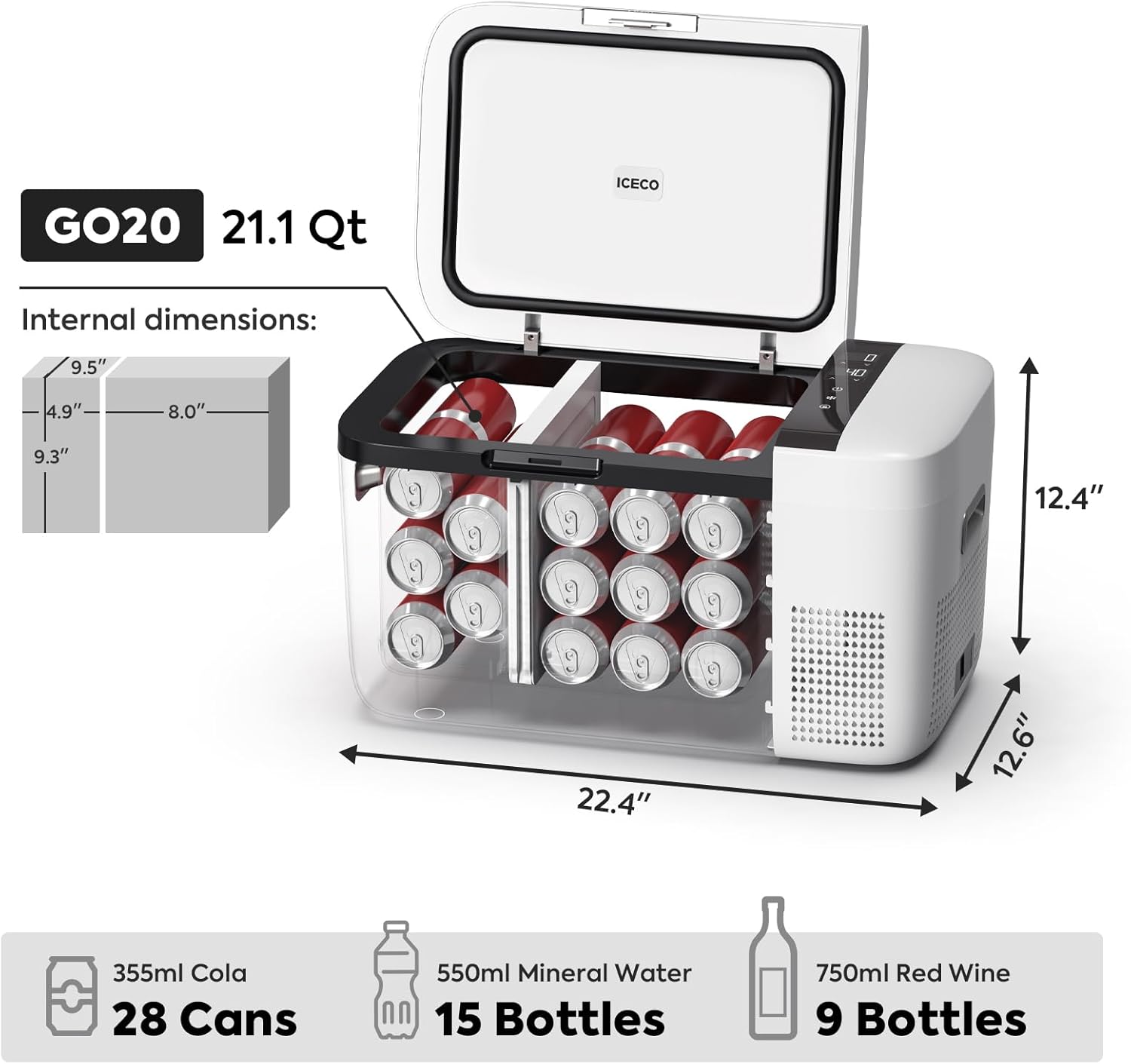
Figure 8.1: Internal dimensions and capacity examples.
9. Warranty and Support
ICECO provides comprehensive support for your GO20 Portable Refrigerator:
- Compressor Warranty: 5 Years Tech Support on the compressor.
- Accessories Warranty: 1 Year Tech Support on accessories.
For any technical assistance or inquiries, please contact ICECO customer service. Local after-sales telephone service is available, and Amazon messages will be answered within 24 hours, even on weekends.
For additional resources, you may refer to the official User Manual PDF: User Manual (PDF).


