
1. Introduction
This manual provides essential information for the assembly, operation, and maintenance of your Walker Edison Buren Classic Grooved Door TV Stand. Please read these instructions carefully before beginning assembly or use to ensure proper setup and longevity of your product.
The Walker Edison Buren Classic Grooved Door TV Stand is designed to accommodate TVs up to 65 inches. It features a combination of slatted cabinet door fronts and exposed metal accents, offering a versatile aesthetic suitable for various room styles. Constructed from high-grade MDF with a premium multi-grain laminate finish, this entertainment console provides both open and closed storage options with adjustable shelves and integrated cord management ports.
2. Safety Information
WARNING: California Proposition 65 requires us to inform you that this product may contain chemicals known to the State of California to cause cancer or birth defects or other reproductive harm. For more information, please visit www.P65Warnings.ca.gov.
To prevent serious injury, always follow these safety guidelines:
- Do not allow children to climb on the product.
- Ensure the TV stand is placed on a level and stable surface.
- Do not overload shelves. Adhere to the weight limits specified in the 'Specifications' section.
- Use the included anti-tip hardware to secure the TV stand to a wall, if provided.
- Keep small parts and assembly hardware away from children.
3. Assembly Instructions
This product is designed for easy assembly and ships ready-to-assemble with step-by-step instructions included in the packaging. All parts are typically numbered, and hardware is packaged separately for convenience.
Tools Required: Basic household tools (e.g., screwdriver, hammer) may be required. Refer to the specific assembly manual included with your product for a detailed list.
Assembly Tips:
- Read all instructions before beginning assembly.
- Lay out all parts on a soft, clean surface to prevent scratches.
- Do not overtighten screws or fasteners.
- Two people are recommended for assembly.
For detailed visual guidance, please refer to the assembly manual provided in your product packaging.
4. Product Features & Dimensions

Front view of the Dark Walnut TV Stand with a television and decorative items.
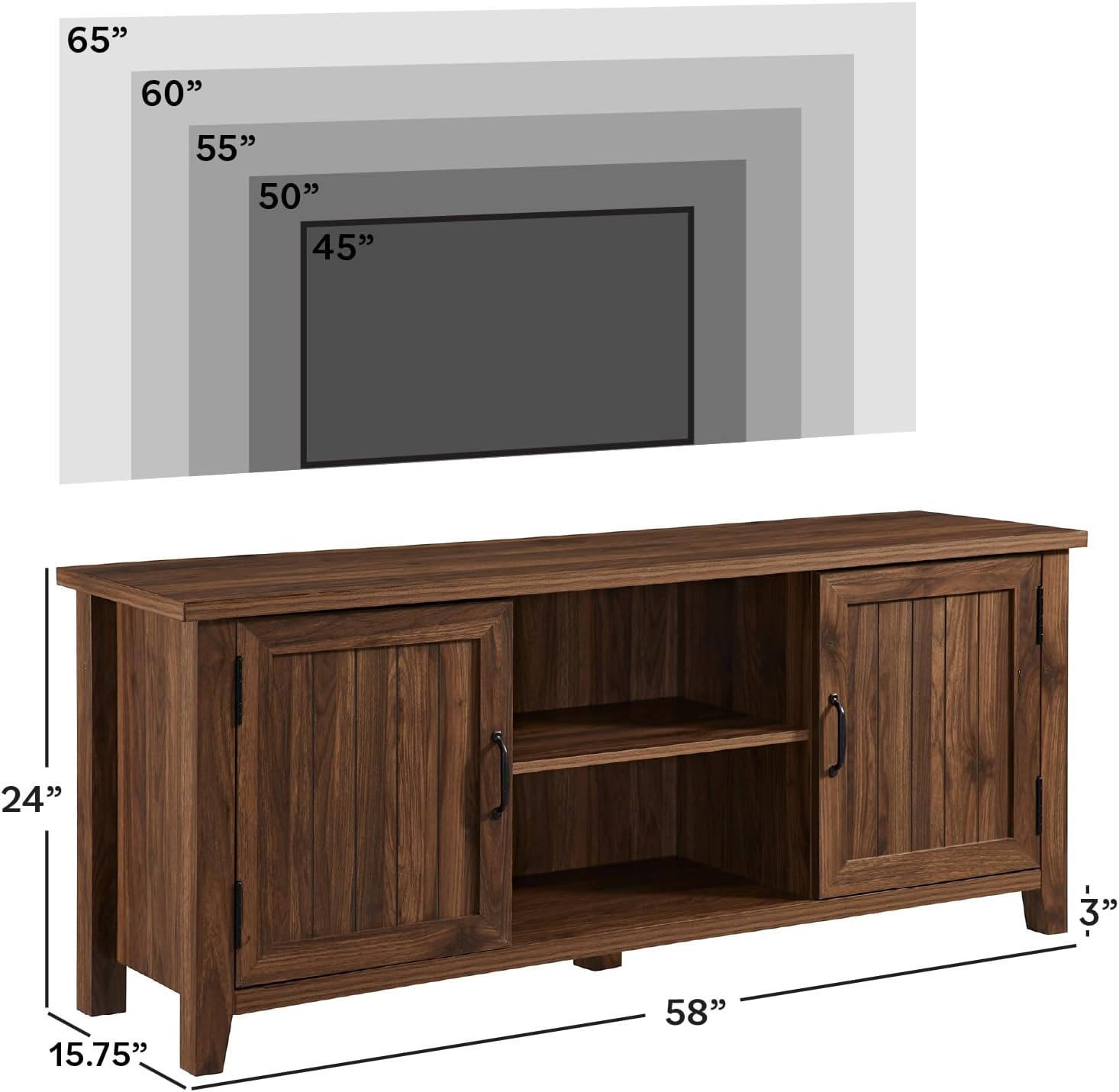
Detailed dimensions of the TV Stand, showing height, depth, and length.
- Overall Dimensions: 24” H x 15.75” D x 58” L
- Open Storage Cubby Dimensions: 9” H x 11” D x 20” L
- Cabinet Interior Dimensions: 18” H x 11” D x 16” L (behind each door)
- Weight Capacity (Top Surface): Up to 150 lbs.
- Weight Capacity (Adjustable Shelves): Up to 30 lbs. each
- TV Size Accommodation: Supports TVs up to 65 inches.
- Material: Engineered Wood
- Features: 2 cabinet doors, 3 adjustable shelves, cord management ports.

Close-up view highlighting the dark walnut wood grain finish.
5. Operating Instructions
The Walker Edison Buren Classic Grooved Door TV Stand is designed for straightforward use once assembled. Its primary function is to provide a stable surface for your television and organized storage for media devices and accessories.
Adjustable Shelves
The internal shelves are adjustable to accommodate items of various heights. To adjust a shelf:
- Empty the shelf of all contents.
- Carefully lift the shelf and remove the shelf pins from their current holes.
- Insert the shelf pins into the desired new set of holes, ensuring they are level.
- Place the shelf back onto the pins, ensuring it is securely seated.
Cord Management
The TV stand includes pre-drilled cord management ports on the back panel of the open cubby area. These ports allow you to route cables from your television and media devices neatly, reducing clutter and improving safety.
6. Maintenance
Proper care and maintenance will help preserve the appearance and extend the lifespan of your TV stand.
Cleaning
- Wipe with a dry cloth to remove dust and light debris.
- For more stubborn marks, use a slightly damp cloth with a mild, non-abrasive cleaner. Dry immediately with a clean, soft cloth.
- Avoid using harsh chemicals, abrasive cleaners, or polishes that may damage the finish.
General Care
- Avoid direct sunlight and extreme temperature changes, which can cause fading or warping.
- Use coasters or protective pads under hot or wet items to prevent damage to the surface.
- Periodically check all fasteners and tighten them as needed to ensure stability.
7. Troubleshooting
If you encounter any issues with your TV stand, please refer to the following common solutions:
- Wobbly Stand: Ensure all cam locks and screws are fully tightened. Verify the stand is on a level surface; use shims if necessary.
- Doors Not Aligning: Check the hinge adjustments. Most hinges allow for minor adjustments to align doors properly. Refer to the assembly manual for specific hinge adjustment instructions.
- Missing or Damaged Parts: If you received a product with missing or damaged parts, please contact customer support immediately.
8. Specifications
| Attribute | Detail |
|---|---|
| Brand | Walker Edison |
| Model Number | W58CS2DDW |
| Color | Dark Walnut |
| Material | Engineered Wood |
| Product Dimensions (L x D x H) | 58.27 x 16.14 x 24.02 inches |
| Item Weight | 79.2 pounds (36 Kilograms) |
| Number of Shelves | 3 (adjustable) |
| Special Feature | Storage, Cord Management |
| Assembly Required | Yes (Ready-to-assemble) |
| Product Care Instructions | Wipe with Dry Cloth |
9. Warranty & Support
This product comes with a 30-day limited manufacturer warranty. Please retain your proof of purchase for any warranty claims.
For questions, replacement parts, or support, please contact Walker Edison customer service:
- Phone: 1-801-433-3008
- Email: service@walkeredison.com
Replacement parts are available. Please contact Walker Edison within 30 days of delivery for any issues.

Customer support details for Walker Edison.