
Inogen BA-500
Inogen Standard (8-cell) Battery Instruction Manual
For Inogen One G5 and Inogen Rove 6 Portable Oxygen Concentrators
1. Introduction
The Inogen Standard (8-cell) Battery is designed to provide reliable and extended power for your Inogen One G5 and Inogen Rove 6 portable oxygen concentrators. This lightweight and compact battery ensures you have the freedom to maintain your active lifestyle with consistent oxygen supply. This manual provides essential information for the safe and effective use of your Inogen Standard Battery.

Image: The Inogen Standard (8-cell) Battery, showing its compact design and labeling.
2. Safety Information
Please read and understand all safety warnings before using the battery. Failure to follow these instructions may result in fire, chemical burn, or explosion.
- DO NOT DISASSEMBLE: Attempting to disassemble the battery can cause damage and is dangerous.
- DO NOT INCINERATE: Do not dispose of the battery by burning.
- DISPOSE OF USED BATTERY PROPERLY: Follow local regulations for proper disposal of lithium-ion batteries.
- KEEP DRY: Protect the battery from moisture and liquids.
- REMOVE TO COOL: If the battery is not charging, remove it from the device and allow it to cool in a well-ventilated area.
- USE ONLY WITH INOGEN IO-500: This battery is specifically designed for use with Inogen One G5 and Inogen Rove 6 (model IO-500) devices.
- RECHARGE ONLY WITH INOGEN BA-503 OR IO-500 CHARGER: Use only approved Inogen charging accessories.
3. Setup and Installation
The Inogen Standard Battery is designed for easy removal and installation into your compatible Inogen portable oxygen concentrator.
3.1. Battery Insertion
- Ensure your Inogen One G5 or Inogen Rove 6 device is powered off.
- Locate the battery compartment at the base of your concentrator.
- Align the battery with the compartment, ensuring the contacts on the battery match the contacts in the device.
- Gently slide the battery into the compartment until it clicks securely into place.
3.2. Battery Removal
- Ensure your Inogen device is powered off.
- Locate the battery release latch, typically near the battery compartment.
- Press or slide the latch to release the battery.
- Carefully slide the battery out of the compartment.

Image: Illustration of the Inogen battery being inserted into a compatible concentrator.
4. Operating the Battery
The Inogen Standard Battery provides extended power for your portable oxygen concentrator, allowing for greater mobility.
4.1. Checking Battery Charge
You can check the battery charge level in two ways:
- On-board Battery Gauge: The battery itself features an integrated LED gauge. Press the button next to the battery icons to illuminate the LEDs, indicating the current charge level.
- Device Control Panel: The Inogen One G5 and Inogen Rove 6 concentrators display the battery charge level on their control panels when the battery is installed.
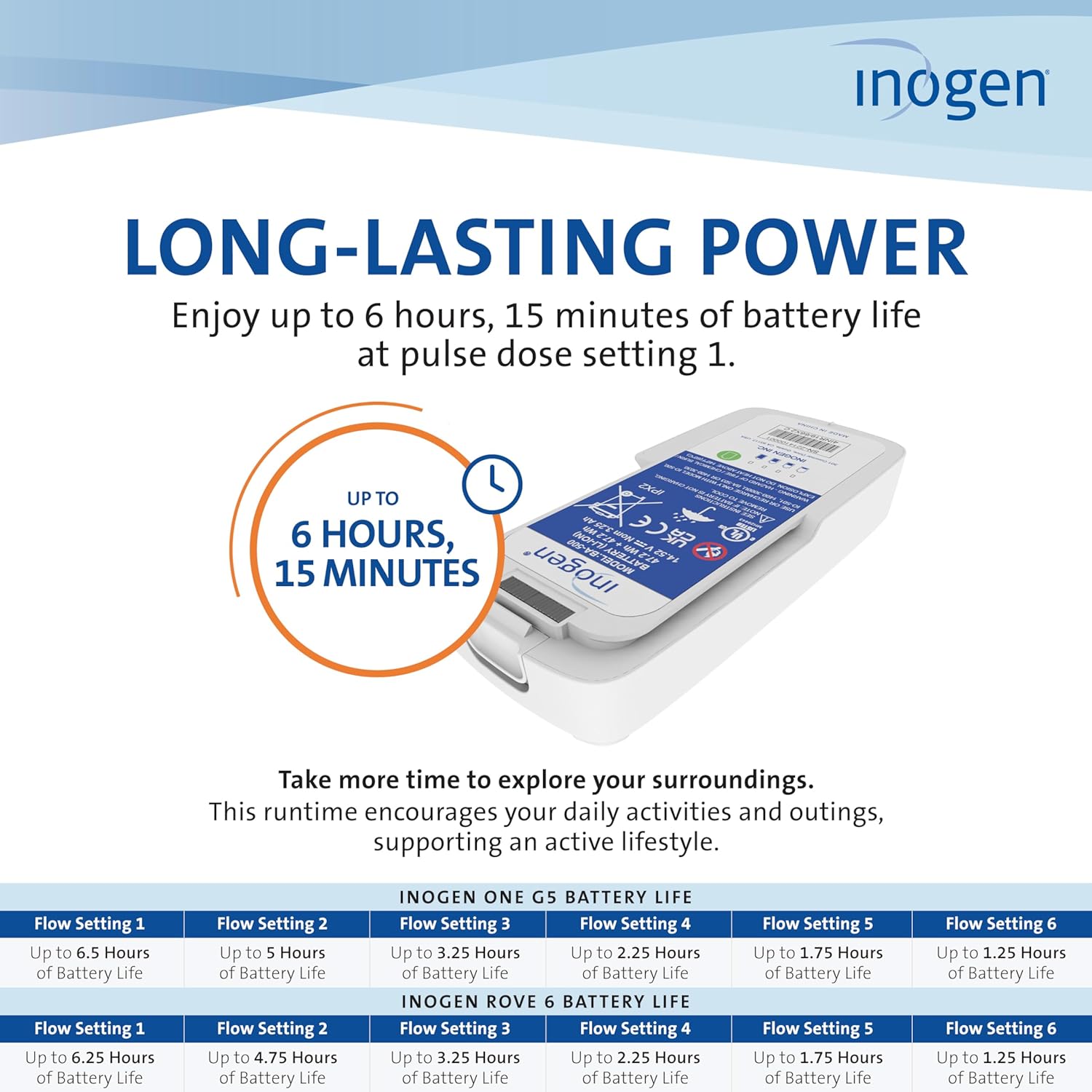
Image: Visual representation of battery life and charge indicators.
4.2. Battery Life
The Inogen Standard Battery offers up to 6 hours and 15 minutes of battery life on pulse-dose setting 1. Actual battery life may vary depending on the flow setting, device usage, and battery condition.
5. Charging the Battery
The Inogen Standard Battery can be recharged using compatible Inogen AC or DC power supplies.
5.1. Charging Process
- Connect the Inogen AC or DC power supply to your concentrator or an external battery charger.
- Ensure the battery is properly installed in the concentrator or placed in the external charger.
- The battery will begin charging. A fully depleted battery can be recharged in approximately 3 hours.
- Monitor the battery gauge or device display to confirm charging status.

Image: An Inogen battery placed on an external battery charger.
6. Maintenance
Proper maintenance ensures the longevity and optimal performance of your Inogen Standard Battery.
- Cleaning: Wipe the battery exterior with a clean, dry cloth. Do not use harsh chemicals or abrasive cleaners.
- Storage: Store the battery in a cool, dry place away from direct sunlight and extreme temperatures. If storing for an extended period, ensure the battery has a partial charge (around 50%) to preserve its lifespan.
- Disposal: When the battery reaches the end of its life, dispose of it according to local regulations for lithium-ion batteries. Do not dispose of in household waste.
7. Troubleshooting
If you experience issues with your Inogen Standard Battery, consider the following common solutions:
- Battery Not Charging:
- Ensure the power supply is correctly connected to both the wall outlet/DC source and the concentrator/charger.
- Verify that the battery is securely seated in the device or external charger.
- Check if the power outlet is functional.
- If the battery is warm, remove it and allow it to cool before attempting to charge again.
- Short Battery Life:
- Battery life is affected by the flow setting; higher settings consume more power.
- Ensure the battery is fully charged before use.
- Over time, all rechargeable batteries experience a decrease in capacity. If the battery life has significantly diminished, it may be time for a replacement.
- Battery Not Recognized by Device:
- Remove and reinsert the battery to ensure proper connection.
- Clean the battery contacts and device contacts with a dry, lint-free cloth.
If issues persist after attempting these steps, please contact Inogen Customer Support for further assistance.
8. Specifications
| Attribute | Value |
|---|---|
| Model Number | BA-500 |
| Battery Type | Lithium-Ion (Li-Ion) |
| Nominal Voltage | 14.4 V |
| Nominal Capacity | 3.2 Ah |
| Watt-Hours (Wh) | 46.1 Wh |
| Weight | Approximately 1.19 lbs (0.54 kg) |
| Dimensions (L x W x H) | Approximately 7.19 x 3.26 x 1.04 inches (18.26 x 8.28 x 2.64 cm) |
| Full Charge Time | Approximately 3 hours (from depleted) |
| Max Battery Life (Setting 1) | Up to 6 hours, 15 minutes |
| Compatibility | Inogen One G5, Inogen Rove 6 |
| FAA Approved | Yes |
9. Warranty Information
Specific warranty terms and conditions for the Inogen Standard (8-cell) Battery are provided by the manufacturer, Inogen. Please refer to the warranty documentation included with your purchase or visit the official Inogen website for detailed information regarding warranty coverage, duration, and claims procedures.
10. Support
For technical assistance, product inquiries, or customer service related to your Inogen Standard (8-cell) Battery, please contact Inogen Customer Support directly. Contact information can typically be found on the Inogen website or in the packaging materials.
You may also visit the Inogen Store on Amazon for additional product information and resources.
Related documentsBA-500


Ask a question about this manual
Ask about setup, troubleshooting, compatibility, parts, safety, or missing instructions. Manuals+ will review the question and use this page’s manual context to help answer it.