
1. Introduction
The Sky-Watcher HEQ5 is a fully computerized GoTo German Equatorial Telescope Mount designed for both visual observation and astrophotography. With a robust 30-pound payload capacity, it offers a stable and precise platform for various optical tubes. Its advanced SynScan hand controller provides access to a vast database of over 42,000 celestial objects, enabling automatic slewing and tracking. This manual provides essential information for setting up, operating, and maintaining your HEQ5 mount.
2. Product Overview
The HEQ5 mount is engineered for performance and durability, featuring heavy-duty all-metal roller bearings on both right ascension and declination axes for smooth operation. It includes a built-in illuminated polar finderscope for quick and accurate polar alignment, a crucial step for successful astrophotography and precise tracking.

Figure 2.1: The Sky-Watcher HEQ5 German Equatorial Mount with a mounted telescope, showcasing its robust design and counterweights.
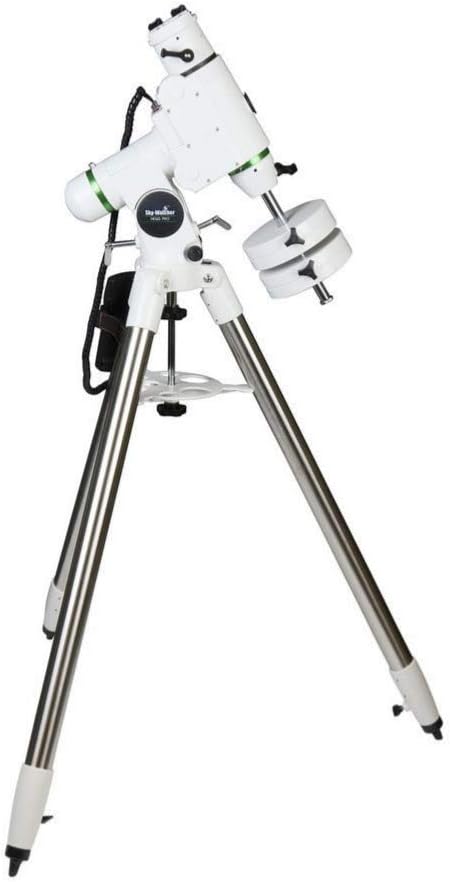
Figure 2.2: A full view of the HEQ5 mount and its sturdy rolled-steel tripod, designed for stability.

Figure 2.3: The HEQ5 mount shown with the SynScan hand controller attached, ready for computerized control.

Figure 2.4: A detailed view of the SynScan hand controller, featuring its display and navigation buttons.

Figure 2.5: The illuminated polar finderscope, integrated into the mount for precise polar alignment.

Figure 2.6: An internal view showing the precision gears within the mount, contributing to accurate tracking.
3. Setup
3.1 Unpacking and Assembly
Carefully unpack all components from the box. Ensure all items listed in the 'What's in the Box' section are present. Begin by setting up the tripod on a stable, level surface.
3.2 Initial Mount Setup
Attach the HEQ5 mount head to the tripod. Secure it firmly. Install the counterweight shaft and then slide the two 11lb counterweights onto the shaft, adjusting their position to balance your telescope. Ensure all clutches are engaged before mounting your optical tube.
3.3 Polar Alignment
For accurate tracking, especially for astrophotography, precise polar alignment is essential. The HEQ5 includes a built-in illuminated polar finderscope to assist with this process. Align the mount with the celestial pole (Polaris in the Northern Hemisphere) using the finderscope's reticle. Refer to the detailed instructions in the SynScan hand controller manual for specific polar alignment routines.
4. Operating the Mount
4.1 SynScan Hand Controller
The SynScan hand controller is the primary interface for operating your HEQ5 mount. It features a user-friendly menu system and a database of over 42,000 celestial objects. After initial setup and alignment, you can use the controller to automatically slew to desired objects, track their movement across the sky, and access various utility functions.
4.2 Computer Control
The HEQ5 mount can be controlled via a computer using a USB cable (sold separately). This allows integration with popular astronomy software such as The SkyX, Stellarium, and Starry Night, providing enhanced control and planning capabilities for your observing or imaging sessions.
4.3 Payload Capacity
The HEQ5 mount is designed to support a maximum payload of 30 pounds. Ensure that the total weight of your telescope, camera, and any accessories does not exceed this limit to maintain optimal performance and stability.
5. Maintenance
To ensure the longevity and optimal performance of your Sky-Watcher HEQ5 mount, follow these maintenance guidelines:
- Keep the mount clean and free from dust and debris. Use a soft, dry cloth for cleaning.
- Avoid exposing the mount to extreme temperatures or humidity.
- Periodically check all screws and fasteners to ensure they are tight. Do not overtighten.
- Store the mount in a dry, protected environment when not in use.
6. Troubleshooting
If you encounter issues with your HEQ5 mount, consider the following common troubleshooting steps:
- Alignment Issues: Ensure your polar alignment is accurate. The built-in bubble level on the mount head may not always be perfectly calibrated; consider using an external level for precise leveling of the tripod.
- Tracking Problems: If tracking is erratic or jerky, check the tightness of the mount's internal bushings. These may sometimes be stiff from the factory and might require adjustment. Consult online resources or Sky-Watcher support for detailed procedures if you are comfortable with mechanical adjustments.
- Motor or Electronic Malfunctions: If the motors are not responding or the hand controller indicates slewing but no movement occurs, verify all cable connections. Ensure the DC power cable is securely connected and providing adequate power. Try updating the firmware of the SynScan hand controller. If problems persist, contact Sky-Watcher customer support.
- Software Connectivity: When connecting to a computer, ensure you have the correct drivers (e.g., ASCOM platform and EQMOD drivers) installed. Verify that your astronomy software is compatible with the mount and that the correct COM port is selected.
7. Specifications
| Product Dimensions | 40 x 18 x 19 inches |
| Item Weight | 30 pounds |
| ASIN | B07TGFKSJ9 |
| Item Model Number | S30400 |
| Brand | Sky-Watcher |
| Color | black/silver |
| Form Factor | Tripod |
| Compatible Devices | Camera |
| Mounting Type | Floor Stand |
8. What's in the Box
The Sky-Watcher HEQ5 package typically includes the following components:
- DC power cable
- SynScan hand controller
- Two 11 pound counterweights
- 1.75" rolled steel tripod
- V-style dovetail bar
9. Warranty and Support
For warranty information, technical support, or service inquiries, please refer to the official Sky-Watcher website or contact their customer service department directly. Keep your purchase receipt as proof of purchase for any warranty claims.