
1. Introduction
The LeTkingok SL-001 Electrostatic Ionizing Air Blower is designed to effectively neutralize static charges and eliminate dust in various industrial environments. This device is suitable for applications involving delicate electronic products, electronic assembly lines, medical device manufacturing, printing, packaging, and small part injection molding. It operates by generating a balanced stream of ions to dissipate static electricity from surfaces and objects.
2. Safety Instructions
- Read all instructions carefully before operating the device.
- Ensure the power supply matches the specified voltage (110V/60HZ).
- Do not operate the device in wet or damp conditions.
- Keep the device away from flammable materials and explosive atmospheres.
- Do not insert objects into the air outlet or inlet.
- Disconnect power before cleaning or performing any maintenance.
- Only qualified personnel should attempt repairs.
- Keep out of reach of children.
3. Package Contents
Verify that all items are present in the package:
- LeTkingok SL-001 Electrostatic Ionizing Air Blower
- Power Cord
- User Manual (this document)
- (Additional accessories may vary by region or package)
4. Product Overview
Familiarize yourself with the components of the SL-001 ionizing air blower.
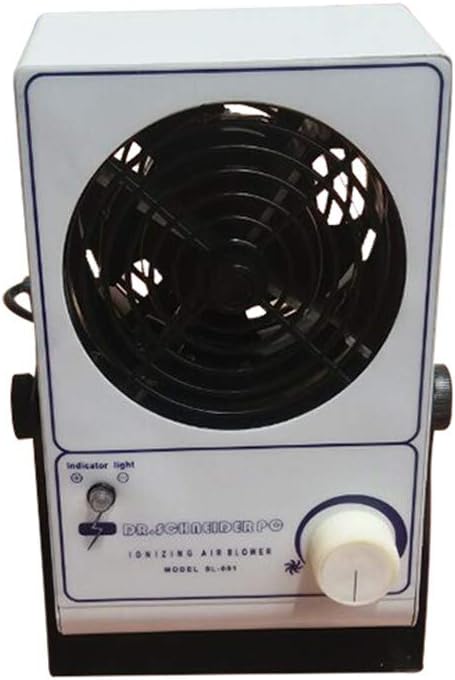
Figure 4.1: Front View of the SL-001 Blower. This image displays the front panel of the LeTkingok SL-001 ionizing air blower, showing the air outlet grille, indicator light, and control knob.

Figure 4.2: Side View with Power Cord. This image shows the side of the LeTkingok SL-001 unit, highlighting the power cord connection and the overall compact design.
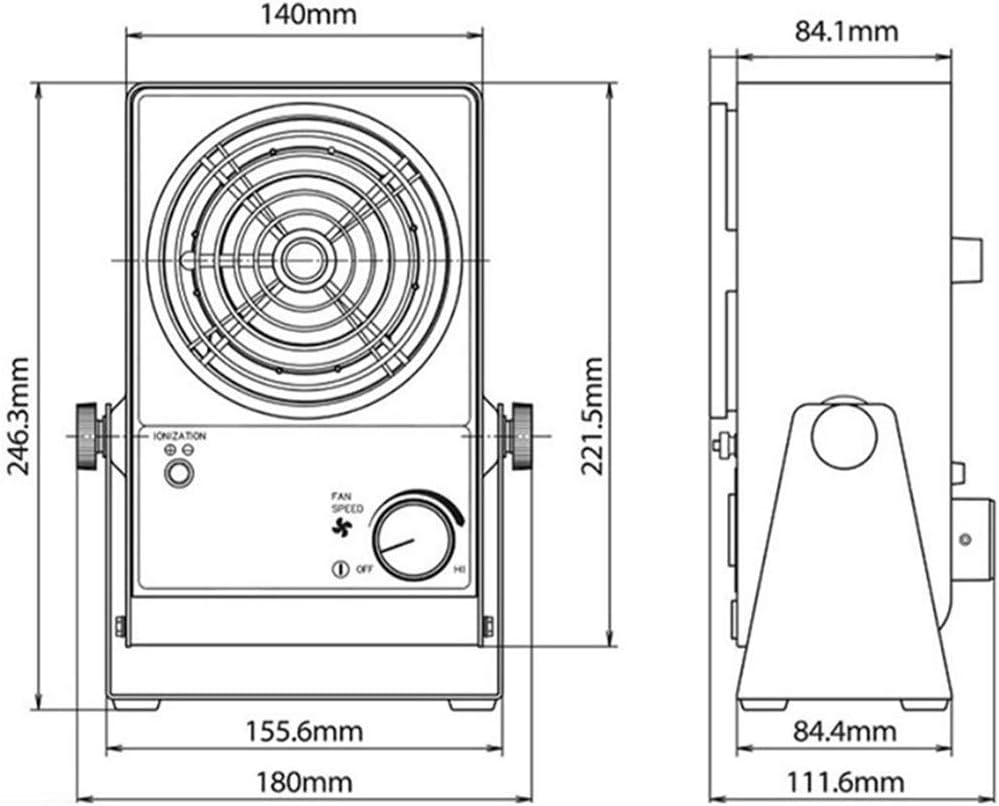
Figure 4.3: Dimensional Diagram. This technical drawing provides precise measurements of the SL-001 blower, including its height, width, and depth, crucial for installation planning. It also indicates the location of the ionization indicator, fan speed control, and power switch.
5. Setup
- Placement: Position the air blower on a stable, flat surface in the desired work area. Ensure there is adequate space around the unit for proper airflow.
- Power Connection: Connect the power cord to the power inlet on the back of the unit. Then, plug the power cord into a grounded 110V/60HZ electrical outlet.
- Initial Check: Before turning on, ensure no foreign objects are obstructing the air inlet or outlet.
6. Operation
- Power On: Locate the power switch or fan speed control knob (as shown in Figure 4.3). Turn the knob clockwise from the "OFF" position to activate the blower. The indicator light should illuminate, signifying operation.
- Adjust Airflow: Rotate the fan speed control knob to adjust the airflow intensity. Turn clockwise for higher fan speed and increased ionization, and counter-clockwise for lower speed.
- Static Elimination: Direct the ionized airflow towards the area where static charges need to be neutralized. The effective airflow area is approximately 40x60 CM.
- Power Off: To turn off the device, rotate the fan speed control knob counter-clockwise until it clicks into the "OFF" position. The indicator light will turn off.
7. Maintenance
Regular maintenance ensures optimal performance and longevity of your SL-001 ionizing air blower.
- Cleaning the Casing: Wipe the exterior of the unit with a soft, dry cloth. Do not use abrasive cleaners or solvents.
- Cleaning the Ion Emitters: Periodically inspect the ion emitter needles for dust buildup. With the unit powered off and unplugged, gently clean the needles using a soft brush or compressed air. Exercise caution as the needles are delicate.
- Air Inlet/Outlet: Ensure the air inlet and outlet grilles are free from dust and debris to maintain efficient airflow.
- Storage: When not in use for extended periods, store the device in a clean, dry environment.
8. Troubleshooting
| Problem | Possible Cause | Solution |
|---|---|---|
| Device does not power on. | No power supply; loose connection; faulty power cord. | Check if the power cord is securely plugged into the unit and the outlet. Verify the outlet has power. |
| Weak or no airflow. | Air inlet/outlet blocked; fan speed set too low. | Clear any obstructions from the grilles. Increase the fan speed using the control knob. |
| Ineffective static elimination. | Ion emitter needles are dirty or damaged; unit too far from target. | Clean the ion emitter needles (refer to Maintenance section). Ensure the unit is positioned within the effective airflow area (40x60 CM). |
If the problem persists after attempting these solutions, contact customer support.
9. Specifications
| Model | SL-001 |
| Operating Voltage | 110V/60HZ |
| Current Consumption | 0.25A or 0.12A |
| Power | ≤30W |
| Air Output | 45-110 CFM (Cubic Feet per Minute) |
| Operating Temperature | 0-50 °C (32-122 °F) |
| Dimensions (L x W x H) | 170 x 90 x 260 MM (6.69 x 3.54 x 10.24 inches) |
| Weight | 3 KG (6.6 pounds) |
| Ion Balance | ≤ ± 10V |
| Residual Voltage | 0V ± 10V |
| Effective Airflow Area | 40 x 60 CM |
| Material | Aluminum |
10. Warranty and Support
For warranty information and technical support, please refer to the documentation provided at the time of purchase or contact your retailer. Keep your purchase receipt as proof of purchase for any warranty claims.