
Introduction
The ALONEFIRE X004 is a versatile multicolor flashlight designed for various outdoor and specialized applications. It features four distinct light colors: red, green, blue, and white, each serving different purposes. The flashlight is built with a durable aluminum alloy shell, is waterproof, and offers an adjustable focus beam. It comes with a rechargeable battery and a dedicated charger, ensuring convenience and reliability for extended use.

Image: The ALONEFIRE X004 flashlight shown with its included battery, USB charging cable, and battery charger.
Product Features
- RGBW 4-in-1 Multi-color: Features red, blue, green, and white light for diverse applications.
- Adjustable Focus: Easily switch between a focused beam and a wide flood beam.
- USB Rechargeable: Includes a high-capacity rechargeable battery and charger with overcharge protection.
- Battery Indicator: Charger displays red light during charging and green when fully charged.
- Quality Aluminum Alloy Shell: Durable and enhances heat dissipation for reliable operation.
- Waterproof Design: Suitable for use in various weather conditions.
What's in the Box
- ALONEFIRE X004 Flashlight
- Rechargeable Lithium Ion Battery (1 included)
- Battery Charger
- USB Cable
- AAA Battery Holder (for optional use with AAA batteries)

Image: All components included in the ALONEFIRE X004 flashlight package.
Setup
Battery Installation and Charging
The ALONEFIRE X004 flashlight operates with a rechargeable Lithium Ion battery. To install or charge the battery:
- Unscrew the tail cap of the flashlight to access the battery compartment.
- Insert the included Lithium Ion battery into the flashlight with the positive (+) end facing towards the head of the flashlight.
- Alternatively, if using AAA batteries (not included), place them into the provided AAA battery holder and then insert the holder into the flashlight.
- To charge the Lithium Ion battery, remove it from the flashlight and place it into the dedicated battery charger.
- Connect the USB cable to the charger and a compatible USB power source (e.g., computer, wall adapter).
- The charging indicator on the charger will display a red light while charging and turn green when the battery is fully charged. Charging typically takes a couple of hours.

Image: The rechargeable battery and its dedicated charger, which connects via USB.

Image: The battery charger connected to a power source, showing the battery indicator light.
Video: An overview of the ALONEFIRE X004 flashlight, demonstrating its physical features and various light modes in different environments.
Operating Instructions
Light Modes and Color Selection
The ALONEFIRE X004 features four distinct light colors: red, green, blue, and white. To cycle through the colors, press the power button located on the tail cap. Each press will switch to the next color in sequence.
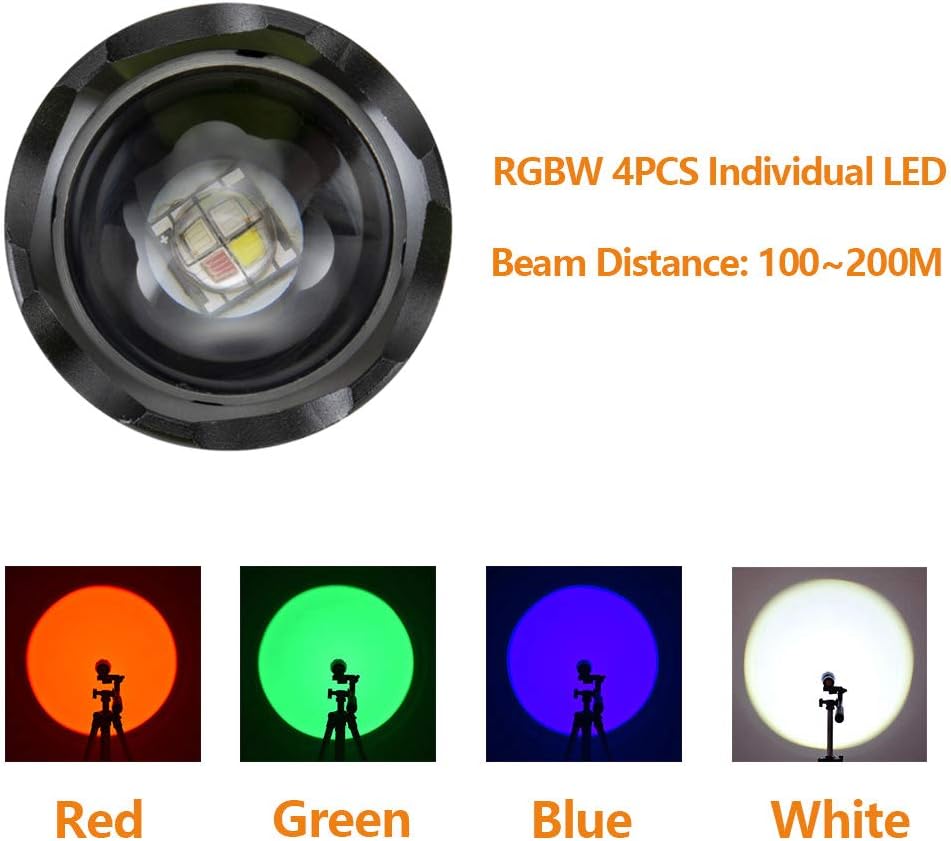
Image: Detail of the flashlight's LED array, highlighting the individual RGBW LEDs and indicating a beam distance of 100-200 meters.

Image: Visual representation of the flashlight's four color modes: white, blue, green, and red, demonstrating their illumination.
Adjustable Focus
The flashlight features an adjustable focus mechanism. To change the beam from a focused spot to a wide flood, gently push or pull the head of the flashlight. This allows you to illuminate a wider area or concentrate the light on a distant target.

Image: Illustration of the flashlight's adjustable focus, showing how to zoom in for a concentrated beam and zoom out for a wider flood.
Application Scenarios
- Red Light: Ideal for astronomy observation, preserving night vision, and discreet signaling.
- Green Light: Commonly used for animal tracking and hunting, as many animals are less sensitive to green light.
- Blue Light: Effective for blood tracking, especially useful in hunting or forensic applications.
- White Light: Standard illumination for daily lighting, camping, hiking, and general outdoor activities.


Image: Examples of red light use for hunting and green light for illuminating forest environments.
Maintenance
Care and Storage
- Keep the flashlight clean and dry. Wipe with a soft, damp cloth as needed.
- Ensure the O-rings are clean and lubricated to maintain the waterproof seal.
- Store the flashlight in a cool, dry place away from direct sunlight and extreme temperatures.
- If storing for an extended period, remove the battery to prevent leakage and damage.
- Avoid dropping the flashlight or subjecting it to strong impacts, despite its durable construction.
Troubleshooting
Common Issues
| Problem | Possible Cause | Solution |
|---|---|---|
| Flashlight does not turn on. | Low or depleted battery; incorrect battery installation. | Charge the battery fully. Ensure the battery is inserted with correct polarity. |
| Light output is dim or flickers. | Low battery charge; loose connections. | Recharge the battery. Tighten the tail cap and head of the flashlight. |
| Specific color (e.g., red) does not work. | Battery charge may be too low for certain LEDs (some colors require more power). | Ensure the battery is fully charged. If the issue persists, contact customer support. |
| Beam adjustment is stiff. | Dirt or debris in the sliding mechanism. | Clean the exterior of the flashlight, especially around the adjustable head. Avoid using lubricants that may attract more dirt. |
Specifications
| Feature | Detail |
|---|---|
| Brand | ALONEFIRE |
| Model Number | X004 |
| Light Source Type | LED (RGBW 4-in-1) |
| Colors | Red, Green, Blue, White |
| White Brightness | 500 Lumens |
| Light Path Distance | Up to 200 Meters |
| Power Source | Battery Powered (Rechargeable Lithium Ion or 3x AAA) |
| Material | Anodized Aluminum |
| Special Features | Waterproof, Rechargeable, Adjustable Focus |
| Item Weight | 0.23 Kilograms (approx. 8 ounces) |
Warranty and Support
Warranty Information
ALONEFIRE products are manufactured to high-quality standards. For specific warranty details regarding your X004 flashlight, please refer to the warranty card included in your product packaging or visit the official ALONEFIRE website.
Customer Support
Should you encounter any issues or have questions not covered in this manual, please contact ALONEFIRE customer support. Contact information can typically be found on the product packaging or the official brand website.
