
1. Product Overview
The LEDMO Dimmable LED Driver is a high-performance 12V DC 60W power supply designed for various LED lighting applications. It ensures stable and flicker-free dimming, compatible with a wide range of AC control systems and dimmable LED products. Its robust design includes input/output isolation for enhanced safety and durability.
Key features include:
- Super Compatibility: Works with most AC control systems and constant voltage LED products, ideal for landscape and home lighting.
- Strong Stability: Flexible start and MCU controlled dimming process ensure no AC flicker and stable performance.
- Enhanced Protection: Features Short-Circuit, Over Current, Over Voltage (OVP), Under Voltage (Blackout Protection), and Auto-recovery Mode.
- Quiet Operation: Designed for quiet performance, suitable for various indoor environments.
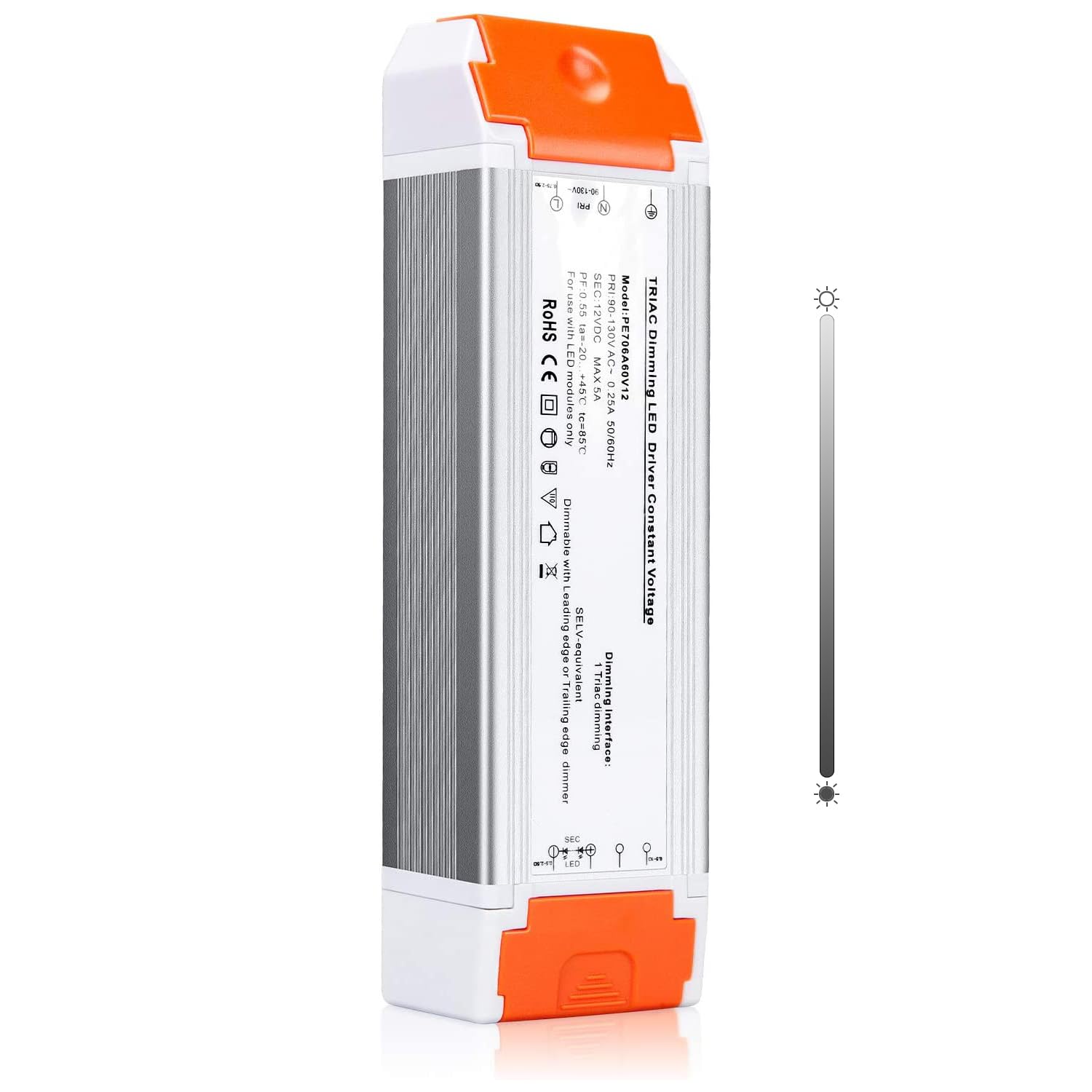
Figure 1.1: LEDMO Dimmable LED Driver (60W 12V 1 Pack)
2. Safety Instructions
Please read all safety instructions carefully before installation and operation. Failure to follow these instructions may result in electric shock, fire, or other hazards.
- Professional Installation Recommended: For safe and correct wiring, it is highly recommended to consult a qualified electrician.
- Power Disconnection: Always disconnect power at the circuit breaker before installing or servicing the LED driver.
- Voltage Compatibility: Ensure the input voltage (100-130V AC) and output voltage (12V DC) are compatible with your electrical system and LED lights.
- Load Capacity: Do not exceed the maximum rated power of 60W. Overloading can cause damage to the driver and connected lights.
- Proper Ventilation: Install the driver in a location with adequate ventilation to prevent overheating.
- Environmental Conditions: Avoid exposing the driver to excessive moisture, dust, or extreme temperatures. While it offers waterproof and dustproof protection, proper installation in suitable environments is crucial.
- Polarity: Observe correct polarity when connecting LED lights to the output terminals.
3. Specifications
| Specification | Value |
|---|---|
| Product Dimensions | 2.36"D x 8.34"W x 1.57"H (9 x 2 x 2 inches) |
| Item Model Number | 1402 |
| Weight | 13.44 ounces |
| Brand | ledmo |
| Power Source | AC Mains |
| Mounting Type | Connection |
| Current Rating | 5 Amps |
| Output Voltage | 12V DC |
| Max Power | 60W |
4. Installation Guide
4.1 Removing the Orange End Caps
The orange end caps protect the wiring terminals. To access the terminals, you need to slide these caps off. Do not pry them directly upwards, as they are designed to slide out along a bump slot.
- Locate the small gap slot on the side of the orange cap.
- Insert a small screwdriver or similar tool into this gap.
- Apply light force to slide the orange cap outwards along the bump slot. It should slide off smoothly without excessive force.
Video 4.1: Demonstration of how to properly remove the orange end caps from the LED driver.

Figure 4.1: Visual guide for removing the orange end caps and size comparison.
4.2 Wiring Connections
The LED driver has clearly marked input and output terminals. Ensure all connections are secure and follow local electrical codes.
- Input (AC Side): Connect the Live (L), Neutral (N), and Ground (GND) wires from your AC power source to the corresponding input terminals on the driver.
- Output (DC Side): Connect the positive (+) and negative (-) wires from your 12V LED strip light or other 12V LED product to the corresponding output terminals on the driver.
- Secure Wires: After inserting the wires, tighten the screw terminals to ensure a firm connection. Reattach the orange end caps by sliding them back into place until they click securely.

Figure 4.2: Detailed wiring diagram for the LED driver.

Figure 4.3: Simplified wiring diagram including an optional dimmer switch.
5. Operation
5.1 Dimmable Functionality
This LED driver is designed to work with compatible dimmer switches (e.g., Lutron, Leviton, and most Triac switches) to control the brightness of your 12V LED lights. Ensure both your dimmer switch and LED lights are dimmable for proper operation.
- Connect the LED driver to a compatible dimmer switch on the AC input side.
- Connect your dimmable 12V LED lights to the DC output side of the driver.
- Adjust the dimmer switch to achieve the desired brightness level. The driver supports a brightness adjustable range, typically from 30% to 100%.

Figure 5.1: Connecting dimmer switches and LED strip lights.

Figure 5.2: Brightness adjustable range demonstration.
5.2 Compatible Applications
The LED driver is suitable for a variety of 12V LED lighting products, including but not limited to:
- LED Strip Lights
- LED Display Lighting
- Ceiling Lights
- Billiard Lights
- Line LED Lights
- Other 12V LED fixtures within the 60W power limit.

Figure 5.3: Examples of compatible LED lighting applications.
6. Troubleshooting
If you encounter issues with your LEDMO Dimmable LED Driver, refer to the following common troubleshooting steps:
| Problem | Possible Cause | Solution |
|---|---|---|
| LED lights not turning on | No power to driver, incorrect wiring, faulty LED lights, overloaded driver. | Check power supply, verify wiring connections (input/output polarity), test LED lights with a known good 12V source, ensure total wattage does not exceed 60W. |
| Flickering or unstable dimming | Incompatible dimmer switch, non-dimmable LED lights, insufficient load, electrical interference. | Ensure dimmer and LED lights are compatible and dimmable. Verify the load is within the driver's operating range. Check for loose connections. |
| Driver making noise | Overloaded driver, poor quality dimmer, electrical interference. | Reduce load if exceeding 60W. Ensure dimmer is high quality and compatible. Check for proper grounding. |
| Driver stops working | Internal component failure, prolonged overload, short circuit. | Disconnect power and inspect for visible damage. If the unit has failed, it may need replacement. Contact support if within warranty. |
7. Care and Maintenance
The LEDMO Dimmable LED Driver is designed for long-term reliability with minimal maintenance. Follow these guidelines to ensure optimal performance:
- Cleaning: Disconnect power before cleaning. Use a dry, soft cloth to wipe the exterior of the driver. Do not use harsh chemicals or abrasive cleaners.
- Inspection: Periodically inspect the wiring connections for any signs of loosening or damage.
- Environment: Ensure the installation environment remains within the recommended temperature and humidity ranges.
- Ventilation: Keep the area around the driver clear to allow for proper heat dissipation.
8. Warranty and Support
LEDMO products are manufactured to high-quality standards. For warranty information and technical support, please refer to the documentation provided with your purchase or contact LEDMO customer service directly. Keep your purchase receipt as proof of purchase for warranty claims.
Typical warranty coverage includes defects in materials and workmanship under normal use. Damage caused by improper installation, misuse, or exceeding specified limits may not be covered.