
Introduction
The MOTOPOWER MP00207 is an advanced 6V/12V 4AMP smart battery charger and maintainer designed for a wide range of lead-acid batteries. This fully automatic device features intelligent voltage detection, multiple charging stages, and a battery recovery mode to ensure optimal battery health and longevity. It is suitable for conventional flooded (wet), factory-activated maintenance-free (MF/FA), absorbed glass mat (AGM), and gel (gel electrolyte) type batteries.
Important Safety Warnings
- Lithium batteries are prohibited for charging. This charger is designed exclusively for 6V and 12V lead-acid batteries, including AGM and Gel types.
- Do not attempt to use this product with any other types of batteries. Charging other battery chemistries may result in injuries, death, or property damage.
- This charger cannot charge totally dead batteries (0V) or badly sulfated batteries.
- Always test the battery and understand its health status before charging.
- This battery charger is made of waterproof materials but cannot sustain in water or rainy environments.
- Contact customer support if you find the charger is abnormal or the plug and power clips are damaged or cracked.
- Stop charging immediately if you find the battery is overheated.
- Charging batteries in the vehicle is not allowed if you are going to use the repair mode, which may result in damages of car electronics.
- Always connect the positive (red) clamp to the positive (+) battery terminal and the negative (black) clamp to the negative (-) battery terminal.
What's in the Box
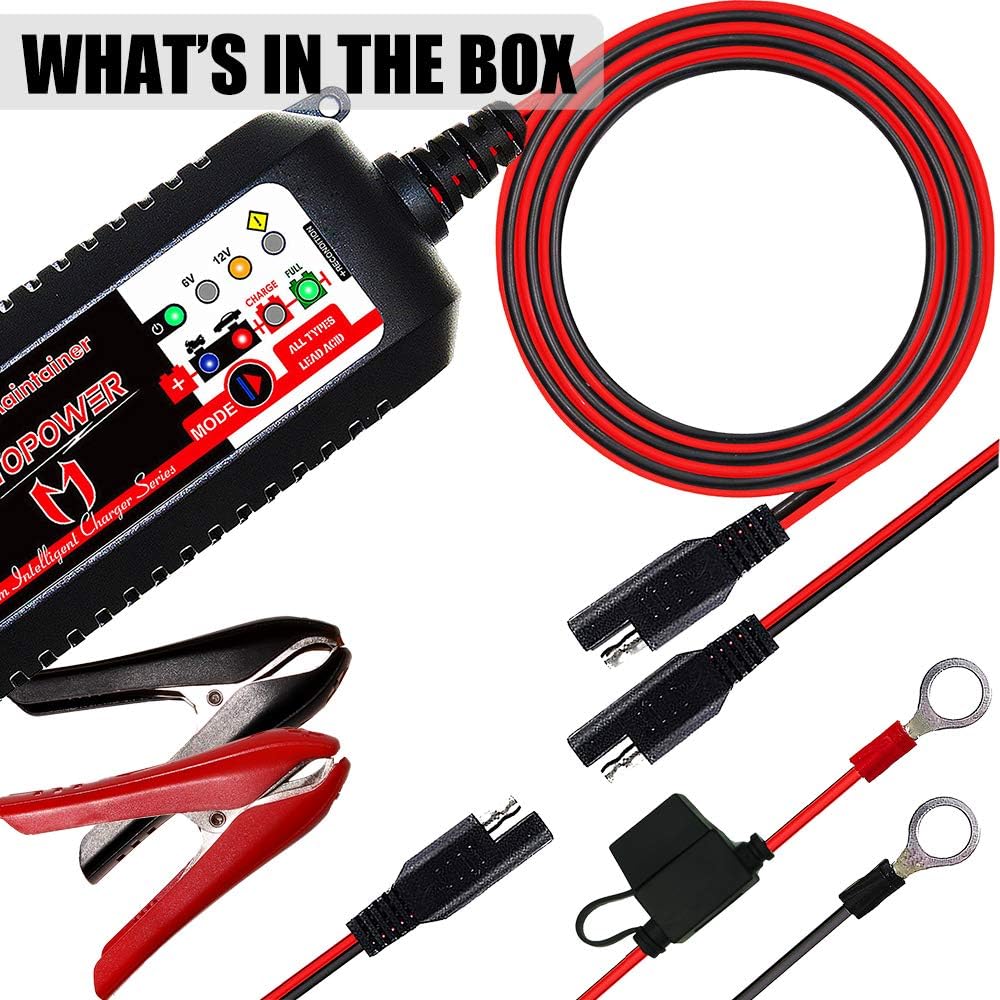
The MOTOPOWER MP00207 package includes the following components:
- Charger Body (Main Unit)
- Ring Terminal Cable with SAE Quick Connection
- Alligator Clip Cable with SAE Quick Connection
Setup and Connection
- Choose Connection Method: Select either the ring terminal cable or the alligator clip cable based on your battery type and accessibility. Both connect to the main charger unit via the SAE quick connection.
- Connect to Battery:
- Connect the positive (red) clamp/ring terminal to the positive (+) battery terminal.
- Connect the negative (black) clamp/ring terminal to the negative (-) battery terminal.
- Power On: Plug the charger's main power cord into a standard AC outlet (230V AC, 50-60Hz). The charger will automatically detect the battery voltage (6V or 12V) and begin charging. The LCD screen will display the voltage and charging status.


Operating Instructions
Automatic Operation
The charger is fully automatic. Once connected and powered on, it will automatically detect the battery voltage (6V or 12V) and initiate the appropriate charging process. The microprocessor-controlled program monitors the entire charging progress and automatically stops when the battery is fully charged. It then switches to a maintenance (float) charge to keep the battery at optimal voltage.
Charging Mode Selections
The charger offers different modes for various charging needs:
- Standard Mode: This is the default quick charge mode, suitable for charging 6V and 12V batteries up to 75Ah. It charges at 2A for 6V batteries and allows selection between 2A or 4A for 12V batteries.
- Trickle Charging Mode: Ideal for long-term charging and maintaining batteries, especially during storage. This mode keeps the battery fully charged without overcharging.
- Repair Function: This mode is designed to recover sulfated or deeply discharged batteries. It applies a special charging sequence to restore battery health and activate it. For 12V batteries, the repair mode is recommended once every 1-3 months. For 6V batteries, it is recommended to use the repair mode for about 4 hours. If the battery does not recover, it may need replacement.
To select a mode, press the "MODE" button on the charger. The corresponding LED indicator will illuminate.


Maintenance
For optimal battery life, regular maintenance is recommended. The trickle charging mode is designed for this purpose, providing a continuous low-current charge to keep the battery fully charged without causing damage. This is particularly useful for vehicles or equipment stored for extended periods.
The charger's thermal compensation feature ensures stable performance across various climates, adjusting charging parameters based on ambient temperature to prevent overcharging or undercharging.

Troubleshooting
- Screen Not Displaying: If the screen does not display when the charger is connected to the battery, check for incorrect clamp connections (reverse polarity) or a completely dead battery (0V).
- Charger Not Charging: Ensure the clamps are correctly connected. If the battery is very low voltage, the charger may not initiate charging. Try the "Repair" mode if applicable.
- "Reverse Connection" Error: If the screen displays "Reverse Connection" or similar, immediately disconnect the clamps and re-connect them with correct polarity (red to positive, black to negative).
- Battery Overheating: Disconnect the charger immediately if the battery becomes excessively hot during charging. This may indicate an internal fault with the battery, which could be damaged or sulfated.
- Charger Stops Prematurely: If the charger stops before the battery is fully charged, the battery might be sulfated or damaged. Consider using the "Repair" mode or replacing the battery if necessary.
Specifications
| Feature | Specification |
|---|---|
| Brand | MOTOPOWER |
| Model Number | MP00207 |
| Input Voltage | 230 Volt (AC) |
| Output Voltage | 6V / 12V |
| Output Current | 2 Ampere (6V), 2 Ampere / 4 Ampere (12V) |
| Amperage | 4 Ampere (Max) |
| Product Dimensions | 5P x 10.5L x 3.8H cm |
| Item Weight | 550 Grams |
| Connector Type | SAE Quick Connection |
| Compatible Battery Types | 6V/12V Lead-Acid (Flooded, MF/FA, AGM, Gel) |
Warranty and Support
The MOTOPOWER MP00207 comes with a 1-year manufacturer's warranty. For any product-related inquiries, technical support, or warranty claims, please refer to the contact information provided in the product packaging or visit the official MOTOPOWER website. Ensure you retain your proof of purchase for warranty validation.
