
FOSA fosaw5yn0op6cg
FOSA Universal Replacement TV Remote Control User Manual
Model: fosaw5yn0op6cg
1. Product Overview
The FOSA Universal Replacement TV Remote Control is designed to provide seamless control for a range of compatible television models. Constructed from durable ABS material, this remote offers a comfortable grip and reliable performance. It serves as a direct replacement for original remote controls, eliminating the need for complex programming in most cases.

Image: Front view of the FOSA Universal Replacement TV Remote Control, showcasing its button layout.
1.1 Key Features
- Durable Construction: Made of high-quality ABS material, ensuring longevity and resistance to wear and tear.
- Wide Compatibility: Compatible with various TV models including Sankey and Kalley 42D10, 42D10F, 19D3260, 24D3270, 24D3270F, 32D3270, 32D3320, 39D3320F, 39D3320, 32E5300, and LT-26A310R.
- Extended Range: Offers a remote control distance greater than 8 meters, though actual distance may vary by TV model and environment.
- Ergonomic Design: Lightweight and designed for comfortable handling.

Image: The FOSA remote control positioned next to a television screen, with text highlighting its compatibility with various TCL, Sankey, and Kalley TV models.
2. Setup and Installation
Before using your new remote control, you will need to install batteries.
2.1 Battery Installation
- Locate the battery compartment on the back of the remote control.
- Press down on the tab and slide the battery cover downwards to open it.
- Insert two (2) AAA batteries, ensuring the positive (+) and negative (-) terminals align correctly with the markings inside the compartment.
- Slide the battery cover back into place until it clicks securely.

Image: The FOSA remote control with its battery compartment open, showing the empty slots for AAA batteries.
Note: This remote control is designed as a direct replacement for the listed compatible models and typically does not require manual programming or code entry. Simply insert batteries and begin use.
3. Operating Instructions
Once batteries are installed, the remote control is ready for use with your compatible television.
3.1 Basic Functions
- Power Button (Power Symbol): Turns the TV on or off.
- Number Buttons (0-9): Directly select channels.
- Volume Up/Down (VOL +/-): Adjusts the sound volume.
- Channel Up/Down (CH +/-): Changes the TV channel.
- Mute Button (Mute Symbol): Mutes or unmutes the TV sound.
- Navigation Pad (Up, Down, Left, Right, OK): Used to navigate menus and confirm selections.
- Menu Button: Accesses the TV's main menu.
- Source Button: Changes the input source (e.g., HDMI, AV).
- Exit Button: Exits current menu or function.

Image: The FOSA remote control in the foreground, with a living room scene in the background where people are watching television, illustrating typical usage.
4. Maintenance
Proper care will extend the life of your remote control.
- Cleaning: Wipe the remote with a soft, dry cloth. For stubborn dirt, slightly dampen the cloth with water or a mild, non-abrasive cleaner. Do not use harsh chemicals or immerse the remote in liquid.
- Battery Care: If the remote will not be used for an extended period, remove the batteries to prevent leakage and potential damage.
- Storage: Store the remote in a cool, dry place away from direct sunlight and extreme temperatures.
- Avoid Drops: While made of durable ABS, repeated drops can damage internal components. Handle with care.

Image: The FOSA remote control resting on a cracked surface, visually representing its durable ABS construction.
5. Troubleshooting
If you experience issues with your remote control, try the following steps:
- Remote Not Responding:
- Ensure batteries are inserted correctly with the correct polarity (+/-).
- Replace old batteries with new ones.
- Check for any obstructions between the remote and the TV's infrared sensor. Ensure you are within the effective operating range (typically within 8 meters and direct line of sight).
- Limited Functionality:
- Verify that your TV model is listed as compatible in Section 1.1. While this remote is universal for the specified models, it may not work with all TV brands or models.
- Some advanced functions specific to your original TV remote might not be replicated on this universal replacement.
- Interference:
- Bright lights or other electronic devices can sometimes interfere with the remote's signal. Try using the remote in a different lighting condition or away from potential interference sources.
If problems persist after trying these steps, please refer to the support information in Section 7.
6. Specifications
| Feature | Detail |
|---|---|
| Shell Material | ABS |
| Remote Control Distance | Greater than 8 meters (varies by machine model) |
| Battery Model | 2 * AAA (not included) |
| Product Size (L*W*H) | Approx. 207 * 46 * 20 mm / 8.1 * 1.8 * 0.8 inches |
| Item Weight | Approx. 66 g / 2.33 oz (without batteries) |
| Compatible Devices | Television (Specific models listed in Section 1.1) |
| Model Number | fosaw5yn0op6cg |
| ASIN | B07TDQ4526 |
| Date First Available | June 21, 2019 |
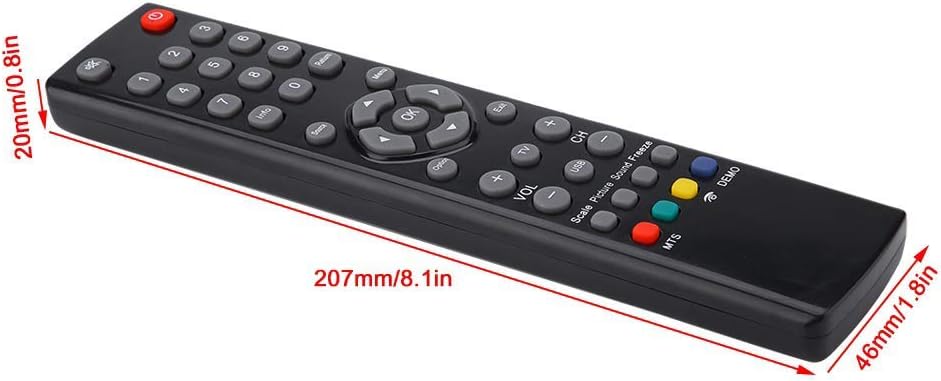
Image: A diagram illustrating the physical dimensions of the FOSA remote control in millimeters and inches.
7. Warranty and Support
This FOSA product is covered by a standard manufacturer's warranty. For specific warranty terms and conditions, please refer to the product packaging or contact the seller directly.
7.1 Customer Support
If you have any questions, require technical assistance, or need to report an issue with your remote control, please contact the seller or manufacturer through the platform where the product was purchased. Provide your order details and the product model number (fosaw5yn0op6cg) for faster service.
Ask a question about this manual
Ask about setup, troubleshooting, compatibility, parts, safety, or missing instructions. Manuals+ will review the question and use this page’s manual context to help answer it.