
1. Introduction
Thank you for choosing the ZIPRO Tekno Treadmill. This manual provides essential information for the safe and efficient operation, assembly, maintenance, and troubleshooting of your new fitness equipment. Please read this manual thoroughly before initial use and retain it for future reference.

Figure 1: ZIPRO Tekno Treadmill in active use and its compact folded state.
2. Important Safety Instructions
To reduce the risk of serious injury, read all instructions before using the treadmill. The manufacturer assumes no responsibility for personal injury or property damage sustained by or through the use of this product.
- Always consult with a physician before beginning any exercise program.
- Keep children and pets away from the treadmill during operation.
- Place the treadmill on a flat, stable surface with adequate clearance around it.
- Ensure the safety key is properly attached to your clothing before starting.
- Do not operate the treadmill if it has a damaged cord or plug, or if it is not working properly.
- Wear appropriate athletic footwear and clothing.
- Do not step on or off the treadmill while the belt is moving.
- The maximum user weight for this treadmill is 120 kg.
3. Product Overview
The ZIPRO Tekno Treadmill is designed for home use, offering a range of features to support your fitness goals. It includes a powerful motor, adjustable speed and incline, and a user-friendly display.
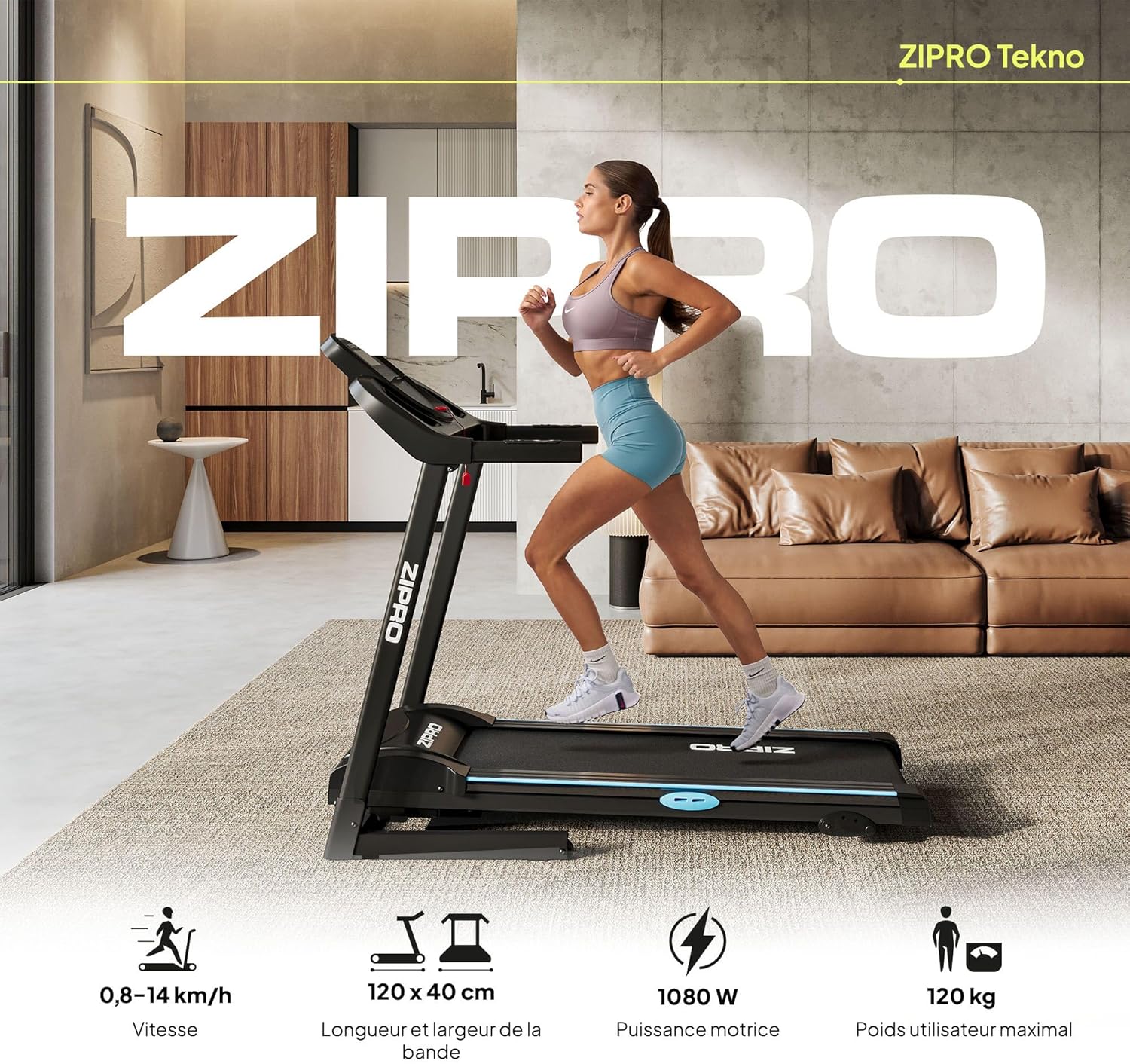
Figure 2: Overview of key features including speed range (0.8-14 km/h), belt size (120x40 cm), motor power (1080 W), and maximum user weight (120 kg).
4. Assembly and Initial Setup
The ZIPRO Tekno Treadmill is designed for relatively easy assembly. Follow these steps carefully:
- Unpacking: Carefully remove all components from the packaging. Ensure all parts listed in the packing list are present.
- Base Assembly: Unfold the main frame and secure the uprights according to the included hardware.
- Console Attachment: Attach the console to the uprights, ensuring all cables are properly connected.
- Handlebar Installation: Secure the handlebars to the main frame.
- Power Connection: Plug the power cord into a grounded electrical outlet.
- Safety Key: Place the safety key in its designated slot on the console. The treadmill will not operate without it.

Figure 3: Folded dimensions of the treadmill (78 cm depth, 68 cm width, 144 cm height) for compact storage.
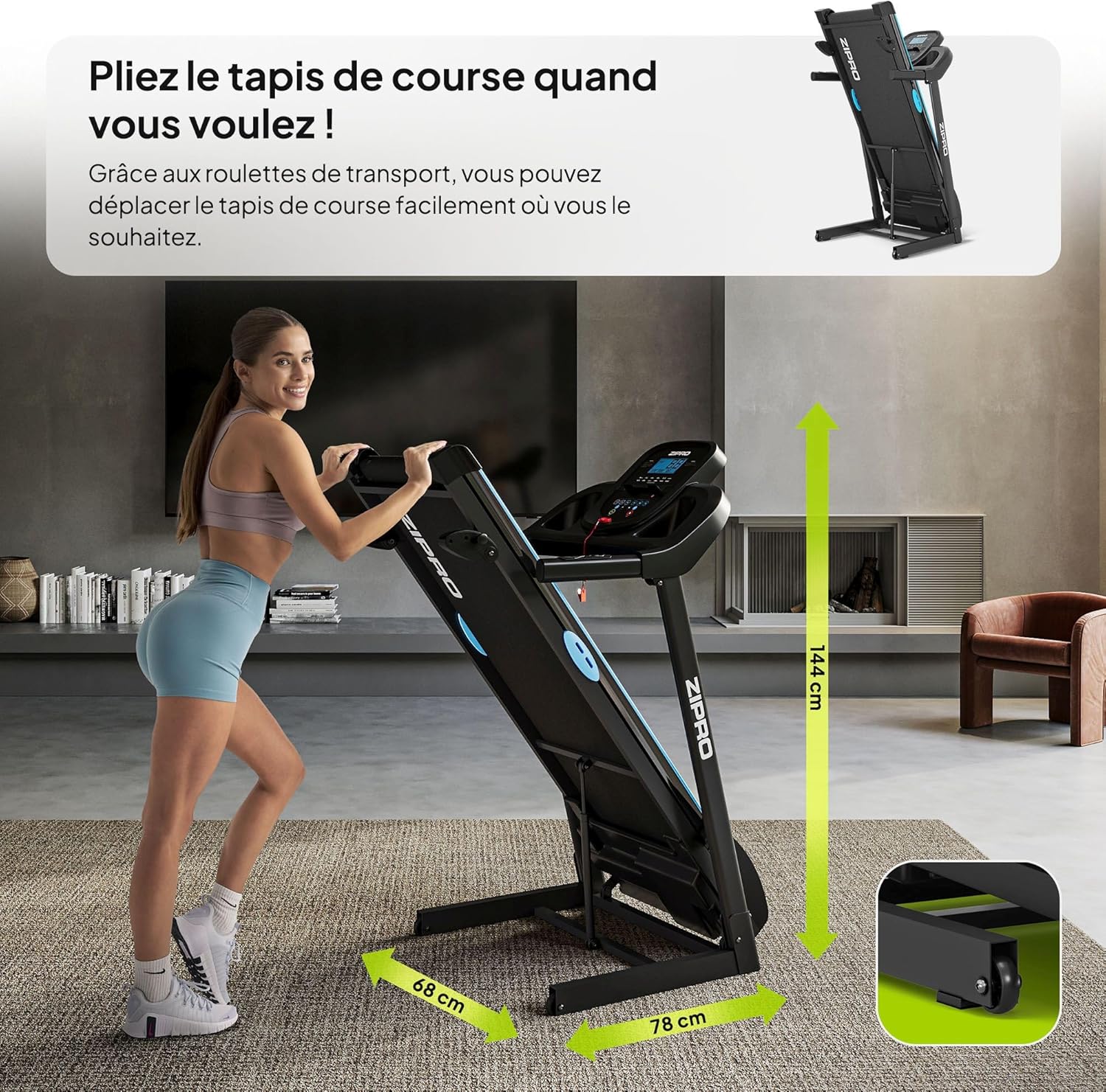
Figure 4: Side view of the ZIPRO Tekno Treadmill in its upright, folded position, ready for storage.
5. Operating Your Treadmill
5.1 Control Panel
The control panel features an LCD display and various buttons for controlling your workout.

Figure 5: The treadmill's LCD control panel displaying metrics such as calories, time, distance, speed, and heart rate, along with quick speed adjustment buttons.
- LCD Display: Shows real-time data including Speed, Time, Distance, Calories Burned, and Pulse.
- Start/Stop Buttons: Initiate and end your workout.
- Speed +/- Buttons: Adjust the running belt speed.
- Incline +/- Buttons: Adjust the incline level.
- Program Buttons: Select from pre-set workout programs.
- Mode Button: Cycle through display modes or settings.
5.2 Starting and Stopping
- To Start: Ensure the safety key is in place. Press the 'Start' button. The belt will begin to move at a low speed.
- To Stop: Press the 'Stop' button. The belt will gradually slow down and stop. Alternatively, pull the safety key to immediately stop the treadmill.
5.3 Adjusting Speed and Incline
Use the 'Speed +/-' buttons to increase or decrease the belt speed from 0.8 km/h to 14 km/h. The treadmill also offers 3 levels of manual incline adjustment to vary your workout intensity.

Figure 6: The treadmill supports a maximum speed of 14 km/h and features 3 levels of incline for varied training.
5.4 Pre-set Programs
The treadmill includes 12 integrated workout programs. Select a program using the 'Program' button to automatically adjust speed and incline throughout your workout, providing a structured training experience.
5.5 Product Video Overview
The following video provides a general presentation of the ZIPRO product range, including the treadmill in action. Please note this is a general overview and not a detailed instructional video.
Video 1: Presentation of the ZIPRO product range.
6. Maintenance and Care
Regular maintenance ensures the longevity and optimal performance of your treadmill.
- Cleaning: Wipe down the treadmill after each use with a damp cloth to remove sweat and dust. Do not use abrasive cleaners.
- Lubrication: The running belt requires periodic lubrication to reduce friction. Refer to the specific lubrication instructions provided with your treadmill.
- Belt Adjustment: Check the tension and alignment of the running belt regularly. Adjust as needed using the provided tools and instructions to prevent slipping or excessive wear.
- Storage: When not in use, the treadmill can be folded for compact storage. Utilize the transport wheels for easy relocation.

Figure 7: The Comfort Protect cushioning system, composed of 8 elastomers, helps protect joints during running.

Figure 8: The anti-slip running surface ensures secure footing during your workout.
7. Troubleshooting Common Issues
This section addresses common issues you might encounter with your treadmill.
| Problem | Possible Cause | Solution |
|---|---|---|
| Treadmill does not start | Safety key not in place; Power cord not connected; Circuit breaker tripped. | Ensure safety key is fully inserted; Check power connection; Reset circuit breaker. |
| Running belt slips | Belt too loose; Belt needs lubrication. | Adjust belt tension; Lubricate the running belt. |
| Unusual noise during operation | Loose parts; Belt misalignment; Motor issue. | Check and tighten all bolts; Adjust belt alignment; Contact customer support if noise persists. |
| Display not working | Loose cable connection; Power issue. | Check all console cable connections; Verify power supply. |
8. Technical Specifications
Detailed specifications for the ZIPRO Tekno Treadmill:
| Feature | Specification |
|---|---|
| Brand | ZIPRO |
| Model Number | 5304086 |
| Color | Black |
| Material | Plastic, Aluminum (frame) |
| Product Dimensions (L x W x H) | 155 x 68 x 132 cm |
| Folded Dimensions (L x W x H) | 78 x 68 x 144 cm |
| Item Weight | 42.9 Kilograms |
| Maximum User Weight | 120 Kilograms |
| Speed Range | 0.8 - 14 km/h |
| Motor Horsepower | 10 Kilowatt (1080 W) |
| Running Belt Dimensions | 120 cm (length) x 40 cm (width) |
| Incline Levels | 3 (manual adjustment) |
| Display Type | LCD |
| Display Metrics | Time, Heart Rate/Calories Burned, Speed, Distance |
| Number of Programs | 12 |
| Special Features | Anti-slip running surface, Compact dimensions, Easy assembly, Heavy-duty use |

Figure 9: Comprehensive dimensions of the ZIPRO Tekno Treadmill, both in operational and folded states.
9. Warranty and Customer Support
Your ZIPRO Tekno Treadmill comes with a standard return policy, typically allowing returns within 30 days of purchase. For specific warranty details, including coverage and duration, please refer to the documentation provided at the time of purchase or contact your retailer.
For technical assistance, spare parts, or any questions not covered in this manual, please contact ZIPRO customer support through the official website or your point of purchase. Please have your model number and purchase date ready when contacting support.

