
1. Introduction
This manual provides essential information for the safe and effective use of the Fameca FC5300 Low Voltage Cable Identifier. The FC5300 is a specialized kit designed for precise identification of live low voltage (BT) cables and conductors within a network. It includes the FC5300D and FC5300E components, working together to ensure accurate cable and phase identification.
2. Safety Information
Always read and understand all safety warnings and operating instructions before using this device. Failure to follow these instructions may result in electric shock, fire, or serious injury.
- This device is designed for use by qualified personnel only.
- Do not use the device if it appears damaged or if any part is missing.
- Always wear appropriate personal protective equipment (PPE) when working with electrical systems.
- The FC5300 is rated CAT III 1000V and CAT IV 600V. Adhere strictly to these voltage categories and never exceed the specified limits.
- Ensure proper insulation and grounding practices are followed.
- Avoid contact with live circuits unless specifically instructed and using appropriate safety measures.
3. Product Overview
The Fameca FC5300 kit consists of two main units: the FC5300D and the FC5300E. These units work in conjunction to provide reliable cable and conductor identification.
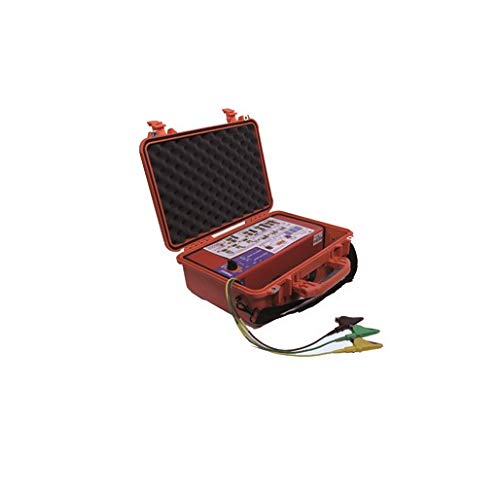
Figure 1: The Fameca FC5300 Low Voltage Cable Identifier kit, showing the main handheld unit (FC5300D) and the auxiliary component (FC5300E) connected by a cable.
The FC5300D is typically the main handheld display unit, while the FC5300E is the auxiliary unit that interacts with the cable or conductor being tested. Together, they enable the precise identification of cables and phases in various electrical network scenarios.
4. Setup
Before operating the Fameca FC5300, ensure the following setup procedures are completed:
- Inspection: Visually inspect both the FC5300D and FC5300E units for any signs of damage, such as cracks in the casing, frayed cables, or loose connections. Do not use if damage is observed.
- Power Source: The device operates via an electrical cable connection. Ensure the power source is stable and within the specified voltage limits.
- Connection: Connect the FC5300D and FC5300E units securely as per the manufacturer's instructions. Ensure all connectors are fully engaged.
- Environmental Conditions: Operate the device in a dry environment, free from excessive dust or extreme temperatures, unless otherwise specified for outdoor use.
5. Operating Instructions
The Fameca FC5300 is designed for several key identification tasks:
5.1. Identification of BT Cables in Open Trenches or Galleries
- Ensure the target cable is accessible and all safety precautions are in place.
- Connect the FC5300E unit to the cable according to the specific test procedure for cable identification.
- Use the FC5300D unit to scan along the trench or gallery. The device will provide indications to positively identify the target cable among others.
- Follow the on-screen prompts or audible signals from the FC5300D for accurate identification.
5.2. Identification of Three Phase Conductors (L1, L2, L3) on Unipolar Three-Phase Cables
- Isolate the three-phase unipolar cable section to be tested, if possible, or ensure appropriate live working procedures are followed.
- Connect the FC5300E to each phase conductor sequentially or as instructed by the device's specific test mode.
- The FC5300D will display the corresponding phase (L1, L2, or L3), allowing for clear identification of each conductor.
5.3. Source Identification and Confirmation
- To confirm the source of a cable, connect the FC5300E to the cable at the point of interest.
- The FC5300D will provide feedback indicating the presence and direction of the source, confirming its origin.
5.4. Discrimination of Upstream and Downstream Cables
- At a specific point in the network, connect the FC5300E to the cable.
- The FC5300D will analyze the signal and indicate whether the cable segment is upstream or downstream from the measurement point, aiding in network topology mapping.
6. Maintenance
Proper maintenance ensures the longevity and accuracy of your Fameca FC5300.
- Cleaning: Clean the device regularly with a soft, dry cloth. Do not use abrasive cleaners or solvents. Ensure no moisture enters the device.
- Storage: Store the FC5300 in a cool, dry place, away from direct sunlight and extreme temperatures. Use the original carrying case, if provided, to protect it from physical damage.
- Calibration: Regular calibration by authorized service centers is recommended to maintain measurement accuracy. Refer to Fameca's official guidelines for recommended calibration intervals.
- Battery (if applicable): Although the product description states 'Batteries included? No' and 'Batteries required? No', if any internal rechargeable batteries are present in specific models or accessories, follow their respective charging and maintenance instructions.
7. Troubleshooting
If you encounter issues with your Fameca FC5300, refer to the following common troubleshooting steps:
- No Power/Display:
- Check all cable connections between the FC5300D and FC5300E, and to the power source.
- Ensure the power source is active and providing the correct voltage.
- Inaccurate Readings:
- Verify that the device is being used according to the operating instructions for the specific task.
- Ensure proper contact with the cable or conductor being tested.
- Check for excessive electromagnetic interference in the testing environment.
- Consider if the device is due for calibration.
- Intermittent Operation:
- Inspect cables and connectors for damage or loose connections.
- Ensure the operating environment is within specified conditions (temperature, humidity).
If problems persist after attempting these steps, contact Fameca customer support or an authorized service center.
8. Specifications
| Feature | Detail |
|---|---|
| Manufacturer | fameca |
| Model Reference | FC5300 |
| Item Weight | 11 Kilograms |
| Color | Black |
| Power Type | Electrical Cable |
| Certification | CAT III 1000V, CAT IV 600V |
| Batteries Included | No |
| Batteries Required | No |
| Measurement Type | Multimeter (Implied functionality for identification) |
| ASIN | B07TD8CVMT |
| First Available Date | June 25, 2019 |
9. Warranty Information
Warranty terms and conditions for the Fameca FC5300 are typically provided with the product at the time of purchase. Please refer to the documentation included in your product packaging or visit the official Fameca website for detailed warranty information. Keep your proof of purchase for warranty claims.
10. Customer Support
For technical assistance, service, or inquiries regarding your Fameca FC5300, please contact Fameca customer support directly. Contact details can usually be found on the manufacturer's website or in the product packaging.
Fameca Official Website: www.fameca.fr (Note: This is a placeholder URL, please verify the actual official website.)