
1. Introduction
1.1 Product Overview
The SUNDING SD-548B is a portable and multi-functional bike digital LCD computer odometer speedometer. It is designed to provide essential cycling data, including current speed, maximum speed, average speed, trip distance, and total odometer readings. Additionally, it features a clock and stopwatch function, making it a versatile tool for cyclists. Its waterproof design ensures reliable performance in various weather conditions.
1.2 Key Features
- Portable and Waterproof Design: Ensures durability and usability in diverse environments.
- Real-time Training Progress Tracking: Monitors current speed, distance, and time.
- Multi-functional Display: Includes odometer, trip distance, maximum speed, average speed, clock, and stopwatch.
- Easy to Use: Simple interface for quick setup and operation.
- Durable Construction: Made with hard plastic shell material.
- Battery Powered: Operates on one 1.5V AG13 button battery (not included).
1.3 Package Contents
Please check the package for the following items:
- 1 x SUNDING SD-548B Bicycle Computer
- 1 x Sensor
- 1 x Wheel Magnet
- 1 x Mounting Shoe
- 1 x Set of Cable Ties
- 1 x User Manual
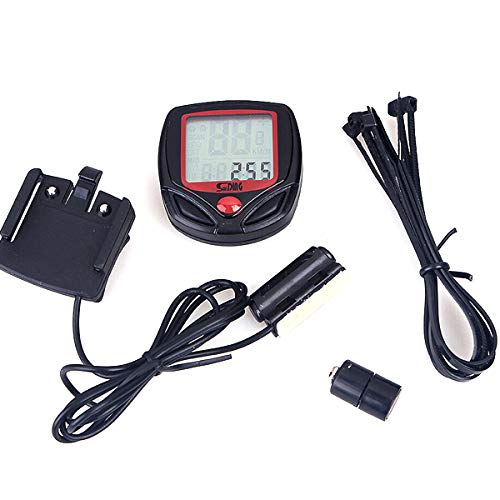
Image: The SUNDING SD-548B Bicycle Computer with its sensor, magnet, and mounting accessories.
2. Safety Information
- Ensure the computer and sensor are securely mounted to avoid interference with cycling or potential detachment during rides.
- Do not attempt to disassemble or modify the device, as this may void the warranty and cause damage.
- Keep button batteries out of reach of children. If swallowed, seek immediate medical attention.
- While the device is waterproof, avoid prolonged submersion in water.
- Dispose of used batteries according to local regulations.
3. Setup
3.1 Battery Installation
- Locate the battery compartment on the back of the computer unit.
- Use a small coin or screwdriver to gently twist open the battery cover.
- Insert one 1.5V AG13 button battery with the positive (+) side facing up.
- Replace the battery cover and ensure it is securely sealed to maintain water resistance.
3.2 Sensor and Magnet Installation
- Attach the sensor to the front fork of your bicycle using the provided cable ties. Position it on the side where the wheel magnet will be installed.
- Mount the magnet to a spoke on the front wheel.
- Adjust the position of the sensor and magnet so that the gap between them is approximately 1-3 mm when the wheel rotates. Ensure they align properly.
- Securely fasten all cable ties, trimming any excess.
3.3 Mounting the Computer
- Attach the mounting shoe to your handlebar or stem using the provided cable ties.
- Slide the SUNDING SD-548B computer unit onto the mounting shoe until it clicks into place.
- Ensure the computer is firmly seated and facing you for easy viewing during your ride.
3.4 Initial Settings (Wheel Circumference)
Accurate speed and distance readings depend on correct wheel circumference input.
- With the computer powered on, press the MODE button until you see the 'SET' or '2060' (default circumference) display.
- Press the SET button to enter the setting mode. The first digit will flash.
- Use the MODE button to change the flashing digit. Press SET to confirm and move to the next digit.
- Repeat until you have entered your wheel's circumference in millimeters (mm). Common values:
- 26 inch: 2060 mm
- 700C: 2155 mm
- 27 inch: 2145 mm
- After setting the circumference, you may be prompted to set the unit (km/h or mph) and clock. Use MODE to select and SET to confirm.
4. Operating Instructions
4.1 Button Functions
- MODE Button: Short press to cycle through different display modes. Long press (approx. 3 seconds) to enter setting mode or reset trip data.
- SET Button: Used to confirm selections or adjust values within setting modes.
4.2 Display Modes
Press the MODE button to cycle through the following display functions:
- SPD (Current Speed): Displays your real-time cycling speed.
- ODO (Odometer): Shows the total accumulated distance. This value cannot be reset.
- DST (Trip Distance): Displays the distance covered during the current trip. Can be reset.
- MXS (Maximum Speed): Shows the highest speed achieved during the current trip.
- AVS (Average Speed): Displays the average speed of the current trip.
- TM (Trip Time): Shows the duration of the current trip.
- CLK (Clock): Displays the current time (12H/24H format).
- SCAN: Automatically cycles through DST, MXS, AVS, and TM displays every few seconds.
4.3 Resetting Trip Data
To reset trip-specific data (DST, MXS, AVS, TM), long press the MODE button while in any of these modes until the values reset to zero.
4.4 Setting the Clock
- In CLK mode, long press the SET button until the time digits start flashing.
- Press MODE to adjust the hour. Press SET to confirm and move to minutes.
- Press MODE to adjust the minutes. Press SET to confirm.
- You may also be able to switch between 12H and 24H format using the MODE button during this process.
5. Maintenance
- Cleaning: Wipe the computer screen and body with a soft, damp cloth. Do not use abrasive cleaners or solvents.
- Battery Replacement: Replace the AG13 battery when the display becomes dim or unresponsive. Follow the battery installation steps in Section 3.1.
- Water Resistance: The device is waterproof for splashes and rain. Avoid high-pressure water jets or prolonged immersion. Ensure the battery cover is always securely closed.
- Storage: When not in use for extended periods, remove the battery to prevent leakage and store the unit in a cool, dry place.
6. Troubleshooting
| Problem | Possible Cause | Solution |
|---|---|---|
| No display or dim display | Dead battery; Incorrect battery installation | Replace battery (AG13); Ensure battery is inserted correctly with positive (+) side up. |
| No speed/distance reading | Sensor/magnet misalignment; Sensor/magnet too far apart; Faulty sensor/magnet | Adjust sensor and magnet to be 1-3 mm apart and aligned; Check for damage to sensor or magnet. |
| Incorrect speed/distance | Incorrect wheel circumference setting | Re-enter the correct wheel circumference (refer to Section 3.4). |
| Buttons unresponsive | Low battery; Internal malfunction | Replace battery; If problem persists, contact customer support. |
7. Specifications
- Model: SUNDING SD-548B
- Material: Durable Hard Plastic
- Power Source: 1 x 1.5V AG13 Button Battery (not included)
- Display: Digital LCD
- Functions: SPD, ODO, DST, MXS, AVS, TM, CLK, SCAN
- Water Resistance: Yes (splash-proof)
8. Warranty and Support
This product comes with a standard manufacturer's warranty against defects in materials and workmanship. Please refer to the warranty card included in your package or contact your retailer for specific warranty terms and conditions.
For technical support or further assistance, please contact the retailer or manufacturer's customer service department. Keep your purchase receipt as proof of purchase for warranty claims.


