
1. Introduction
This manual provides essential information for the safe and effective operation of your TENLOG TL-D3 Pro Dual Extruder 3D Printer. Please read this manual thoroughly before operating the device to ensure proper setup, usage, and maintenance. The TENLOG TL-D3 Pro is designed for advanced 3D printing, featuring independent dual extruders for versatile printing modes and material compatibility.
2. Safety Information
Observe the following safety precautions to prevent injury or damage to the printer:
- Electrical Safety: Ensure the printer is connected to a grounded power outlet. Do not operate with wet hands or in damp conditions. Disconnect power before performing any maintenance or adjustments.
- Hot Surfaces: The print nozzle and heated bed reach high temperatures during operation. Avoid direct contact with these components to prevent burns. Allow components to cool before handling.
- Moving Parts: Keep hands and loose clothing clear of moving parts during operation to prevent entanglement.
- Ventilation: Operate the printer in a well-ventilated area, especially when printing with materials that may emit fumes.
- Filament Handling: Store filament in a dry environment to prevent moisture absorption, which can affect print quality.
- Children and Pets: Keep the printer out of reach of children and pets.
3. Package Contents
Upon unpacking, verify that all components are present and undamaged. The TENLOG TL-D3 Pro package typically includes:
- TENLOG TL-D3 Pro 3D Printer main unit
- Two independent extruders
- Borosilicate glass print bed
- Filament spools (starter quantity)
- Power cable
- USB cable
- Tool kit (wrenches, screwdrivers, spatula, etc.)
- SD card with test models and software
- User Manual (this document)
4. Setup
The TENLOG TL-D3 Pro is designed for a straightforward setup process. Follow these general steps to prepare your printer for its first use.
4.1 Unpacking and Placement
Carefully remove the printer from its packaging. Place the printer on a stable, level surface in a well-ventilated area, away from direct sunlight and drafts.
4.2 Assembly
The TL-D3 Pro comes largely pre-assembled. Minor assembly may include attaching the gantry to the base and securing the filament holders. Refer to the quick start guide included in the box for detailed assembly instructions.

Figure 4.2.1: Front view of the TENLOG TL-D3 Pro 3D Printer, showcasing its dual extruder setup and filament spools.
4.3 Power Connection
Connect the power cable to the printer and then to a suitable power outlet. Ensure the power switch is in the OFF position before connecting. The printer features a robust 600W power supply.
4.4 Filament Loading
Load filament onto the designated spool holders. Guide the filament through the filament runout sensor and into the extruder's input. The direct drive system facilitates smooth filament feeding. Ensure the filament is not kinked or bent excessively, as this can cause feeding issues.
4.5 Bed Leveling
The printer features an upgraded borosilicate glass bed. Proper bed leveling is crucial for successful prints. Use the manual leveling points on the print bed to adjust the distance between the nozzle and the bed. A piece of paper should slide with slight resistance between the nozzle and the bed at each point.

Figure 4.5.1: Illustration of the TENLOG TL-D3 Pro's build volume, indicating dimensions of 300mm x 300mm x 350mm.
5. Operating the Printer
The TENLOG TL-D3 Pro offers various printing modes and features for diverse applications.
5.1 User Interface
Navigate the printer's functions using the integrated display and control knob. The intuitive interface allows for easy access to print settings, filament loading/unloading, and printer calibration.
5.2 Printing Modes
The independent dual extruder design enables several advanced printing modes:
- Dual Material Printing: Print models using two different filament types or colors simultaneously. This mode allows for separate temperature, extrusion, and printing speed settings for each nozzle.
- Duplication Mode: Print two identical models at the same time, effectively doubling production efficiency.
- Mirror Mode: Print two symmetrical models simultaneously, ideal for creating mirrored parts without additional design work.

Figure 5.2.1: Examples of Duplication Mode (multiple identical spheres) and Mirror Mode (symmetrical shoe designs) printing.

Figure 5.2.2: The TENLOG TL-D3 Pro operating in Mirror Mode, printing two symmetrical objects using TPU filament.
5.3 Supported Materials
The TL-D3 Pro supports a wide range of filaments, including PVA, TPU, ABS, PLA, and Nylon, thanks to its 300-degree high-temperature nozzle and direct drive extruders. Adjust print settings according to the specific filament manufacturer's recommendations.
5.4 Advanced Features
- Filament Runout Detection: The printer automatically pauses printing when filament runs out, allowing you to load new filament and resume the print.
- Power Loss Recovery: In the event of a power interruption, the printer can resume printing from where it left off once power is restored.
- Silent Motherboard: Equipped with a self-developed silent motherboard featuring TMC2209 drivers, ensuring quieter operation and stable motion performance.
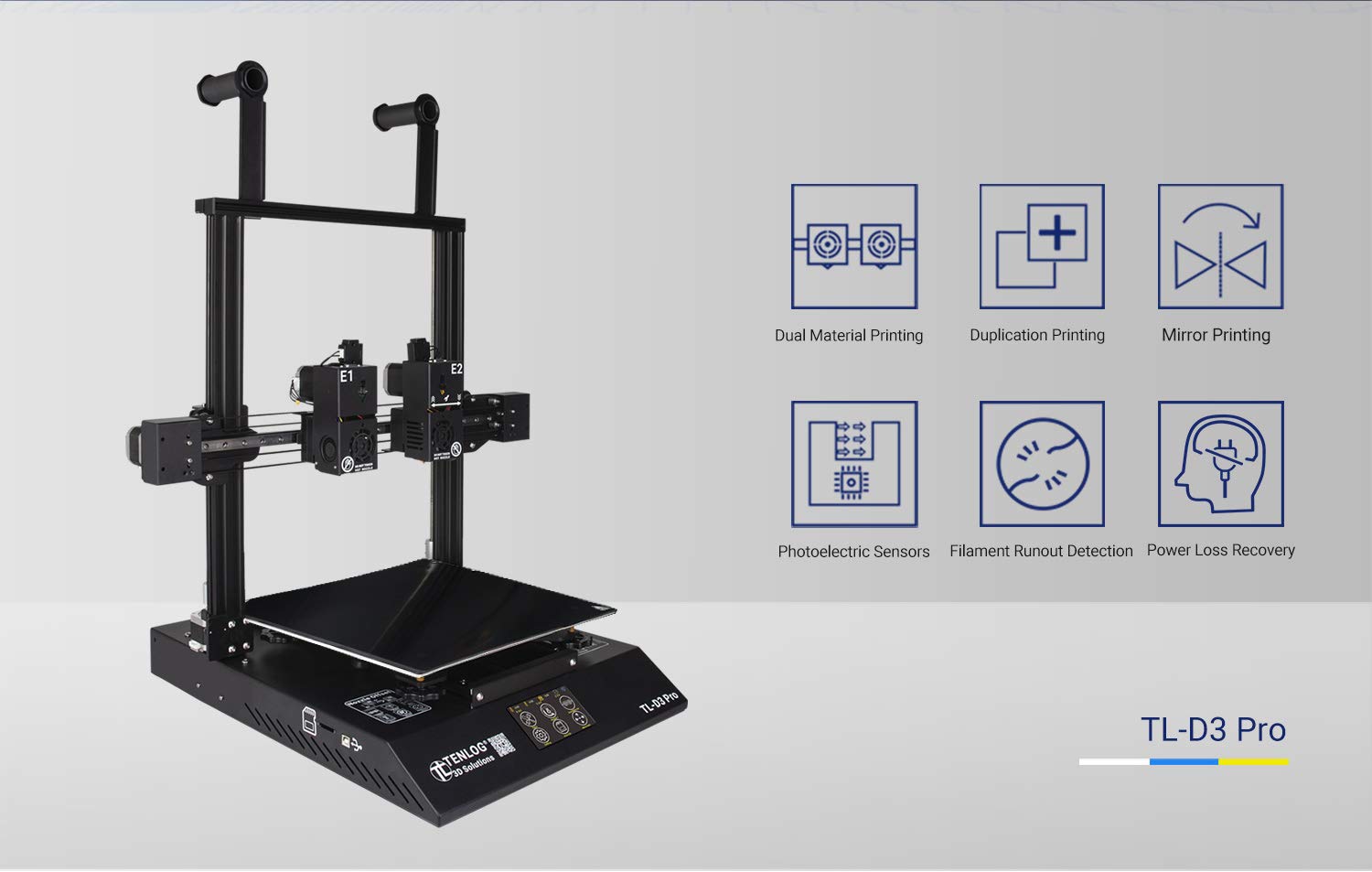
Figure 5.4.1: Overview of key features including Dual Material Printing, Duplication Printing, Mirror Printing, Photoelectric Sensors, Filament Runout Detection, and Power Loss Recovery.

Figure 5.4.2: Diagram illustrating the TENLOG DMP 7-axis Motherboard, highlighting its smart 3D printing system and support for TMC2208 & TMC2225 drivers.
6. Maintenance
Regular maintenance ensures optimal performance and longevity of your 3D printer.
6.1 Cleaning the Print Bed
For best adhesion, clean the borosilicate glass print bed regularly. Use isopropyl alcohol and a clean cloth to wipe down the surface before each print. This removes oils and residues that can hinder adhesion.
6.2 Extruder Maintenance
The integrated metal copper brush helps to wipe off excess filament from the nozzles before and during printing, reducing stringing and artifacts. Periodically inspect the nozzles for clogs and clean them using the provided tools if necessary.
6.3 General Cleaning
Keep the printer free of dust and filament debris. Use a soft brush or compressed air to clean the moving parts and electronic components. Avoid using liquids directly on electronic parts.
7. Troubleshooting
This section addresses common issues you might encounter with your TENLOG TL-D3 Pro.
7.1 Print Adhesion Issues
- Problem: Prints do not stick to the bed or detach mid-print.
- Solution: Ensure the print bed is properly leveled. Clean the borosilicate glass bed with isopropyl alcohol to remove any oils. Increase the bed temperature slightly if the filament type allows.
7.2 Filament Feeding Problems
- Problem: Filament fails to feed into the nozzle or gets jammed.
- Solution: Check for kinks or knots in the filament. Ensure the filament path is clear and the nozzle is not clogged. Verify that the filament diameter matches the extruder settings. For flexible filaments like TPU, ensure the filament is guided smoothly to prevent binding in the sensor or extruder.
7.3 Power Issues
- Problem: Printer does not power on or experiences intermittent power.
- Solution: Check all power cable connections. Ensure the power outlet is functional. If issues persist, contact customer support for assistance.
7.4 Print Quality Issues
- Problem: Stringing, blobs, or poor layer adhesion.
- Solution: Adjust retraction settings in your slicer software to reduce stringing. Ensure proper print temperature for the filament being used. Check for partial nozzle clogs.
8. Specifications
| Brand | TENLOG |
| Model | TL-D3 Pro |
| Extruder Type | Independent Dual Extruder (IDEX) |
| Nozzle Temperature | Up to 300°C |
| Build Volume | 11.8'' x 11.8'' x 13.8'' (300mm x 300mm x 350mm) |
| Print Bed | Upgraded Borosilicate Glass Bed |
| Motherboard | Self-Developed Silent Motherboard (TMC2209 Driver) |
| Power Supply | 600W |
| Supported Filaments | PVA, TPU, ABS, PLA, Nylon, etc. |
| Supported File Format | STL, OBJ |
| Material | Aluminum |
| Color | Navy Blue |
| Compatible Devices | Laptop, Personal Computer |
9. Warranty and Support
For warranty information and technical support, please contact the seller, LNL 3D Solutions. They can provide assistance with troubleshooting, replacement parts, and any product-related inquiries. It is recommended to have your purchase details and product serial number available when contacting support.
Contact Information: Refer to your purchase documentation or the seller's information on the platform where the product was acquired (e.g., Amazon seller page for LNL 3D Solutions).


