
Introduction
This manual provides instructions for the Redi-Remote replacement remote control, model RTPWW1021. This remote is designed to be compatible with specific Pioneer audio/video units, including models PWW1021, CU-PD015, PDM90X, PDM70, and PDM500. It is a custom replacement remote and is not an original Pioneer product.
The remote control measures approximately 7.5 inches in length, 2.25 inches in width, and 0.75 inches in thickness. It operates via infrared technology and requires no programming for use with the compatible Pioneer units.
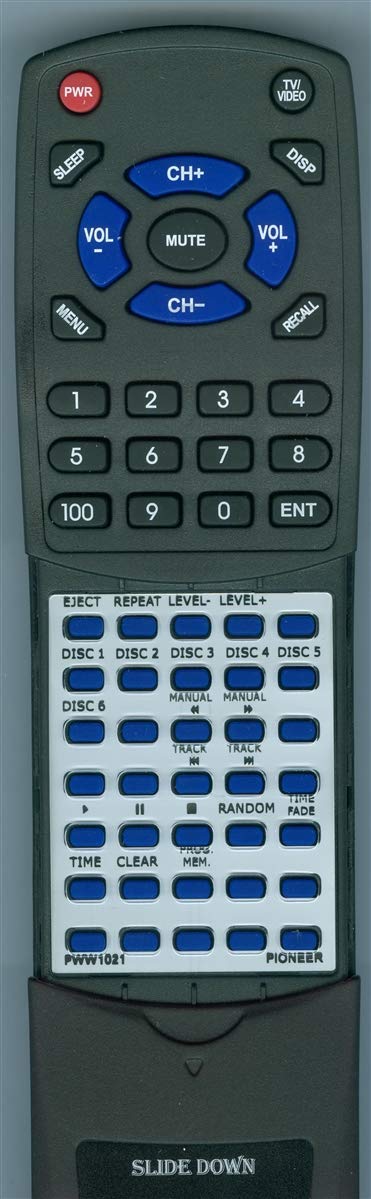
Image: The Redi-Remote replacement remote control, showing its general shape and button layout.
Setup
Battery Installation
- Locate the battery compartment on the back of the remote control.
- Slide open the battery compartment cover.
- Insert four (4) AAA batteries, ensuring correct polarity (+ and -) as indicated inside the compartment.
- Close the battery compartment cover securely.
The remote is ready for use immediately after battery installation; no programming is required.
Operating Instructions
This Redi-Remote is designed to perform all functions of the specific Pioneer unit it controls. It does not require any programming.
Basic Operation
- Power On/Off: Press the POWER button to turn the compatible Pioneer unit on or off.
- Function Selection: Use the designated function buttons (e.g., CD, Tuner, Aux) to select the desired input or mode on your Pioneer unit.
- Volume Control: Adjust the audio output using the VOLUME UP and VOLUME DOWN buttons.
- Playback Controls: For compatible media players, use buttons such as PLAY, PAUSE, STOP, SKIP, and REWIND/FAST FORWARD.
Accessing Additional Functions
The remote features a sliding cover over its lower half. To access additional, model-specific functions, gently slide this cover downwards. This will reveal more buttons for advanced controls relevant to your Pioneer unit.
Maintenance
- Cleaning: Wipe the remote control with a soft, dry cloth. Do not use liquid cleaners or abrasive materials.
- Battery Replacement: Replace all four AAA batteries when the remote's performance diminishes or if it stops responding. Always replace with new batteries of the same type.
- Storage: Store the remote in a dry place, away from direct sunlight and extreme temperatures. If storing for extended periods, remove the batteries to prevent leakage.
Troubleshooting
| Problem | Possible Cause | Solution |
|---|---|---|
| Remote not responding. | Dead or incorrectly installed batteries. | Replace batteries with new AAA batteries, ensuring correct polarity. |
| Remote has limited range or intermittent response. | Weak batteries; Obstruction between remote and unit; Remote sensor on unit is blocked. | Replace batteries. Ensure a clear line of sight between the remote and the Pioneer unit. Check for anything blocking the unit's infrared sensor. |
| Certain functions do not work. | Remote cover is closed; Function not supported by your specific Pioneer model. | Slide down the remote cover to reveal additional buttons. Verify if the function is available on your Pioneer unit's original remote or specifications. |
Specifications
| Brand | Redi-Remote |
| Model Number | RTPWW1021 |
| Compatible Devices | Pioneer PWW1021, CU-PD015, PDM90X, PDM70, PDM500 |
| Connectivity Technology | Infrared |
| Special Feature | No Programming Required |
| Maximum Range | 20 Feet |
| Number of Buttons | 58 |
| Batteries Required | 4 AAA batteries |
| Item Weight | 5 Ounces |
| Dimensions | 7.5" x 2.25" x 0.75" (approximate) |
Warranty and Support
For any concerns regarding your Redi-Remote replacement remote control, please contact the seller directly. As this is a replacement product, specific warranty details may vary. It is recommended to retain your purchase receipt for any support inquiries.