
1. Introduction
The Ourlife Kids Camera is designed to capture memorable moments for children aged 3-12 years. Featuring FHD 1080p/30fps videos and 8MP bright photos, this camera is equipped with a 2.4-inch colored large screen for clear viewing. It supports various creative features including 12 different built-in frame photo effects and 7 video filters, making photography fun and engaging for young users. Its durable design and included waterproof case allow for adventures both on land and underwater.
2. What's in the Box
Your Ourlife Kids Camera package includes the following items:
- Camera Body
- Waterproof Case
- Silicone Protective Case
- 8GB TF Card (pre-installed or included separately)
- USB Charging Cable
- Micro USB Card Reader
- Neck Strap
- Wrist Strap
- Mini Tripod
- Bicycle Mount
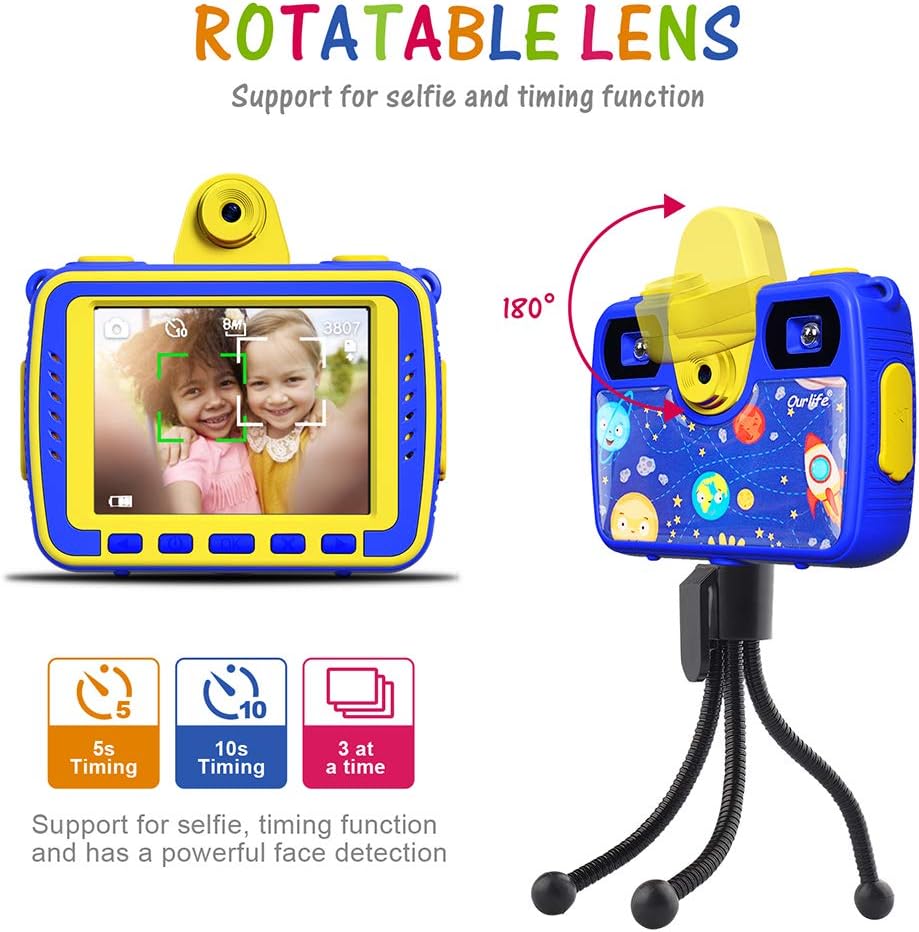
Image: All accessories included with the Ourlife Kids Camera.
3. Setup
- Initial Battery Activation: For first-time use, open the waterproof case and locate the battery protection switch on the side of the camera. Turn this switch ON.
- Charging the Camera: Connect the camera to a USB power source using the provided USB charging cable. Ensure the camera is fully charged before its first use. The charging indicator light will typically turn off or change color when charging is complete.
- Inserting the TF Card: If the 8GB TF card is not pre-installed, carefully insert it into the designated slot on the camera. Ensure it clicks into place.
- Attaching Protective Cases: For added durability and protection, place the camera inside the blue silicone protective case. For underwater use, ensure the camera is securely placed within the clear waterproof case.

Image: The Ourlife Kids Camera securely housed in its waterproof case.
4. Operating the Camera
4.1 Basic Functions
- Power On/Off: Press and hold the power button (usually located on the top or side) to turn the camera on or off.
- Navigation: Use the arrow buttons below the screen to navigate through the menu options. The 2.4-inch screen provides a clear interface for easy operation.
4.2 Photo and Video Modes
- Image Quality: Capture FHD 1080p/30fps videos and 8MP photos.
- Selfie Function: The camera features a rotatable lens that can be flipped forward for selfie mode. This allows children to easily take self-portraits or group photos with themselves in the frame.
- Face Detection & Timer: The camera automatically detects faces. Utilize the 5-second or 10-second self-timer and continuous shooting functions for perfect shots.
- Creative Effects: Enhance photos with 12 different built-in frame effects and 7 video filters. These options add a fun, personalized touch to every capture.
- Dual Fill Light: For low-light conditions or night photography, the camera's two complementary fill lights will help illuminate the environment, ensuring brighter and clearer images.

Image: The camera's rotatable lens for easy selfies and timing functions.

Image: Examples of the 12 frame modes and 7 color shooting modes available.
4.3 Waterproof Use
With the durable waterproof case, the Ourlife Kids Camera can capture amazing pictures and videos up to 30 meters (100 feet) underwater. It is ideal for various water activities such as beaches, diving, swimming, rafting, snorkeling, and surfing. Always ensure the waterproof case is properly sealed before submerging the camera.

Image: Children enjoying underwater photography with the Ourlife Kids Camera.
4.4 Mounting Options
The camera comes with a versatile mounting kit, allowing it to be attached to various surfaces or held in different ways:
- Tripod: Use the included mini tripod for stable shots or time-lapse videos.
- Bicycle Mount: Attach the camera to a bicycle for action shots during rides.
- Handheld Selfie: The rotatable lens and compact size make it easy for handheld selfies.
- Neckband & Wrist Strap: Use the durable neckband or wrist strap for safe carrying and to prevent accidental drops.

Image: Various ways to mount and use the Ourlife Kids Camera.
5. Maintenance
- Cleaning: Use a soft, dry cloth to clean the camera body and screen. For the waterproof case, rinse with fresh water after saltwater use and allow to air dry completely before storage.
- Battery Care: To prolong battery life, avoid fully discharging the camera frequently. Charge the camera regularly, even if not in use for extended periods.
- Storage: Store the camera in a cool, dry place away from direct sunlight and extreme temperatures. When storing for long periods, ensure the battery protection switch is OFF.
- TF Card Management: Regularly transfer photos and videos from the TF card to a computer or other storage device to free up space and prevent data loss.
6. Troubleshooting
- Camera Not Turning On/Charging:
- Ensure the battery protection switch (located inside the waterproof case) is in the ON position.
- Verify the charging cable is securely connected to both the camera and a working USB power source.
- Allow the camera to charge for at least 30 minutes before attempting to turn it on again.
- Poor Image/Video Quality:
- Ensure the camera lens and the waterproof case lens are clean and free from smudges or debris.
- Check lighting conditions. Use the dual fill light in dark environments.
- Ensure the camera is held steady during capture.
- Memory Card Error:
- Reinsert the TF card to ensure it is properly seated.
- Try formatting the TF card (this will erase all data, so back up important files first).
- If the issue persists, try a different compatible TF card.
7. Specifications
| Feature | Detail |
|---|---|
| Model Number | OU-620 |
| Product Dimensions | 3.94 x 2.95 x 1.57 inches |
| Item Weight | 2.4 ounces |
| Video Resolution | FHD 1080p/30fps |
| Photo Resolution | 8MP |
| Screen Size | 2.4 inches |
| Waterproof Depth | Up to 30 meters (100 feet) with case |
| Recommended Age | 6 - 15 years |
| Battery | 1 Lithium Metal battery (included) |
8. Warranty and Customer Support
The Ourlife Kids Camera comes with a 30-day money-back guarantee and 12-month service. We are committed to providing free lifetime customer service to ensure your satisfaction. If you encounter any issues with your camera, please do not hesitate to contact Ourlife customer support. We are happy to assist you with any questions or concerns.
For support, please refer to the contact information provided on the product packaging or the official Ourlife website.


