
1. Introduction
The AC Infinity AIRLIFT T12 is a high-airflow shutter exhaust fan designed for efficient ventilation and cooling in various environments such as greenhouses, garages, attics, workshops, and sheds. This system is engineered to automatically eliminate heat, moisture, odor, and dust, contributing to a healthier and more controlled indoor climate.
Equipped with a smart controller, the AIRLIFT T12 offers dynamic climate and time-based programming, allowing for precise environmental management. Its innovative EC motor with PWM control ensures maximum airflow while minimizing energy consumption and noise levels. The robust construction features durable aluminum blades, steel wire guards, and steel shutters, ensuring longevity and reliable performance.
This product integrates seamlessly into the AC Infinity UIS platform, designed for interconnected grow devices and smart controllers to create an optimal environment.
2. Product Features
- High-Airflow Design: Effectively ventilates heat, moisture, odor, and dust from various spaces.
- Smart Controller: Features dynamic temperature and humidity programming, timers, grow cycles, scheduling, and minimum speed settings.
- WiFi App Connectivity: Remotely connect via the AC Infinity app to access advanced programs, alarms, notifications, and view historical climate data.
- Durable Construction: Built with steel shutters, aluminum blades, and an IP-44 rating for high resistance to liquid and dust.
- Efficient EC Motor: PWM-controlled EC motor maximizes airflow while reducing noise and power consumption.
- Dual-Ball Bearings: Permanently lubricated motor with dual-ball bearings rated for 67,000 hours of operation.
- UIS Platform Integration: Designed to connect with other UIS devices like CLOUDLINE inline fans and AIRTITAN crawlspace fans.

Figure 2.1: Smart Control Features Overview. This diagram highlights the key functionalities of the smart controller, including independent programs, remote access via WiFi app, advanced automation, dynamic temperature and humidity control, precise PWM 10-level control, climate charts, CSV data export, and alert notifications.

Figure 2.2: High Performance EC Motor. This image provides a detailed view of the fan's internal components, emphasizing the PWM-controlled EC motor engineered for maximized airflow at lower noise levels, featuring dual-ball bearings rated for 67,000 hours.
3. Setup and Installation
The AIRLIFT T12 fan is designed for wall-mount installation. Ensure you have the necessary tools and a suitable location with adequate space for the fan and controller.
3.1 Unpacking and Inspection
- Carefully remove all components from the packaging.
- Inspect the fan, controller, and accessories for any signs of damage. Contact AC Infinity support if any components are damaged or missing.
- Verify all included components are present: fan unit, smart controller, temperature/humidity probe, power cord, and fan-to-controller cord.
3.2 Mounting the Fan
- Choose a suitable location for the fan, typically an exterior wall of the space requiring ventilation.
- Measure and mark the opening for the fan. Refer to the specifications section for precise dimensions (15.75" x 15.75" overall, with a recommended cut-out size just under 13.5" for the flap box).
- Cut the opening in the wall.
- Secure the fan unit into the opening using appropriate fasteners. Ensure a tight seal to prevent air leakage and vibrations. Butyl glue can be used for sealing where the fan meets the wall.
3.3 Connecting the Controller
- Mount the smart controller in a convenient location, ideally near the fan or an access point.
- Connect the fan to the controller using the provided 10 FT fan-to-controller cord. Ensure the 4-pin molex connector is inserted correctly.
- Plug the temperature/humidity probe into the controller. The probe length is 12 FT.
- Connect the controller to a power outlet using the 8 FT power cord.

Figure 3.1: Exhaust Fan Airflow. This illustration demonstrates how the exhaust fan ventilates heat, moisture, odor, and dust from an enclosed space, with fresh air entering through an intake vent.

Figure 3.2: Example Installation. An example of the AIRLIFT T12 fan and its smart controller installed on a wall in a workshop environment, demonstrating a typical setup.
4. Operating Instructions
The AIRLIFT T12 is controlled by the advanced Controller 69 PRO, offering comprehensive programming options via its display and the AC Infinity app.
4.1 Basic Operation
- Power On/Off: Use the power button on the controller to turn the unit on or off.
- Manual Speed Control: Adjust fan speed manually from 1 to 10 using the controller buttons.
- Display: The controller display shows current temperature, humidity, and other settings.
4.2 Smart Programming (Controller 69 PRO)
The Controller 69 PRO allows for sophisticated automation based on environmental conditions and time.
- Temperature and Humidity Triggers: Set specific temperature and humidity thresholds to activate or adjust fan speed.
- Dynamic Fan Speeds: Program the fan to respond dynamically to changes in temperature and humidity.
- Minimum Speed Setting: Define a constant minimum speed for the fan, which will only increase when triggered by set conditions.
- Timer Mode: Set the fan to run for a specific duration.
- Cycle Mode: Program the fan to run in repeating on/off cycles.
- Schedule Mode: Set specific times for the fan to activate or deactivate.
4.3 AC Infinity App (WiFi Connectivity)
For remote access and advanced features, connect the controller to the AC Infinity app via WiFi.
- Remote Control: Operate your fan from anywhere.
- Advanced Programs: Unlock and configure more complex automation scenarios.
- Notifications and Alarms: Receive alerts for critical environmental changes or system status.
- Historical Climate Charts: View past temperature and humidity data.
- CSV Data Export: Export climate data for analysis.

Figure 4.1: AIRLIFT T12 System. This image displays the complete AIRLIFT T12 system, including the shutter exhaust fan, the smart controller, and a representation of the mobile app interface, illustrating the integrated control capabilities.
5. Maintenance
Regular maintenance ensures optimal performance and longevity of your AIRLIFT T12 fan.
- Cleaning: Periodically clean the fan blades and shutters to prevent dust and debris buildup, which can reduce airflow and efficiency. Use a soft cloth or brush.
- Shutter Inspection: Ensure the steel shutters open and close freely. The IP-44 rating provides resistance to dust and liquids, but regular checks are recommended.
- Motor: The EC motor is permanently lubricated and features dual-ball bearings, requiring no user maintenance.
- Connections: Periodically check all cable connections (power, fan-to-controller, probe) to ensure they are secure.
6. Troubleshooting
If you encounter issues with your AIRLIFT T12 fan, refer to the following common troubleshooting steps:
- Fan Not Turning On:
- Check if the power cord is securely plugged into both the controller and the wall outlet.
- Ensure the fan-to-controller cord is properly connected and not reversed.
- Verify the controller is powered on.
- Fan Not Responding to Settings:
- Confirm the correct operating mode (manual, auto, timer, etc.) is selected on the controller or app.
- Check if any alarms or triggers are preventing the desired operation.
- Ensure the temperature/humidity probe is clean and correctly positioned.
- WiFi Connectivity Issues:
- Ensure your WiFi network is active and the controller is within range.
- Restart your router and the controller.
- Verify the AC Infinity app is updated to the latest version.
- Unusual Noise:
- Check for any obstructions in the fan blades or shutters.
- Ensure the fan is securely mounted and not vibrating against the wall.
For further assistance, consult the AC Infinity app's help section or contact AC Infinity customer support.
7. Specifications
Detailed technical specifications for the AC Infinity AIRLIFT T12 fan:
| Feature | Specification |
|---|---|
| Model | AIRLIFT T12 |
| Impeller Diameter | 12 inches |
| Power Usage | 54 Watts |
| Controller | Controller 69 PRO |
| Engine | EC-Motor PWM |
| Airflow | 830 CFM (Cubic Feet Per Minute) |
| Noise Level | 62 dBA |
| Sensors | Temperature & Humidity |
| Product Dimensions | 15.75"D x 15.75"W x 8.14"H (40.0 cm x 40.0 cm x 20.7 cm) |
| Item Weight | 12.52 pounds |
| Probe Length | 12 FT (144 inches) |
| Power Cord Length | 8 FT (96 inches) |
| Fan to Controller Cord Length | 10 FT (120 inches) |
| Voltage | 240 Volts |
| IP Rating | IP-44 (Highly resistant to dust and liquids) |
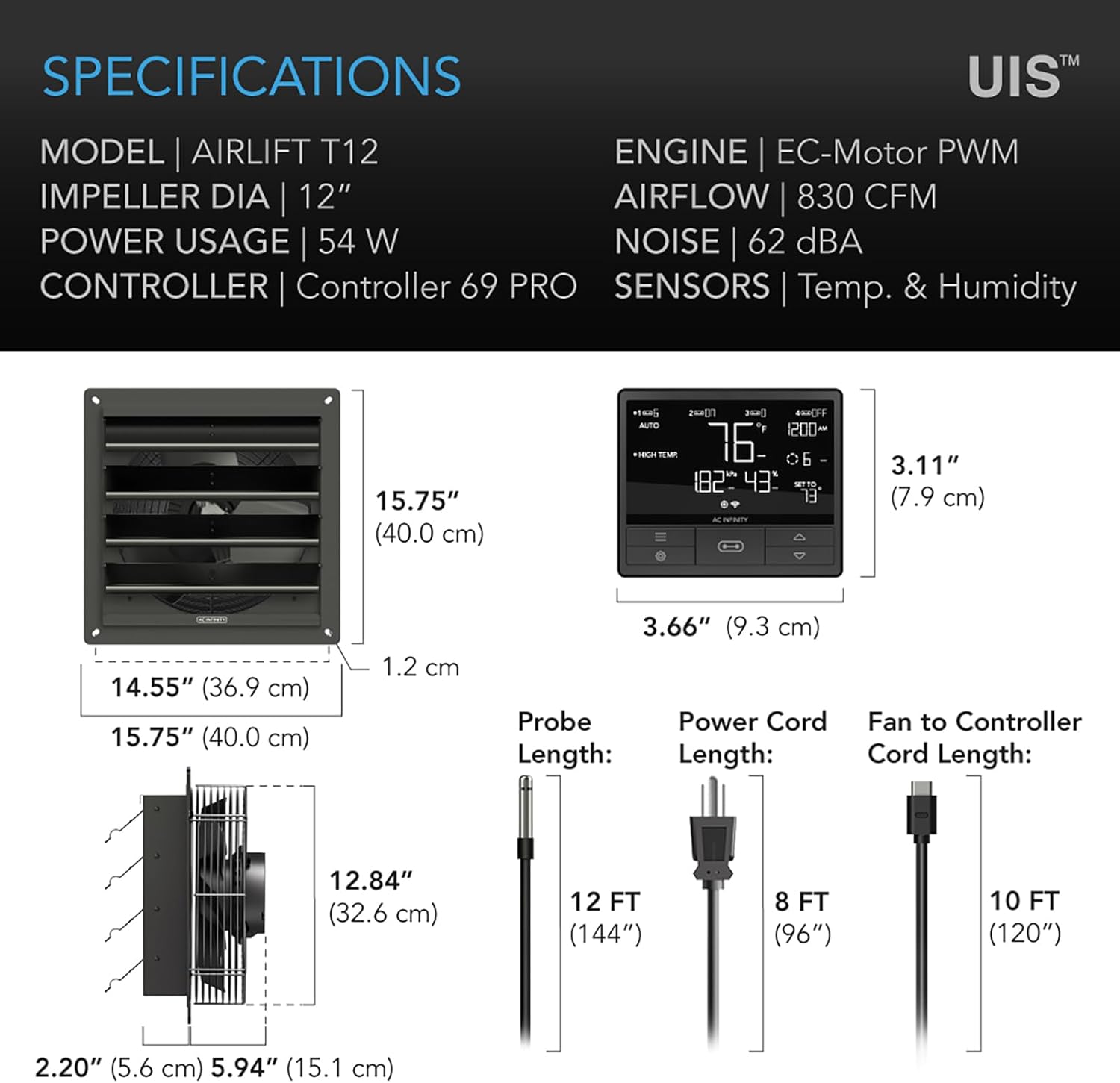
Figure 7.1: Product Dimensions and Component Lengths. This diagram provides precise measurements for the fan unit, controller, and the lengths of the included probe, power cord, and fan-to-controller cord.
8. Warranty and Support
AC Infinity is committed to providing dependable service and product quality. For warranty information, technical support, or any inquiries regarding your AIRLIFT T12 fan, please contact AC Infinity directly.
You can find more information and contact details by visiting the official AC Infinity store on Amazon: AC Infinity Amazon Store.
9. AC Infinity Ecosystem
The AIRLIFT T12 is part of the AC Infinity UIS platform, designed for seamless integration with other AC Infinity devices. This ecosystem allows you to control up to four UIS devices, providing dynamic climate and time-based programming across your entire setup.
- AIRLIFT Series: Shutter Exhaust Fans (like the T12)
- CLOUDLINE Series: Inline Exhaust Fans
- AIRTITAN Series: Crawl Space Fans
These devices can be mixed and matched and controlled by the same smart controller, allowing you to create a fully integrated and automated environmental control system.

Figure 9.1: AC Infinity UIS Ecosystem. This diagram shows how various AC Infinity fan series, including AIRLIFT, CLOUDLINE, and AIRTITAN, can be connected and controlled by a single UIS controller to create a comprehensive environmental management system.
10. Important Note on Video Content
While this product has associated video content, the provided data does not include specific video URLs, filenames, or creator types necessary to meet the strict embedding requirements (e.g., verifying 'creator_type':'Seller' and avoiding 'preview' videos unless genuinely useful). Therefore, no videos have been embedded in this manual.


