1. Introduction
Thank you for choosing the Orbegozo ADR 126 Portable Air Conditioner. This manual provides essential information for the safe and efficient operation, installation, and maintenance of your appliance. Please read these instructions carefully before use and keep them for future reference.
The Orbegozo ADR 126 is a versatile portable unit offering cooling, heating, fan, and dehumidification functions, designed for comfort in various environments.
2. Important Safety Instructions
Always follow basic safety precautions when using electrical appliances to reduce the risk of fire, electric shock, and injury.
- Ensure the power supply matches the voltage specified on the appliance's rating label.
- Do not operate the unit with a damaged cord or plug. If the cord is damaged, it must be replaced by the manufacturer, its service agent, or similarly qualified persons to avoid a hazard.
- Do not block air inlets or outlets. Maintain at least 30 cm clearance around the unit for proper airflow.
- Do not insert objects into the air outlets.
- Always unplug the unit before cleaning or servicing.
- Do not use the appliance in wet environments or near water.
- This appliance is not intended for use by persons (including children) with reduced physical, sensory or mental capabilities, or lack of experience and knowledge, unless they have been given supervision or instruction concerning use of the appliance by a person responsible for their safety.
- Children should be supervised to ensure that they do not play with the appliance.
- Use only the accessories provided or recommended by the manufacturer.
- Position the unit on a flat, stable surface.
3. Product Overview
Familiarize yourself with the main components of your Orbegozo ADR 126 portable air conditioner.
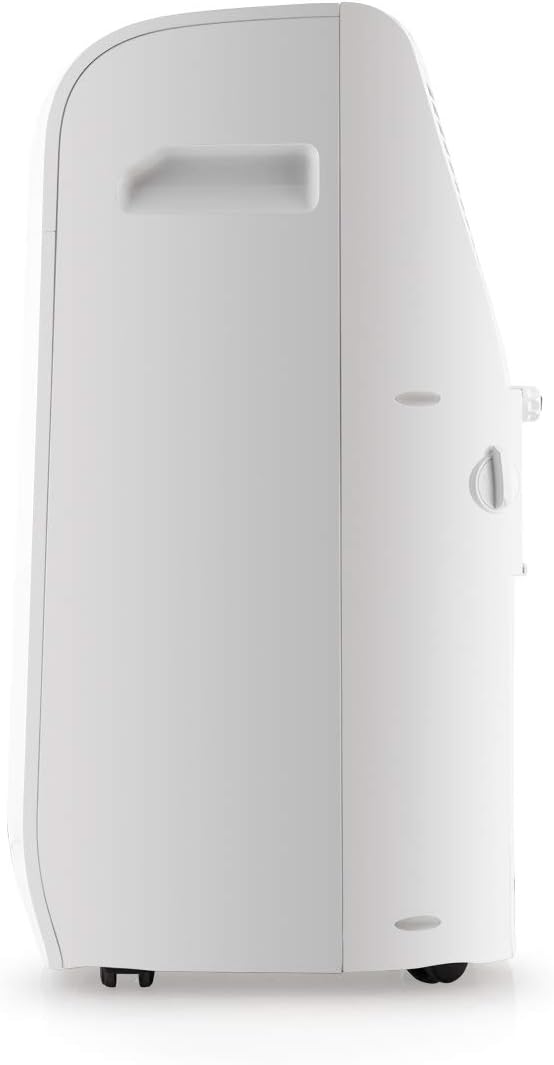
Figure 3.1: Front view of the Orbegozo ADR 126 unit, showing the air outlet grille and control panel.

Figure 3.2: Side view of the Orbegozo ADR 126 unit, highlighting its compact design and integrated handle for portability.
Main Components:
- Control Panel: Located on the top of the unit for manual operation.
- Air Outlet Grille: Front-facing grille where conditioned air is expelled.
- Air Inlet Grille: Located on the rear/sides for drawing in ambient air.
- Exhaust Air Outlet: Connection point for the exhaust hose.
- Drainage Port: For continuous drainage in dehumidifier mode or manual drainage.
- Casters: Wheels at the base for easy movement.
- Remote Control: For convenient operation from a distance.
4. Setup and Installation
Proper installation is crucial for the efficient operation of your portable air conditioner. Follow these steps carefully.
4.1 Unpacking and Placement
- Carefully remove the unit and all accessories from the packaging.
- Place the unit on a flat, stable surface, ensuring there is at least 30 cm of clear space around it for adequate airflow.
- Allow the unit to stand upright for at least 2 hours before plugging it in, especially if it was transported horizontally.
4.2 Exhaust Hose Installation
The exhaust hose must be installed to vent hot air outside the room when using cooling or heating functions.

Figure 4.1: Attaching the exhaust hose to the unit's rear outlet.
- Screw one end of the exhaust hose into the hose connector.
- Attach the other end of the hose connector to the exhaust air outlet on the back of the air conditioner.
- Attach the window kit adapter to the other end of the exhaust hose.
4.3 Window Kit Installation
Use the provided window kit to seal the window opening and prevent outside air from entering.

Figure 4.2: Included accessories: exhaust hose, window kit panels, and adapters.
- Adjust the window sealing plate to fit your window opening.
- Secure the window sealing plate in the window.
- Insert the window kit adapter of the exhaust hose into the opening of the window sealing plate.
- Ensure the window is sealed as much as possible to maximize efficiency.
5. Operating Instructions
Your Orbegozo ADR 126 can be operated using the control panel on the unit or the remote control.
5.1 Control Panel

Figure 5.1: The unit's control panel with power, mode, fan speed, timer, and temperature adjustment buttons.
- Power Button (⏻): Turns the unit ON or OFF.
- Mode Button (⌛): Cycles through Cooling, Heating, Fan, and Dehumidifier modes.
- Fan Speed Button (☰): Adjusts fan speed (Low, Medium, High).
- Temperature/Timer Adjustment Buttons (+ / -): Increases or decreases the set temperature or timer duration.
- Timer Button (⏱): Sets the auto-on or auto-off timer (up to 24 hours).
- Sleep Mode Button (☽): Activates sleep mode for quieter operation and reduced energy consumption.
- LCD Display: Shows current temperature, timer settings, and mode indicators.
5.2 Operating Modes
- Cooling Mode: Select this mode for cooling the room. Adjust the desired temperature using the + / - buttons.
- Heating Mode: Select this mode for heating the room. Adjust the desired temperature using the + / - buttons.
- Fan Mode: The unit operates as a fan, circulating air without cooling or heating. Adjust fan speed as desired.
- Dehumidifier Mode: Removes moisture from the air. The fan speed is fixed in this mode. Ensure continuous drainage is set up if operating for extended periods.
5.3 Remote Control
The remote control duplicates most functions of the control panel, allowing for convenient adjustments from a distance. Insert 2x AAA batteries (not included) into the remote control.
6. Maintenance
Regular maintenance ensures optimal performance and extends the lifespan of your air conditioner. Always unplug the unit before performing any maintenance.
6.1 Air Filter Cleaning
The air filter should be cleaned every two weeks or more frequently depending on usage and air quality.

Figure 6.1: Removing the air filter for cleaning.
- Turn off and unplug the unit.
- Locate the air filter panel on the back of the unit.
- Gently pull out the air filter.
- Wash the filter with lukewarm water and a mild detergent. Rinse thoroughly.
- Allow the filter to air dry completely before reinserting it. Do not expose to direct sunlight.
- Reinstall the dry filter into the unit.
6.2 Water Drainage
The unit collects condensed water during cooling and dehumidifying operations. The unit has an internal water tank that will trigger a "Full Tank" indicator when full, and the unit will stop operating. You can also set up continuous drainage.
- Manual Drainage: When the water tank is full, turn off and unplug the unit. Place a shallow pan under the drainage port and remove the drain plug. Allow all water to drain. Replace the drain plug firmly.
- Continuous Drainage: For dehumidifier mode or extended cooling, attach a drain hose (not included) to the continuous drainage port. Ensure the hose is sloped downwards to allow gravity drainage into a suitable container or floor drain.
6.3 Unit Cleaning
- Wipe the exterior of the unit with a soft, damp cloth. Do not use harsh chemicals, abrasives, or solvents.
- Ensure no water enters the electrical components.
7. Troubleshooting
Before contacting customer service, please refer to the following table for common issues and their solutions.
| Problem | Possible Cause | Solution |
|---|---|---|
| Unit does not turn on. | No power supply. Power cord not plugged in. Water tank full. |
Check power outlet. Plug in the power cord firmly. Drain the water tank. |
| Unit is running but not cooling/heating effectively. | Air filter is dirty. Exhaust hose not properly installed or blocked. Room too large. Doors/windows open. Temperature setting too high/low. |
Clean the air filter. Ensure exhaust hose is properly connected and unblocked. Use in a room within its recommended capacity. Close all doors and windows. Adjust temperature setting. |
| Unit is noisy. | Unit not on a flat surface. Air filter dirty. Internal components vibrating. |
Place unit on a flat, stable surface. Clean the air filter. This is normal for portable units; ensure no loose parts. |
| "Full Tank" indicator is on. | Internal water tank is full. | Drain the water tank manually or set up continuous drainage. |
8. Specifications
Technical data for the Orbegozo ADR 126 Portable Air Conditioner.
| Feature | Specification |
|---|---|
| Model Number | ADR 126 |
| Brand | Orbegozo |
| Functions | Cooling, Heating, Fan, Dehumidifier |
| Cooling Power | 1300 W (3000 kfg/h) |
| Heating Power | 1350 W (2750 kcal/h) |
| Voltage | 230 Volts |
| Number of Fan Speeds | 3 |
| Noise Level | 65 Decibels |
| Energy Efficiency (Cooling/Heating) | A / A+ |
| Refrigerant | [LOW GWP] |
| Product Weight | 37 kg |
| Automatic Shut-off | Yes |
9. Warranty and Support
For warranty information, please refer to the warranty card included with your product or contact Orbegozo customer service. Keep your purchase receipt as proof of purchase.
For technical support or inquiries, please visit the official Orbegozo website or contact their customer service department. You can also visit the Orbegozo Brand Store for more information.


