
1. Introduction
Thank you for purchasing the Lenco Classic Phono TT-27 Retro Turntable. This device allows you to enjoy your vinyl record collection with its built-in speakers and classic design. This manual provides essential information for the safe and efficient operation of your turntable. Please read it thoroughly before use and retain it for future reference.
2. Important Safety Instructions
- Power Source: Ensure the power supply voltage matches the requirements specified on the unit (AC 230V).
- Water and Moisture: Do not expose the unit to rain, moisture, or dripping/splashing liquids. Do not place objects filled with liquids, such as vases, on the unit.
- Ventilation: Do not block any ventilation openings. Install in accordance with the manufacturer's instructions.
- Heat: Do not install near any heat sources such as radiators, heat registers, stoves, or other apparatus (including amplifiers) that produce heat.
- Cleaning: Clean only with a dry cloth.
- Servicing: Do not attempt to service this product yourself. Refer all servicing to qualified service personnel.
- Placement: Place the unit on a stable, level surface to prevent damage from falling.
3. Package Contents
Please check that all items are present and in good condition:
- Lenco Classic Phono TT-27 Retro Turntable
- Power Adapter (AC 230V)
- User Manual
4. Product Overview
The Lenco Classic Phono TT-27 is designed for ease of use and features a retro aesthetic. It includes built-in speakers for immediate playback and an RCA output for connection to external audio systems.
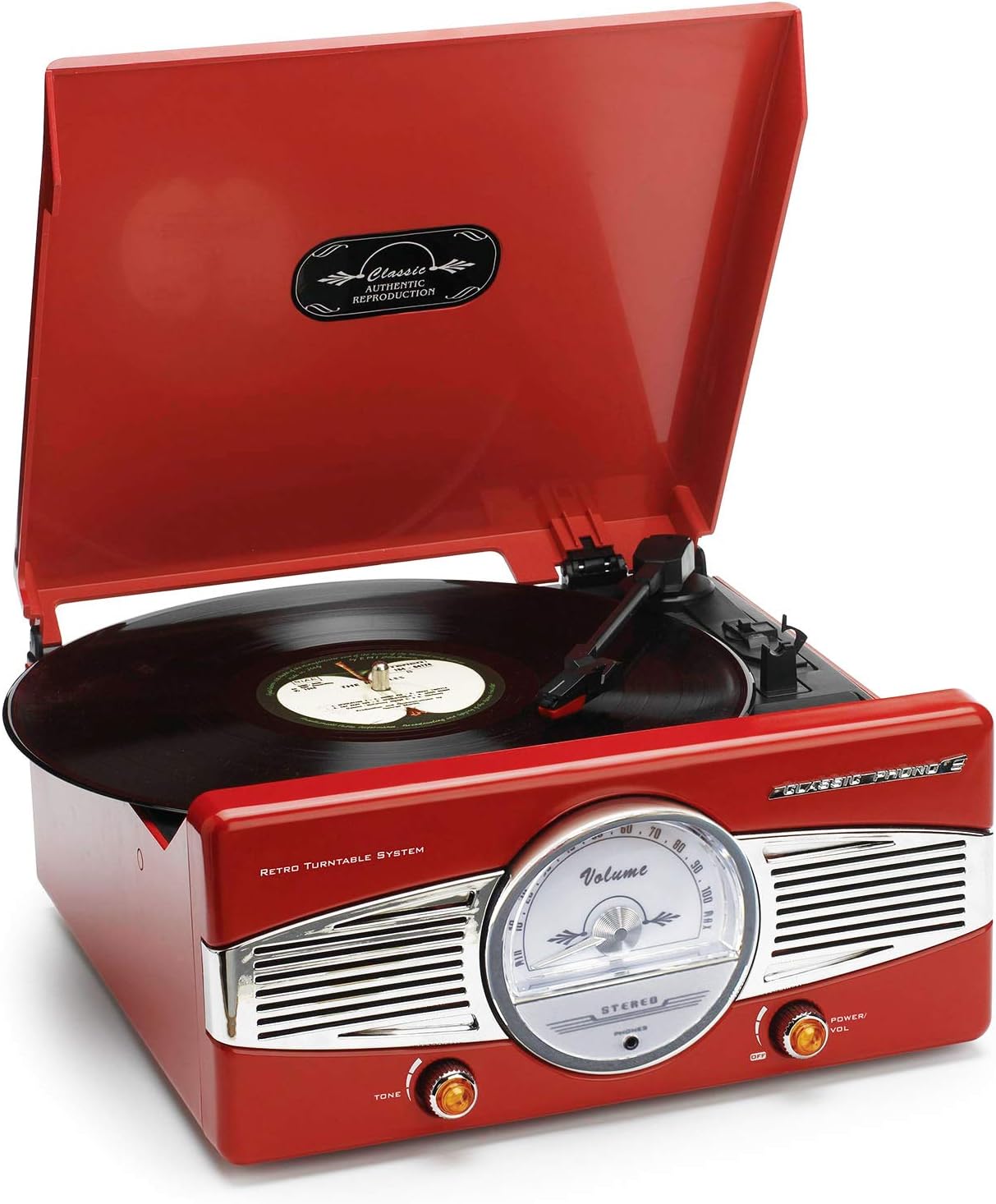
Image 1: Lenco TT-27 Retro Turntable with the dust cover open, revealing the record platter, tonearm, and front panel controls including volume and tone knobs.

Image 2: Lenco TT-27 Retro Turntable with the dust cover closed, showcasing its compact and portable design in a red finish.
Controls and Features:
- Dust Cover: Protects the platter and tonearm from dust.
- Platter: The rotating platform where records are placed.
- Tonearm: Holds the cartridge and stylus.
- Stylus (Needle): Reads the grooves of the record.
- Speed Selector: Allows selection between 33 and 45 RPM playback speeds.
- Power/Volume Knob: Turns the unit on/off and adjusts the volume of the built-in speakers.
- Tone Knob: Adjusts the audio tone (bass/treble balance).
- Built-in Speakers: For direct audio playback.
- RCA Output: For connecting to external amplifiers or powered speakers.
- Bluetooth Connectivity: Allows wireless audio streaming to the turntable (as per specifications).
5. Setup
5.1 Unpacking
- Carefully remove the turntable from its packaging.
- Remove any protective materials, including the stylus guard and any ties securing the tonearm.
- Place the turntable on a stable, level surface away from direct sunlight, heat sources, and excessive dust.
5.2 Power Connection
Connect the provided power adapter to the DC input jack on the back of the turntable, then plug the adapter into a standard AC 230V wall outlet.
5.3 Audio Output Connection (Optional)
If you wish to connect the turntable to an external amplifier or powered speakers, use an RCA cable (not included) to connect the RCA output jacks on the turntable to the corresponding input jacks on your audio system. Ensure correct left (white) and right (red) channel connections.
5.4 Bluetooth Pairing (Optional)
To use the Bluetooth feature, ensure your external Bluetooth device (e.g., smartphone, tablet) is in pairing mode. Select the turntable from the list of available devices. Once paired, you can stream audio from your device to the turntable's built-in speakers.
6. Operating Instructions
6.1 Playing a Record
- Turn the Power/Volume knob clockwise to turn on the turntable.
- Lift the dust cover.
- Place a record on the platter.
- Select the appropriate speed (33 or 45 RPM) using the Speed Selector switch, matching the record's speed.
- Gently lift the tonearm using the tonearm lift lever.
- Move the tonearm over the desired starting track of the record.
- Lower the tonearm gently onto the record using the tonearm lift lever. The record will begin to play.
- At the end of the record, the tonearm will automatically return to its rest position. Lift the tonearm and return it to its rest manually if needed.
6.2 Adjusting Volume and Tone
- Volume: Rotate the Power/Volume knob to increase or decrease the sound level from the built-in speakers.
- Tone: Rotate the Tone knob to adjust the audio's bass and treble balance to your preference.
7. Maintenance
7.1 Cleaning the Turntable
- Always unplug the turntable from the power outlet before cleaning.
- Use a soft, dry, lint-free cloth to wipe the exterior surfaces.
- For the dust cover, use a soft cloth and a mild, non-abrasive cleaner if necessary.
- Avoid using harsh chemicals or abrasive cleaners, as they can damage the finish.
7.2 Stylus Care
- The stylus is delicate. Handle it with extreme care.
- Clean the stylus regularly using a soft brush, brushing gently from back to front.
- A worn or damaged stylus can harm your records and degrade sound quality. Replace the stylus when necessary.
8. Troubleshooting
| Problem | Possible Cause | Solution |
|---|---|---|
| No power | Power adapter not connected or faulty outlet. | Ensure power adapter is securely connected and the outlet is functional. |
| No sound from built-in speakers | Volume too low; Mute activated (if applicable); External speakers connected via RCA. | Increase volume using the Power/Volume knob. Disconnect RCA cables if you want sound from built-in speakers. |
| Sound distortion or skipping | Dirty or damaged record; Dirty or worn stylus; Turntable not level. | Clean the record. Clean or replace the stylus. Ensure the turntable is on a level surface. |
| Incorrect playback speed | Wrong speed selected. | Adjust the Speed Selector to match the record's speed (33 or 45 RPM). |
| Bluetooth pairing issues | Device not in pairing mode; Out of range. | Ensure your device is in pairing mode and within close proximity to the turntable. |
9. Technical Specifications
| Feature | Specification |
|---|---|
| Model | TT-27 |
| Brand | Lenco |
| Playback Speeds | 33 1/3, 45 RPM |
| Drive System | Belt-Drive |
| Speakers | Built-in |
| Pre-Amplifier | Built-in |
| Audio Output | RCA |
| Power Supply | AC 230V |
| Connectivity | Bluetooth |
| Dimensions (W x D x H) | 400 x 500 x 30 cm (approximate) |
| Weight | 5 kg (approximate) |
10. Warranty and Support
Lenco products are designed and manufactured to the highest quality standards. For detailed warranty information and customer support, please refer to the warranty card included with your product or visit the official Lenco website. Keep your proof of purchase for any warranty claims.


