
RCA RPJ136
RCA RPJ136 Home Theater Projector User Manual
Model: RPJ136
Introduction
This manual provides essential information for the safe and efficient operation of your RCA RPJ136 Home Theater Projector. Please read this manual thoroughly before using the projector and retain it for future reference.
The RCA RPJ136 is designed to deliver an immersive viewing experience, projecting images from 30 inches up to 130 inches. It features multiple connectivity options, including two HDMI ports, to easily connect various media devices.
Safety Information
Always observe the following safety precautions to prevent fire, electric shock, or injury:
- Do not block ventilation openings.
- Do not expose the projector to rain or moisture.
- Use only attachments/accessories specified by the manufacturer.
- Unplug the projector during lightning storms or when unused for long periods.
- Refer all servicing to qualified service personnel.
What's in the Box
Upon opening the package, ensure all items are present and in good condition:
- RCA RPJ136 Projector
- AC power adapter
- Power Cord
- Remote Control (requires 2 AAA batteries, included)
- User Manual

Image: The RCA RPJ136 Home Theater Projector shown with its accompanying remote control. The projector is white with black accents, featuring a large lens on the front and various controls on the top panel. The remote is white with multiple buttons for navigation and function control.
Setup
1. Placement
Position the projector on a stable, flat surface. For optimal viewing, ensure the projector is centered with the projection surface (screen or wall). The projector can project images from 30 inches to 130 inches. Optimal picture size is between 37 inches and 100 inches.
2. Power Connection
- Connect the AC power adapter to the projector's power input port.
- Plug the power cord into a standard electrical outlet.
- The power indicator light on the projector will illuminate.
3. Connecting Devices
The RPJ136 features multiple input ports for various devices:
- HDMI Ports (x2): For connecting Blu-ray players, gaming consoles, streaming devices, laptops, etc. Supports 1080p, 1080i, 720p, 576i, 480p, and 480i resolutions.
- USB Port: For playing media files directly from a USB flash drive.
- MicroSD Card Slot: For playing media files directly from a MicroSD card.
- VGA Port: For connecting to computers.
- AV Input: For connecting older devices using composite video and stereo audio cables.
- Audio Output (3.5mm): For connecting external speakers or headphones.

Image: The rear panel of the RCA RPJ136 Projector, displaying the various input and output ports including HDMI, USB, MicroSD, VGA, AV, and audio out. These ports allow for versatile connectivity with different media sources.
Operating Instructions
1. Powering On/Off
- To power on, press the Power button on the projector or the remote control.
- To power off, press the Power button again. The projector will enter standby mode.
2. Focusing the Image
Rotate the focus ring located around the projector lens until the projected image appears sharp and clear. For best results, focus the center of the image first.

Image: A front-angle view of the RCA RPJ136 Projector, highlighting the large projection lens and the adjustable focus ring surrounding it. The focus ring is used to sharpen the image projected onto the screen.
3. Keystone Correction
If the projected image appears trapezoidal (wider at the top or bottom), adjust the keystone correction dial on the projector. This corrects the image distortion when the projector is not perfectly perpendicular to the screen.
4. Input Source Selection
Use the "Source" button on the remote control or the projector's control panel to cycle through available input sources (HDMI1, HDMI2, USB, MicroSD, VGA, AV).
5. Audio Output
The projector has a built-in speaker. For enhanced audio, connect external speakers or headphones to the 3.5mm audio output jack.
Maintenance
1. Cleaning the Lens
Gently wipe the projector lens with a soft, lint-free cloth specifically designed for optical lenses. Do not use abrasive cleaners or solvents.
2. Cleaning the Projector Body
Wipe the exterior of the projector with a soft, dry cloth. For stubborn marks, a slightly damp cloth can be used, followed by a dry cloth.
3. Ventilation
Ensure the ventilation vents are clear of dust and obstructions to prevent overheating. The quieter fan design reduces cooling fan noise by 5db.
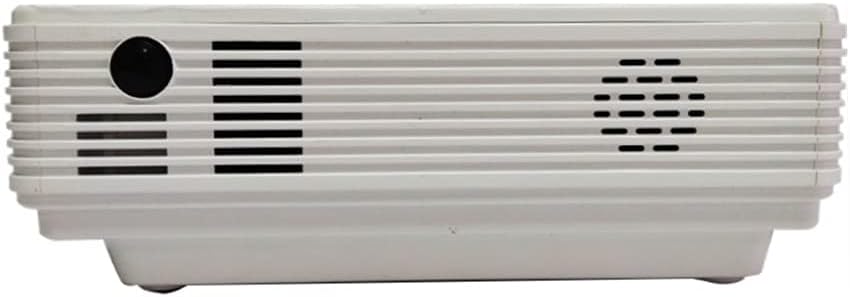
Image: A side view of the RCA RPJ136 Projector, highlighting the ventilation grilles designed to dissipate heat and maintain optimal operating temperature. Keeping these vents clear is crucial for the projector's longevity.
4. Lamp Life
The LED Projector Lamp has an estimated life of 50,000 hours, providing long-term use without frequent lamp replacement.
Troubleshooting
| Problem | Possible Cause | Solution |
|---|---|---|
| No image projected |
|
|
| Image is blurry |
|
|
| Image is distorted (trapezoid) |
|
|
| No sound or low volume |
|
|
Specifications
- Model: RPJ136
- Brand: RCA
- Display Resolution: Native 800 x 480 (Supports 1080p via HDMI)
- Projection Size: 30" - 130" (Optimal: 37" - 100")
- Lamp Life: Estimated 50,000 hours (LED)
- Connectivity: 2x HDMI, USB, MicroSD, VGA, AV, 3.5mm Audio Out
- Item Weight: 2.94 pounds
- Product Dimensions: 15 x 12 x 10 inches
- Special Features: Portable, Quieter Fan Design (-5db)
- Power: AC power adapter (2 AA batteries for remote, included)
Warranty and Support
This RCA RPJ136 projector is a renewed product. Please refer to the specific warranty terms provided by the seller, Hyper Microsystems, at the time of purchase. Typically, renewed products come with a limited warranty or return policy. For this product, a 90-day refund/replacement return policy is offered.
For technical support or service inquiries, please contact the seller or refer to the contact information provided with your purchase documentation.
Ask a question about this manual
Ask about setup, troubleshooting, compatibility, parts, safety, or missing instructions. Manuals+ will review the question and use this page’s manual context to help answer it.