
Important Safety Information
- Remove Protective Film: Please remove the protective film cover from the watch face before initial use for better visibility.
- Water Resistance Precautions: Do NOT press any buttons underwater. Avoid using the watch in extremely hot or cold temperatures, as this can compromise water resistance.
- Internal Moisture: If mist or droplets are found inside the watch surface, contact the manufacturer immediately for maintenance to prevent moisture corrosion of internal components.
- Excessive Water Contact: Too much water contact will shorten the watch's life. Adhere to the water resistance guidelines provided.
Product Overview
The FANMIS Military Multifunction Digital Watch Model 1222 features a robust design with both analog and digital displays. It includes various functions such as a chronograph stopwatch, countdown timer, daily alarm, date/week display, dual time zones, and LED backlight for clear visibility in low-light conditions.
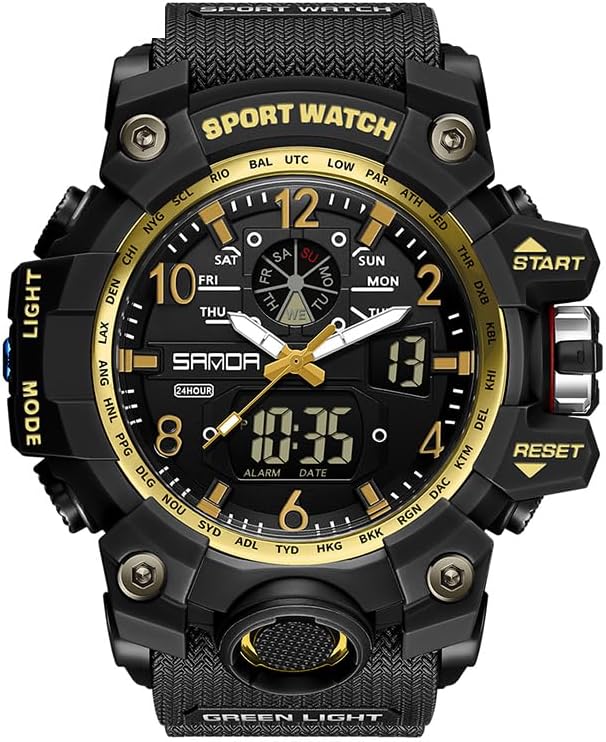
Figure 1: Front view of the FANMIS Military Multifunction Digital Watch Model 1222.
Watch Components and Button Functions

Figure 2: Watch button identification and primary functions.
- LIGHT Button (Top Left): Activates the LED backlight for illumination of the display.
- MODE Button (Bottom Left): Cycles through different modes: Time, Alarm, Stopwatch, Countdown Timer.
- START Button (Top Right): Used to start/stop functions (e.g., stopwatch) and increase numerical values during setting.
- RESET Button (Bottom Right): Used to reset functions (e.g., stopwatch) and set values during setting.

Figure 3: Key features of the FANMIS Military Multifunction Digital Watch.
Setup and Initial Configuration
1. Setting Time and Date
- Press the MODE button repeatedly until the time setting mode is displayed (usually indicated by flashing digits).
- Use the START button to increase the selected value (hours, minutes, year, month, date).
- Use the RESET button to move to the next setting item.
- Once all settings are adjusted, press the MODE button to exit the setting mode.
- The week day will be automatically calculated according to the year, month, and date setting. Ensure the year setting is correct.
2. 12/24 Hour Format
In the normal time display mode, press the START button to toggle between 12-hour and 24-hour (military) time formats.
3. Setting the Alarm
- Press the MODE button to navigate to the Alarm mode.
- Use the START and RESET buttons to set the desired alarm time.
- Press the MODE button to confirm and exit the alarm setting.
4. Dual Time Zone
The watch supports dual time zone display. Refer to the specific instructions on the watch face or accompanying quick start guide for detailed steps on setting the second time zone, as this can vary slightly.
Operating Instructions
1. Using the LED Backlight
Press the LIGHT button (top left) to illuminate the watch display. The backlight will remain active for a few seconds.
2. Chronograph Stopwatch
- Press the MODE button to enter the Stopwatch mode.
- Press the START button to begin timing.
- Press the START button again to pause the timing.
- Press the RESET button to clear the stopwatch to zero.
3. Countdown Timer
To use the countdown timer, navigate to the Countdown Timer mode using the MODE button. Set the desired countdown duration using the START and RESET buttons, then press START to begin the countdown.
4. Daily Alarm
In Alarm mode, you can activate or deactivate the alarm. Once set, the alarm will sound at the programmed time daily until deactivated.
5. Cycling Through Display Modes
Press the MODE button to switch between the following display modes: Normal Time, Alarm, Stopwatch, and Countdown Timer.
Water Resistance Guidelines
This watch is rated 5 ATM (50 meters / 164 feet) water resistant. This means it is suitable for:
- Rain exposure
- Handwashing
- Splashes
- Brief cold-water immersion (e.g., shallow swimming)
Important Restrictions:
- Do NOT press any buttons underwater.
- Not suitable for hot showers, saunas, snorkeling, or diving.
- Avoid exposure to steam or hot water, as this can damage the seals.
Video: Demonstration of the watch's water resistance features, showing it submerged in water without damage.

Figure 4: The watch is designed to withstand splashes and brief water exposure.
Maintenance and Care
- Cleaning: Clean the watch strap regularly with a soft, damp cloth to remove dirt and sweat.
- Temperature: Avoid exposing the watch to extreme hot or cold temperatures, as this can affect its performance and seals.
- Chemicals: Keep the watch away from solvents, detergents, perfumes, and cosmetics, which can damage the case, strap, or seals.
- Battery Replacement: The watch uses 1 Nonstandard Battery. While the back has screws for easy access, it is recommended to have the battery replaced by a qualified watch technician to ensure water resistance is maintained.
Troubleshooting
- Mist or Droplets Inside Watch: If you observe mist or droplets inside the watch surface, this indicates a potential breach in the water resistance. Contact the manufacturer immediately for service to prevent internal corrosion.
- Buttons Not Responding Underwater: This is a normal design feature to maintain water resistance. Do not attempt to press buttons while the watch is submerged.
- Incorrect Time/Date: Ensure you have followed the 'Setting Time and Date' instructions carefully. Verify the year setting, as it affects the automatic week day calculation.
Specifications
| Feature | Specification |
|---|---|
| Model Number | 1222 |
| Movement | Imported Digital Electronic Movement |
| Water Resistance | 5 ATM (50 meters / 164 feet) |
| Case Material | Silicone Rubber, Plastic (ABS) |
| Band Material | Silicone Rubber (TPU) |
| Mirror Surface | Mineral Glass Mirror |
| Clasp Type | Buckle (Stainless Steel) |
| Battery | 1 Nonstandard Battery |
| Fit Wrist Size | 6.50 - 9.25 inches |
| Watch Weight | Approximately 3.17 ounces (74g) |
| Watch Dimensions (Approx.) | Case Diameter: 56mm, Case Thickness: 17mm, Band Width: 22-27mm, Total Length: 257mm |
Warranty and Support
Specific warranty details are not provided in the product information. For warranty claims, technical support, or any inquiries regarding your FANMIS Military Multifunction Digital Watch Model 1222, please contact the manufacturer directly.
The package includes:
- Fanmis Sport Watch x 1
- Instruction Manual x 1 (this document)
- Watch Box x 1