
1. Introduction
Thank you for choosing the DOSS SoundBox Plus Bluetooth Speaker. This manual provides essential information for setting up, operating, and maintaining your speaker to ensure optimal performance and longevity. The DOSS SoundBox Plus delivers 16W HD stereo sound with deep bass, features intuitive touch controls, and offers dynamic LED lights that sync with your music. It supports wireless stereo pairing for an enhanced audio experience and provides up to 20 hours of playtime.
2. Package Contents
Please check the package for the following items:
- DOSS SoundBox Plus Bluetooth Speaker
- Micro USB Charging Cable
- User Manual (this document)
3. Product Overview
Familiarize yourself with the components and controls of your DOSS SoundBox Plus speaker.

Figure 3.1: Front view of the DOSS SoundBox Plus Bluetooth Speaker, showing the speaker grilles and top panel controls.
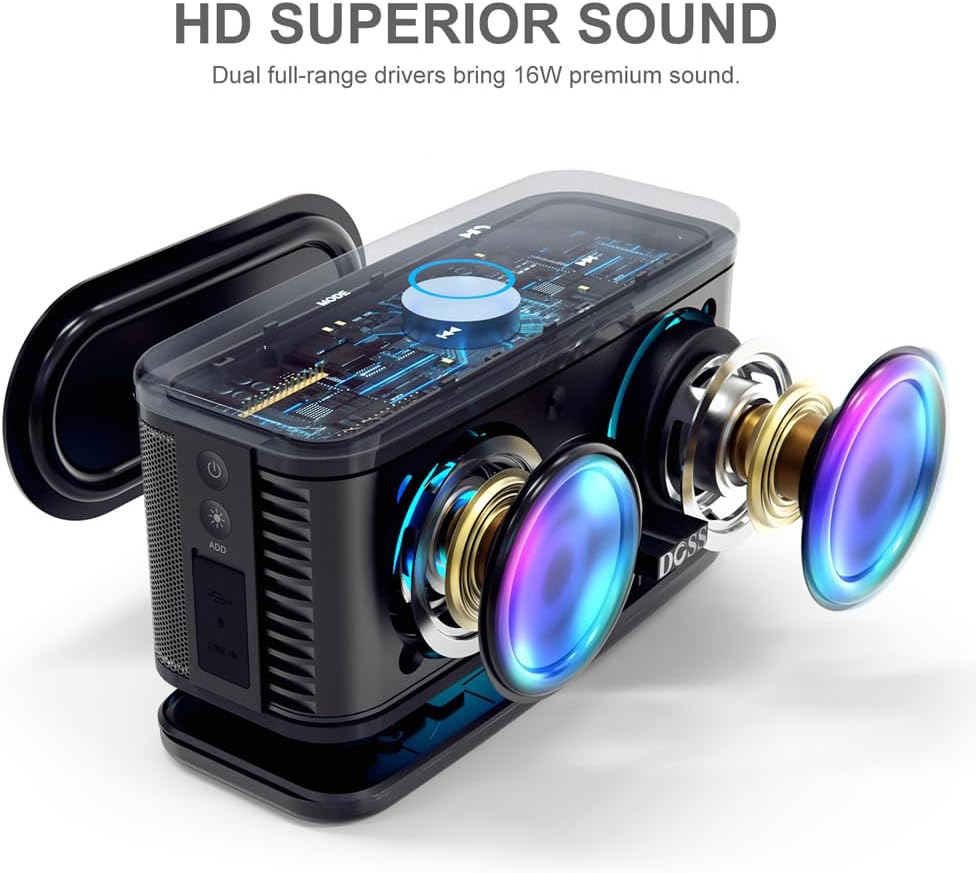
Figure 3.2: Exploded view illustrating the dual full-range drivers and passive radiator for HD superior sound.
Controls and Indicators:
- Power Button: Turns the speaker on or off.
- Mode Button: Switches between Bluetooth, AUX, and TF card modes.
- Play/Pause Button: Controls music playback.
- Volume Control (Touch Ring): Rotate clockwise/counter-clockwise on the illuminated ring to adjust volume.
- Previous/Next Track Buttons: Skips to the previous or next song.
- Light Mode Button: Cycles through different LED light effects or turns them off.
- Micro USB Port: For charging the speaker.
- AUX-in Port: For wired audio connection.
- TF Card Slot: For playing music directly from a TF (Micro SD) card.
4. Setup
4.1 Charging the Speaker
Before first use, fully charge your DOSS SoundBox Plus speaker. A full charge takes approximately 3-4 hours using the provided micro USB cable. The built-in 3200mAh rechargeable battery provides up to 20 hours of playtime at 50% volume (without lights).
- Connect the micro USB cable to the charging port on the speaker.
- Connect the other end of the cable to a USB power adapter (not included) or a computer's USB port.
- The LED indicator will show charging status and turn off when fully charged.

Figure 4.1: The speaker is designed for extended playtime, indicating its 3200mAh battery capacity and 20-hour duration.
4.2 Powering On/Off
- To power on, press and hold the Power button until you hear an audible prompt.
- To power off, press and hold the Power button again until the speaker shuts down.
4.3 Bluetooth Pairing
The speaker will automatically enter Bluetooth pairing mode when powered on for the first time or if no device is connected.
- Ensure the speaker is powered on and in Bluetooth mode (indicated by a flashing blue light).
- On your device (smartphone, tablet, computer), enable Bluetooth and search for available devices.
- Select "DOSS SoundBox Plus" from the list of devices.
- Once connected, you will hear a confirmation sound, and the blue light will become solid.
Note: The speaker will automatically reconnect to the last paired device if it's within range.
5. Operating Your Speaker
5.1 Basic Music Playback
- Play/Pause: Press the Play/Pause button once.
- Next Track: Press the Next Track button once.
- Previous Track: Press the Previous Track button once.
5.2 Volume Control
The DOSS SoundBox Plus features a sensitive touch control ring for volume adjustment.

Figure 5.1: Adjust volume effortlessly using the capacitive touch control ring on the speaker's top panel.
- Increase Volume: Gently slide your finger clockwise along the illuminated touch ring.
- Decrease Volume: Gently slide your finger counter-clockwise along the illuminated touch ring.
5.3 LED Light Modes
Enhance your listening experience with dynamic LED lights that sync to the rhythm of your music.

Figure 5.2: The speaker's lights dynamically change color and pattern in sync with the music.
- Press the Light Mode button to cycle through different light patterns.
- Continue pressing to turn the lights off.
5.4 Wireless Stereo Pairing (TWS Function)
You can pair two DOSS SoundBox Plus speakers together for a true stereo sound experience and double the volume.

Figure 5.3: Two DOSS SoundBox Plus speakers wirelessly paired for an immersive stereo sound experience.
- Ensure both DOSS SoundBox Plus speakers are powered on and not connected to any Bluetooth device.
- On one speaker (this will be the primary speaker), press and hold the "ADD" button (usually near the charging port) until you hear a pairing prompt.
- The two speakers will automatically connect to each other. You will hear a confirmation sound once paired.
- Once paired, connect your device to the primary speaker via Bluetooth as described in Section 4.3.
Note: TWS pairing only works with two DOSS SoundBox Plus speakers.
6. Maintenance
- Cleaning: Use a soft, dry cloth to clean the speaker. Do not use abrasive cleaners or solvents.
- Storage: Store the speaker in a cool, dry place away from direct sunlight and extreme temperatures.
- Battery Care: To preserve battery life, fully charge the speaker at least once every three months if not in regular use. Avoid fully discharging the battery frequently.
- Water Resistance: This product is NOT waterproof. Avoid exposure to water or excessive moisture.
7. Troubleshooting
| Problem | Possible Cause | Solution |
|---|---|---|
| Speaker does not turn on. | Battery is depleted. | Charge the speaker fully using the micro USB cable. |
| No sound from the speaker. | Volume is too low or muted. Device not connected. Incorrect mode selected. | Increase volume on both the speaker (using the touch ring) and your connected device. Ensure Bluetooth is connected or AUX/TF card is properly inserted. Press the Mode button to cycle through modes. |
| Bluetooth connection fails. | Speaker is out of range. Device's Bluetooth is off. Speaker is connected to another device. | Move the speaker closer to your device (within 66 feet). Ensure Bluetooth is enabled on your device. Disconnect from other devices or reset the speaker's Bluetooth. |
| Sound is distorted. | Volume is too high. Low battery. | Decrease the volume. Charge the speaker. |
| Volume control via touch ring is unresponsive or difficult. | Improper touch technique. | Ensure you are gently sliding your finger along the illuminated blue circle on the top panel, rather than just tapping. A continuous slide is required for adjustment. |
8. Specifications
| Feature | Detail |
|---|---|
| Model Name | SoundBox Plus |
| Speaker Maximum Output Power | 16 Watts |
| Connectivity Technology | Bluetooth, USB (for charging) |
| Wireless Communication Technology | Bluetooth 4.2 |
| Bluetooth Range | Up to 66 Feet (20 meters) |
| Battery Capacity | 3200 mAh Lithium Polymer |
| Battery Life | Up to 20 Hours (at 50% volume, without lights) |
| Charging Time | 3-4 Hours |
| Product Dimensions | 4.1"D x 8.6"W x 4.2"H (10.4cm D x 21.8cm W x 10.7cm H) |
| Item Weight | 1.4 Pounds (0.64 kg) |
| Control Method | Touch |
| Included Components | Micro USB cable |

Figure 8.1: Detailed dimensions of the DOSS SoundBox Plus speaker.
9. Warranty and Support
DOSS products are backed by a 12-month warranty, starting from the date of purchase, covering any quality-related concerns.
If you encounter any issues with your product or require assistance, please feel free to contact DOSS customer support. We are committed to providing you with 24-hour prompt assistance and support.

Figure 9.1: DOSS customer support details, including phone number and email address.
- Phone: 1-833-275-3677
- Email: support@dossav.com


