
Uniclife Uniclife-KeyCabinet
Uniclife 28-Position Key Cabinet User Manual
Model: Uniclife-KeyCabinet
Introduction
This manual provides comprehensive instructions for the setup, operation, and maintenance of your Uniclife 28-Position Key Cabinet. Designed for secure and organized key storage, this steel key cabinet features a resettable combination lock and comes with colorful key tags for easy identification. Please read this manual thoroughly before installation and use to ensure proper functionality and safety.
Safety Information
For optimal security and stability, ensure proper wall mounting using appropriate anchors. Do not exceed the maximum weight capacity of 20 kilograms (approximately 44 pounds) inside the cabinet. This key cabinet is designed for indoor use only.
Product Features
- 28 Positions: Optimized storage case to hold up to 28 keys efficiently.
- Combination Lock: Secure 3-digit resettable code lock with 1,000 possible combinations for private access.
- Resettable Code: Easy code resetting mechanism.
- 28 Tags in 5 Colors: Flexible key tags with removable blank paper for labeling and transparent windows for quick identification.
- Easy to Track: Includes 28 number stickers and 28 hooks for numerical organization of keys.
- Durable Construction: Made from alloy steel for enhanced security.
Setup and Installation
The Uniclife Key Cabinet is designed for easy wall mounting. Ensure you select a suitable indoor location for installation.
Mounting the Cabinet
- Choose a sturdy indoor wall surface for installation.
- Open the key cabinet door to access the pre-formed mounting holes inside.
- Using the included screws and wall anchors, securely fasten the cabinet to the wall. Ensure the cabinet is level and firmly attached before use.

Figure 1: Product dimensions and reinforced construction. The cabinet measures approximately 10.24 inches (D) x 8.27 inches (W) x 3.15 inches (H).

Figure 2: The Uniclife 28-Key Steel Key Cabinet, shown closed with its combination lock. This image highlights its compact and secure design.
Operating Instructions
Setting/Resetting the Combination Code
The initial factory code for the combination lock is "000". You can easily reset this code to your desired 3-digit combination.
- Open the key cabinet door.
- Locate the control lever inside the cabinet, near the combination lock mechanism.
- Push the control lever from position A to position B.
- While the lever is in position B, set your desired 3-digit code by rotating the number dials on the front of the lock.
- Once your new code is set, pull the control lever back from position B to position A.
- Your new combination code is now set. Test the new code before closing and locking the cabinet.

Figure 3: Detailed view of the 3-digit resettable combination lock, highlighting its 1,000 possible combinations for secure key storage.
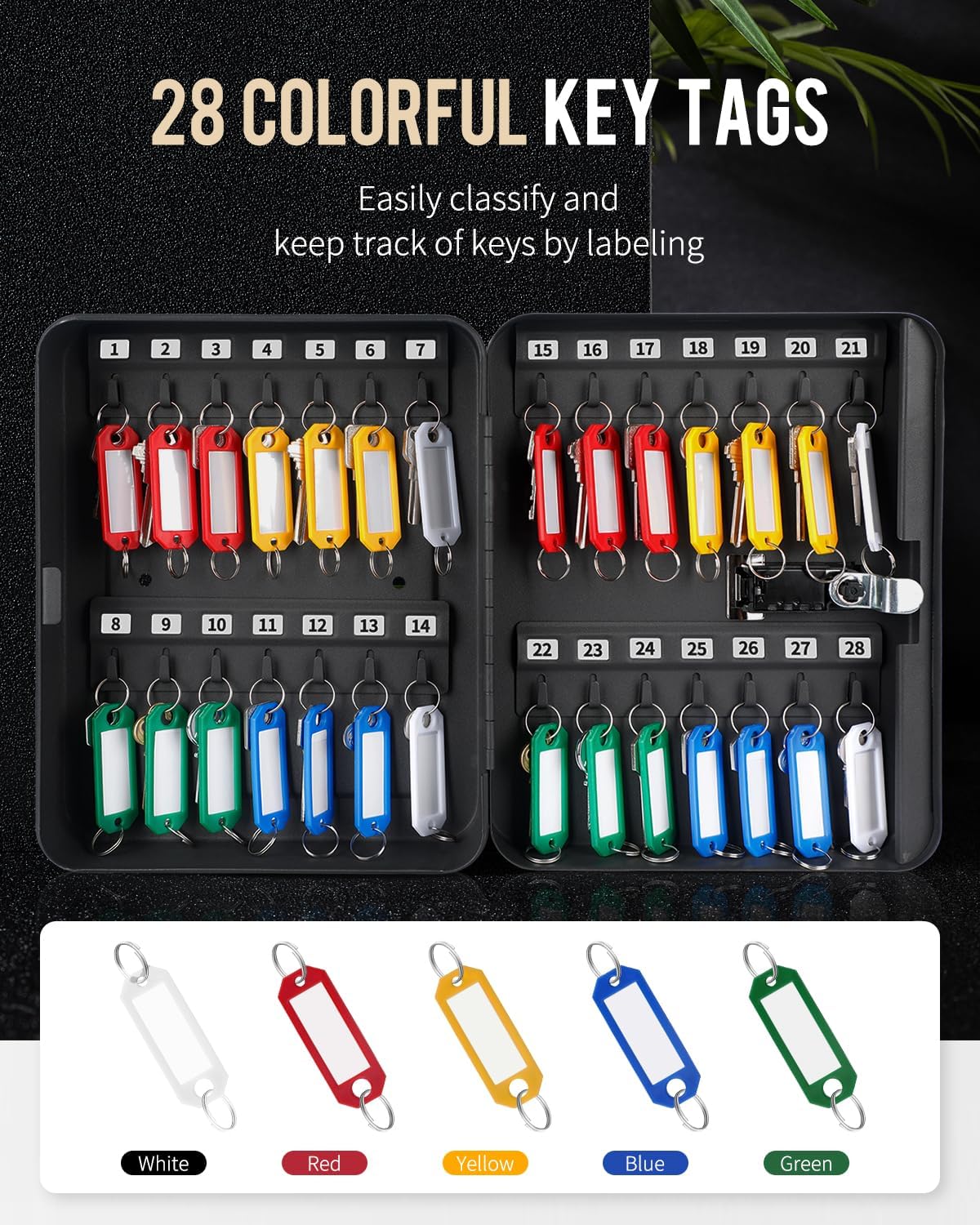
Figure 4: Visual instructions for resetting the combination code, showing the internal control lever and dial adjustments.
Locking and Unlocking the Cabinet
- To unlock, align the dials to your set 3-digit combination and turn the knob to the left.
- To lock, close the cabinet door, turn the knob to the right, and then scramble the numbers on the dials.
Key Organization
The cabinet includes 28 colorful key tags and number stickers to help you organize your keys efficiently.
- Use the provided number stickers to label each key hook inside the cabinet numerically (1-28).
- For each key tag, remove the blank paper insert, write relevant information (e.g., room number, key purpose), and reinsert it.
- Attach your keys to the key rings on the tags.
- Hang the key tags onto the corresponding numbered hooks inside the cabinet.

Figure 5: The key cabinet opened, displaying 28 colorful key tags organized on hooks. This illustrates the capacity and organization system.

Figure 6: A close-up view of the key hooks and number stickers, demonstrating how to label and arrange keys numerically for easy tracking.
Maintenance
To ensure the longevity and proper functioning of your key cabinet, follow these maintenance guidelines:
- Cleaning: Wipe the exterior and interior surfaces with a soft, damp cloth. Avoid using abrasive cleaners or solvents, as they may damage the finish.
- Lock Mechanism: Periodically check the combination lock dials for smooth operation. If they become stiff, a small amount of graphite lubricant can be applied, but avoid oil-based lubricants.
- Mounting: Regularly inspect the wall mounting screws to ensure they remain tight and secure.
Troubleshooting
| Problem | Possible Cause | Solution |
|---|---|---|
| Combination lock dials are hard to rotate. | Dust or debris accumulation; lack of lubrication. | Clean the dials with a soft brush. Apply a small amount of graphite lubricant if necessary. |
| Unable to set a new passcode. | Control lever not fully moved to position B; incorrect procedure. | Ensure the control lever is firmly pushed to position B before setting the new code. Follow the "Setting/Resetting the Combination Code" steps precisely. |
| Cabinet feels loose on the wall. | Mounting screws are loose or wall anchors are not secure. | Tighten the mounting screws. If the issue persists, consider using more robust wall anchors or relocating the cabinet to a stronger wall section. |
Specifications
| Attribute | Detail |
|---|---|
| Brand | Uniclife |
| Model Number | Uniclife-KeyCabinet |
| Color | Black |
| Product Dimensions (D x W x H) | 10.24" x 8.27" x 3.15" |
| Material Type | Alloy Steel |
| Weight Limit | 20 Kilograms (approx. 44 lbs) |
| Lock Type | Combination |
| Number of Key Positions | 28 |
| Mounting Type | Surface Mount (Wall mount) |
| Included Components | Key cabinet, key tags, number stickers, screws, wall anchors |
Warranty and Support
For warranty information or technical support regarding your Uniclife Key Cabinet, please refer to the product packaging or contact Uniclife customer service directly. Contact details can typically be found on the manufacturer's official website or through your point of purchase.
Ask a question about this manual
Ask about setup, troubleshooting, compatibility, parts, safety, or missing instructions. Manuals+ will review the question and use this page’s manual context to help answer it.