
Walfront SF-500
Walfront SF-500 Digital Force Gauge User Manual
Model: SF-500
1. Introduction
The Walfront SF-500 Digital Force Gauge is a high-precision instrument designed for measuring push and pull forces. It features a built-in high-sensitivity sensor, fast measurement speed, and high accuracy, making it suitable for various industrial and scientific applications. This manual provides detailed instructions for the safe and effective use of your SF-500 Force Gauge.
2. Safety Information
Please read all safety warnings and instructions carefully before operating the device to prevent injury or damage.
- Do not disassemble or modify the device. Unauthorized modifications can lead to malfunction or electric shock.
- Keep the device away from water, high humidity, and extreme temperatures.
- Use only the provided power adapter for charging.
- Avoid applying force beyond the specified maximum capacity (500N) to prevent damage to the sensor.
- Ensure the device is placed on a stable surface during measurements.
- The battery has protective functions against short circuit, leakage, and overload. However, always handle with care.
3. Package Contents
Verify that all items listed below are included in your package:

Image: The SF-500 Digital Force Gauge, power adapter, and various accessories laid out on a blue background, illustrating the complete package contents.
- 1 x Digital Force Gauge (SF-500)
- 1 x Power Adapter (US Plug)
- 1 x Instruction Manual
- 1 x Hook Assembly
- 1 x Point Push Connector
- 1 x Flat Push Connector
- 1 x V Female Connector
- 1 x V Male Connector
- 1 x Extended Rod
- 1 x Screw (Bag)
- 1 x Inspection Certificate
- 1 x Certificate
- 1 x Desiccant
4. Product Overview
Familiarize yourself with the components of your SF-500 Digital Force Gauge.

Image: Front view of the SF-500 Force Gauge with labels pointing to the Screw Bar, LCD Display Screen, Power Indicator Light, Power On/Off Button, Unit Conversion button, Zero Key, and Measurement Mode Selection button.

Image: Back view of the SF-500 Force Gauge showing the model number and a close-up inset of the Reset Key located on the side.
The device features a clear LCD display, intuitive control buttons (OFF/ON, UNIT, ZERO, SET), and a robust screw bar for attaching various probes. The power socket is located on the side for charging.
5. Specifications
| Feature | Specification |
|---|---|
| Model | SF-500 |
| Material | Stainless Steel, Plastic |
| Maximum Load Capacity | 500N |
| Power Source | 3.7V Lithium Battery |
| Theoretical Working Time | Up to 15 hours |
| Units of Measurement | Lb, Kg, N (Newtons) |
| Item Dimensions (L x W x H) | 3.94 x 3.94 x 3.94 inches (approx.) |
| Item Weight | 0.6 Kilograms (approx. 1.32 pounds) |
| Charging Voltage | 100-240V (US Plug) |
| Display | Large LCD, Rotatable |

Image: Technical drawing showing the dimensions of the SF-500 Force Gauge in millimeters, including length, width, and screw bar details.
6. Setup
- Unpacking: Carefully remove all components from the packaging. Refer to the "Package Contents" section to ensure all items are present.
- Charging the Device:
The device is equipped with a 3.7V lithium battery. Before first use, or if the battery is low, connect the provided power adapter to the device's power socket and plug it into a 100-240V AC outlet. The power indicator light will show charging status. A full charge allows for approximately 15 hours of theoretical working time.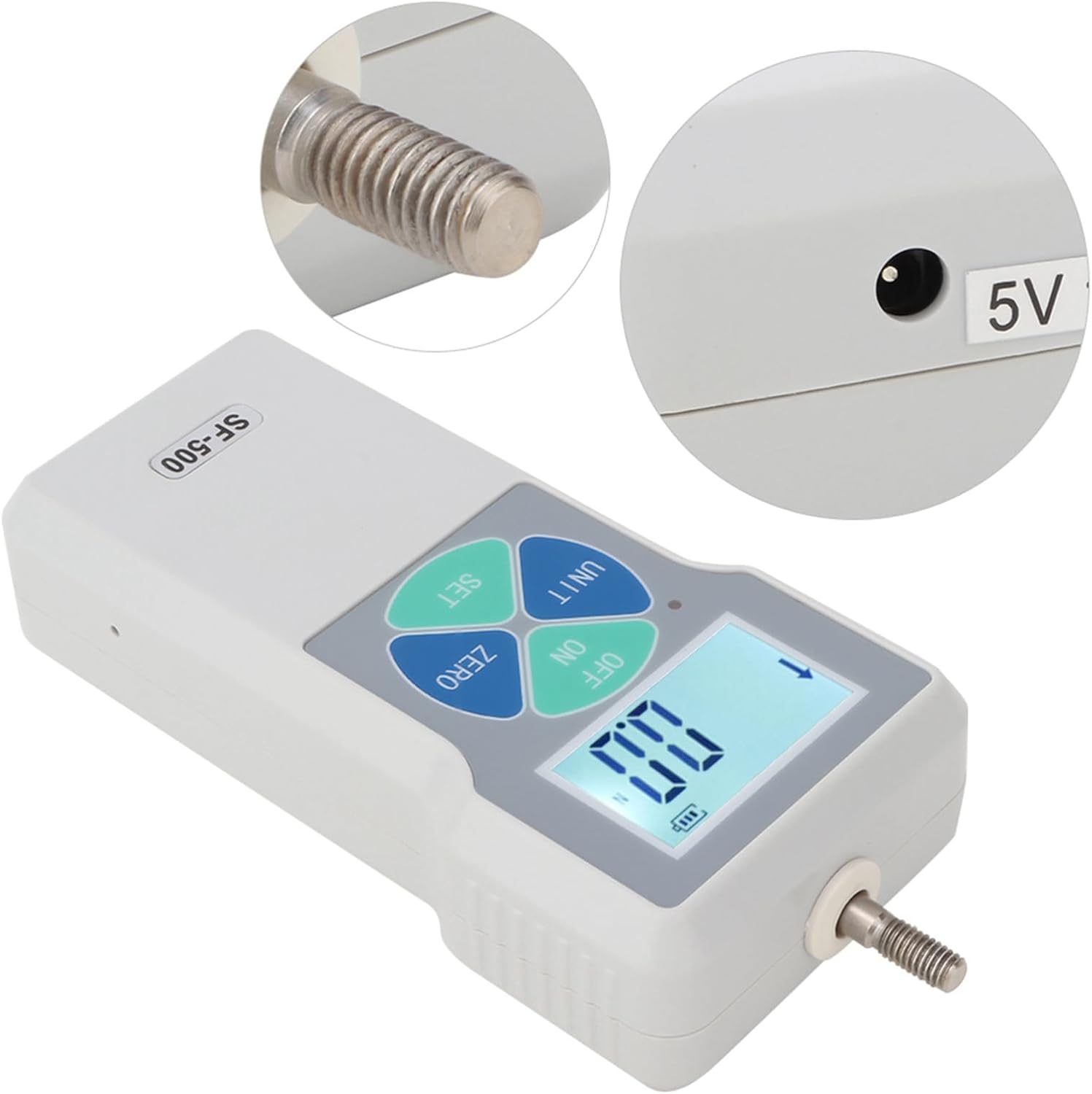
Image: Close-up view of the SF-500 Force Gauge's screw bar and the 5V 1A power socket.
- Attaching Accessories: Select the appropriate probe (e.g., hook clamp, flat push connector) for your measurement task. Screw the chosen accessory securely onto the screw bar at the top of the force gauge.

Image: The SF-500 Force Gauge displayed with various interchangeable probes, including a Growth Pole, Hook Clamp, Concave Fixture, Convex Fixture, Conical Pointed Clamp, and Flat Head Fixture.
7. Operating Instructions
- Power On/Off: Press the OFF/ON button to turn the device on or off.
- Unit Conversion: The SF-500 supports three units of measurement: Newtons (N), Kilograms (Kg), and Pounds (Lb). Press the UNIT button to cycle through the available units.

Image: The SF-500 Force Gauge displaying measurements in Newtons (N), Kilograms (Kg), and Pounds (Lb), illustrating the one-button switching feature.
- Zeroing the Display: Before taking a measurement, ensure the display reads "0.0". If not, press the ZERO button to reset the reading.
- Taking a Measurement: Apply the force to be measured using the attached probe. The real-time force value will be displayed on the LCD screen.
- Rotating the Display Screen: The digital display can be flipped for easier viewing depending on the orientation of the gauge. To rotate the display, press and hold the UNIT key for approximately 5 seconds, then release it.

Image: Two SF-500 Force Gauges side-by-side, demonstrating how the screen digital display can be flipped by long-pressing the UNIT button for about 5 seconds.
- Automatic Shut-off: To conserve battery, the device will automatically shut down if no operation is performed within 10 minutes.
8. Maintenance
- Cleaning: Wipe the device with a soft, dry cloth. Do not use abrasive cleaners or solvents.
- Storage: Store the force gauge in a cool, dry place, away from direct sunlight and extreme temperatures.
- Battery Care: For optimal battery life, avoid fully discharging the battery frequently. Charge the device regularly, even if not in use for extended periods.
- Reset Key: If the device experiences unexpected behavior, a small reset key is located on the side. Use a thin, pointed object (like a paperclip) to gently press the reset button.
Image: The back of the SF-500 Force Gauge with an inset showing the location of the small reset key on the side, described as a convenient push-pull force testing instrument feature.
9. Troubleshooting
| Problem | Possible Cause | Solution |
|---|---|---|
| Device does not power on. | Low battery or no charge. | Connect the power adapter and charge the device. Ensure the adapter is properly connected and the outlet has power. |
| Inaccurate readings. | Device not zeroed; sensor overload; environmental interference. | Press the ZERO button before measurement. Ensure force applied is within 500N. Avoid strong electromagnetic fields. |
| Display is frozen or unresponsive. | Temporary software glitch. | Press the reset key on the side of the device using a thin object. |
| Device shuts off unexpectedly. | Low battery; automatic shut-off activated. | Charge the device. If no operation is performed for 10 minutes, the device will automatically shut off; this is normal behavior. |
10. Warranty and Support
Walfront products are designed for reliability and performance. For warranty information or technical support, please refer to the contact details provided with your purchase documentation or visit the official Walfront store on Amazon:
Visit the Walfront Store on Amazon
Please have your model number (SF-500) and purchase details ready when contacting support.
Ask a question about this manual
Ask about setup, troubleshooting, compatibility, parts, safety, or missing instructions. Manuals+ will review the question and use this page’s manual context to help answer it.