
1. Introduction
This manual provides detailed instructions for the safe and efficient operation of your Retevis RT647 Walkie Talkie. The RT647 is a robust, IP67 waterproof, license-free PMR446 two-way radio designed for reliable communication in various environments.

Image: Front view of the Retevis RT647 Walkie Talkie.
2. Package Contents
Ensure all items are present in your package:
- 2 x RT647 Two-Way Radios
- 2 x 1100 mAh Li-ion Batteries
- 2 x USB Charging Bases
- 2 x Belt Clips
- 2 x User Manuals
3. Product Overview
3.1 Radio Components

Image: Front view of the RT647 showing the speaker and microphone.
- Antenna: For transmitting and receiving signals.
- Power/Volume Knob: Turn clockwise to power on and increase volume; turn counter-clockwise to decrease volume and power off.
- Channel Selector Knob: Rotate to select one of the 16 available channels.
- PTT (Push-to-Talk) Button: Press and hold to transmit, release to receive.
- Speaker: For audio output.
- Microphone: For audio input.
- SP/MIC Jack: For connecting external audio accessories (e.g., earpiece, microphone).
- Indicator Light: Red for transmitting, green for receiving.
3.2 IP67 Waterproof Design
The Retevis RT647 is designed to meet IP67 standards, making it dust-tight and waterproof. It can withstand immersion in water up to 1 meter for 30 minutes, ensuring reliable performance in harsh environments.
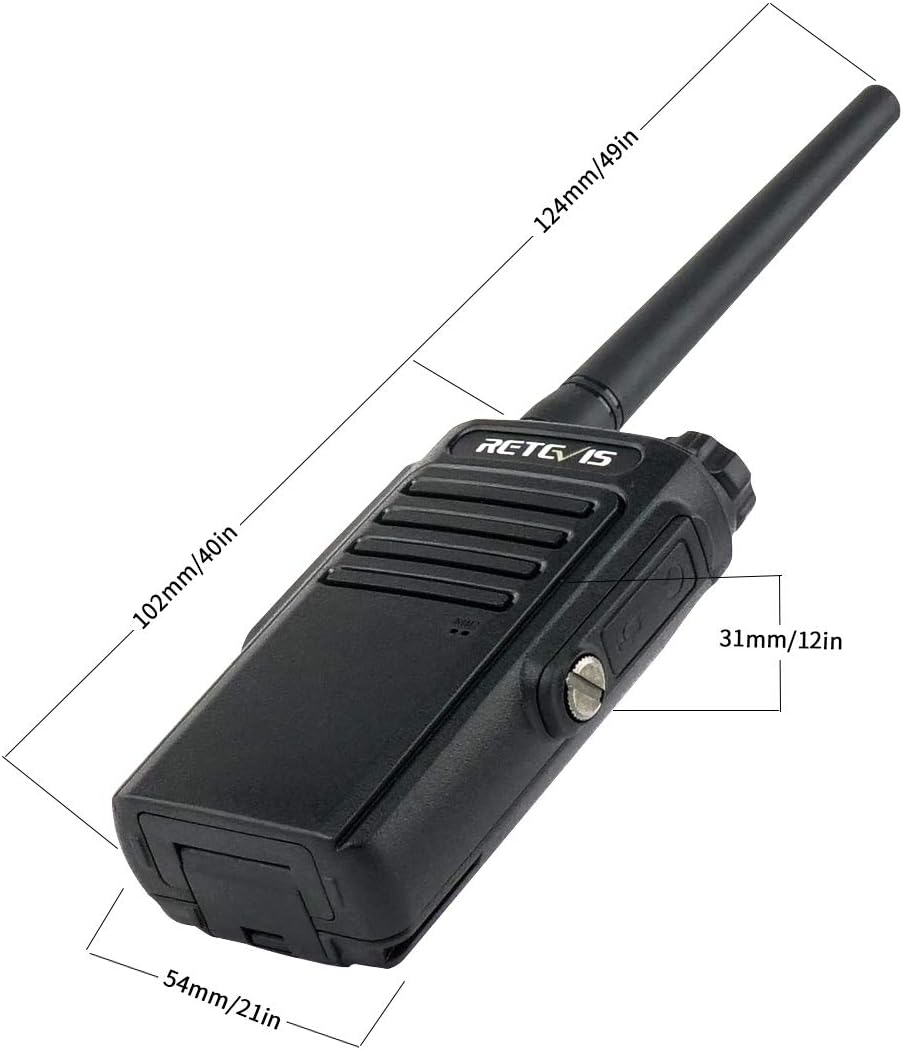
Image: The RT647 demonstrating its IP67 waterproof capability.
4. Setup
4.1 Battery Installation
- Align the battery pack with the grooves on the back of the radio.
- Slide the battery pack upwards until it clicks into place.
- To remove, push the battery release latch and slide the battery downwards.

Image: View of the RT647 with the battery detached, illustrating the battery connection points.
4.2 Charging the Battery
- Connect the USB cable to the charging base and a power source.
- Place the radio (with battery installed) into the charging base.
- The indicator light on the charger will show charging status (usually red for charging, green for fully charged).
- A full charge typically takes 2-3 hours and provides 10-12 hours of use.

Image: The RT647 charging base connected via USB.
4.3 Attaching the Belt Clip
Secure the belt clip to the back of the radio using the provided screws. This allows for convenient carrying.
5. Operating Instructions
5.1 Power On/Off and Volume Adjustment
- To power on, rotate the Power/Volume knob clockwise until you hear a click and a voice prompt.
- Continue rotating clockwise to increase the volume.
- Rotate counter-clockwise to decrease the volume.
- To power off, rotate the knob counter-clockwise until you hear a click.

Image: Top view of the RT647 highlighting the power/volume and channel selector knobs.
5.2 Channel Selection
Rotate the Channel Selector knob to choose one of the 16 available channels. Ensure all radios in your group are on the same channel for communication.
5.3 Transmitting and Receiving (PTT)
- To transmit, press and hold the PTT button on the side of the radio. Speak clearly into the microphone. The indicator light will turn red.
- Release the PTT button to stop transmitting and return to receive mode. The indicator light will turn green when receiving a signal.

Image: Side view of the RT647 highlighting the PTT button.
5.4 VOX (Voice Operated Exchange) Function
The VOX function allows for hands-free operation. When activated, the radio will automatically transmit when it detects your voice, without needing to press the PTT button. Refer to the full user manual for activation and sensitivity settings.
5.5 Squelch Function
The 9-level squelch function helps to suppress weak signals and background noise, ensuring clearer communication. Higher squelch levels require stronger signals to open the receiver.

Image: Visual representation of the squelch function improving audio clarity.
5.6 CTCSS/DCS Codes
The RT647 supports 50 CTCSS (Continuous Tone-Coded Squelch System) and 210 DCS (Digitally Coded Squelch) codes. These codes help filter out unwanted conversations on the same channel, allowing you to hear only transmissions from users with the same code settings.
6. Maintenance
6.1 Cleaning
Wipe the radio's surface with a soft, damp cloth. Do not use harsh chemicals or abrasive cleaners. Ensure all port covers are securely closed to maintain IP67 rating.
6.2 Battery Care
To prolong battery life, avoid overcharging or completely discharging the battery. Store the radio and battery in a cool, dry place when not in use for extended periods.
7. Troubleshooting
| Problem | Possible Cause | Solution |
|---|---|---|
| Radio does not power on | Low or dead battery; incorrect battery installation. | Charge the battery; ensure battery is correctly installed. |
| Cannot transmit or receive | Incorrect channel/CTCSS/DCS settings; out of range. | Verify channel and code settings; move closer to other radios. |
| Poor audio quality | Low battery; high squelch level; interference. | Charge battery; adjust squelch level; move away from interference sources. |
8. Specifications
| Feature | Detail |
|---|---|
| Brand | Retevis |
| Model | RT647 |
| Color | Black |
| Number of Channels | 16 |
| Special Features | IP67 waterproof, Clear sound quality, VOX |
| Frequency Range | 446.00625-446.19375MHz (PMR446) |
| Maximum Call Range | 2 Kilometers |
| Waterproof Level | IP67 |
| Product Dimensions | 13.7D x 7.9W x 5.7H centimeters |
| Battery Type | 2 x Lithium-ion batteries (1100 mAh each) |
| Battery Life | 10-12 hours (usage), 2-3 hours (charging) |
| Noise Level | 40 Decibels |
| Compatible Devices | Walkie talkies with same frequency and CTCSS-DCS codes, USB charging cable |
| Temperature Variation | -10℃ to +50℃ |
9. Warranty and Support
Retevis offers a 2-year warranty for the radio body and a 1-year warranty for accessories. You also have 30 days for no-reason returns. For support or warranty claims, please contact RetevisDirect via Amazon. They commit to responding within 12 hours.


