
Hyperice HISPHEREMINI
Hyperice Hypersphere Go - Vibrating Massage Ball User Manual
Brand: Hyperice | Model: HISPHEREMINI
Product Overview
The Hyperice Hypersphere Go is a portable vibrating massage ball designed for muscle recovery, myofascial release, and soreness relief. Its compact size and powerful vibration make it ideal for use at home, the gym, or while traveling. It features three speeds of vibration and a textured surface for effective targeting of tight areas.

Image: The Hyperice Hypersphere Go, a compact black vibrating massage ball, resting on its stand.
What's Included
Your Hyperice Hypersphere Go package includes the following items:
- Hypersphere Go Device: The vibrating massage ball itself.
- USB Cable: For charging the device.
- Desktop Stand: To rest your device when not in use.

Image: A visual representation of the Hyperice Hypersphere Go, its USB charging cable, and the circular desktop stand.
Setup and Charging
Initial Charge
Before first use, fully charge your Hypersphere Go. The device requires a USB-A to USB-C charging connection. Locate the charging port on the device, lift the protective flap, and insert the USB-C end of the cable. Connect the USB-A end to a compatible power source.
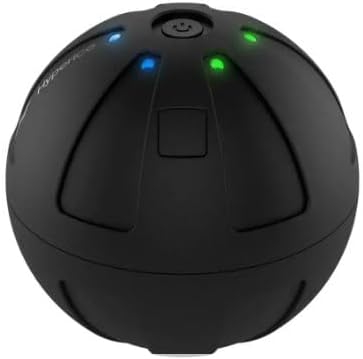
Image: A close-up view showing the charging port of the Hypersphere Go, with a USB-C cable connected for power.
Battery Indicator
When the device is charging, the first red light will stay solid while the rest of the green lights blink in order. Please note that the first red charging light will never turn green; this is normal operation.
Operating Instructions
Power On/Off and Speed Selection
- To turn on the Hypersphere Go, press and hold the power button for three seconds until the LED lights illuminate. Release the button.
- Once on, press the power button once more to select the desired vibration level. The device offers three speeds: low, medium, and high.
- To turn off the device, press and hold the power button until the lights turn off.
Usage Recommendations
The Hypersphere Go is designed to increase mobility by loosening muscles, tendons, and joints. It can be used pre-workout to warm up muscles or post-workout for recovery and soreness relief. Its compact size allows for precise targeting of various muscle groups, including the back, feet, and limbs.

Image: A person demonstrating the use of the Hypersphere Go on their arm, highlighting its compact and powerful design.

Image: A person using the Hypersphere Go to massage their lower back while seated in a chair, illustrating its versatility.
Video: A brief demonstration of the Hypersphere Go's features, including power on/off and speed adjustments.
Maintenance
Cleaning
To clean your Hypersphere Go, wipe it down with a damp cloth. Do not submerge the device in water.
Storage
Store the device in a cool, dry place away from direct sunlight. Ensure it is fully charged before long-term storage to maintain battery health.
Troubleshooting
Device Not Turning On
- Ensure the device is fully charged. Refer to the "Setup and Charging" section for charging instructions and battery indicator details.
- Press and hold the power button for three seconds to activate. A quick press may not be sufficient.
Vibration Not Strong Enough
- Cycle through the three speed settings by pressing the power button repeatedly until you reach the desired intensity.
- Ensure the device has sufficient charge, as lower battery levels may affect vibration strength.
Specifications
| Feature | Detail |
|---|---|
| Weight | 345 Grams (approx. 0.76 lbs) |
| Dimensions (LxWxH) | 3.94 x 3.94 x 4.72 inches |
| Battery Life | Up to 2 hours |
| Vibration Speeds | 3 |
| Material | Plastic |
| TSA Approved | Yes, for carry-on |

Image: The Hypersphere Go displayed alongside a list of its key technical specifications.
Safety Information
For your safety, please observe the following:
- Do not use the device on sensitive areas of the body.
- Keep the device away from water and do not submerge it.
- Consult a healthcare professional before use if you have any pre-existing medical conditions or concerns.
Warranty and Support
The Hyperice Hypersphere Go comes with a manufacturer's warranty. For detailed warranty information or technical support, please visit the official Hyperice website or contact their customer service directly.
You can find more information and support at the Hyperice Store on Amazon.
Ask a question about this manual
Ask about setup, troubleshooting, compatibility, parts, safety, or missing instructions. Manuals+ will review the question and use this page’s manual context to help answer it.