
1. Introduction
The Metrel MI 3100 SE EurotestEASI is a high-performance, multi-functional electrical installation safety tester designed for comprehensive testing of electrical installations in accordance with various international standards. It is capable of performing insulation resistance measurements, continuity tests, RCD tests, and TRMS voltage measurements. This manual provides essential information for the safe and effective use of your device.

Figure 1: Metrel MI 3100 SE EurotestEASI device.
2. Safety Information
Always adhere to the following safety precautions to prevent injury or damage to the instrument:
- Read and understand this manual completely before using the instrument.
- Only qualified and trained personnel should operate this device.
- Do not use the instrument if it appears damaged or is not functioning properly.
- Ensure all test leads and accessories are in good condition before use.
- Always disconnect the instrument from the circuit before changing functions or connecting/disconnecting test leads.
- Observe all local and national safety regulations.
3. Package Contents
Verify that all items listed below are included in your package:
- Metrel MI 3100 SE EurotestEASI Instrument
- Test leads (various types)
- Test probes and crocodile clips
- Power adapter/charger
- 6 x AA batteries (included)
- USB communication cable
- Soft carrying bag
- Instruction manual and calibration certificate
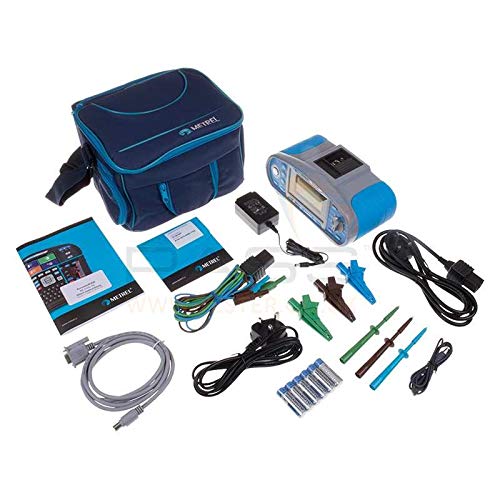
Figure 2: Metrel MI 3100 SE EurotestEASI and included accessories.
4. Setup
4.1. Battery Installation
- Locate the battery compartment on the rear of the instrument.
- Open the battery compartment cover.
- Insert the 6 AA batteries, ensuring correct polarity as indicated inside the compartment.
- Close the battery compartment cover securely.
4.2. Connecting Test Leads
Connect the appropriate test leads to the input terminals on the instrument. Ensure a firm and secure connection for accurate measurements and safety.
5. Operating Instructions
5.1. Powering On/Off
Press the POWER button to turn the instrument on. To turn it off, press and hold the POWER button until the display shuts down.
5.2. Navigating the Menu
Use the rotary switch to select the desired measurement function. The arrow keys and ENTER button are used to navigate through sub-menus and confirm selections on the LCD display.
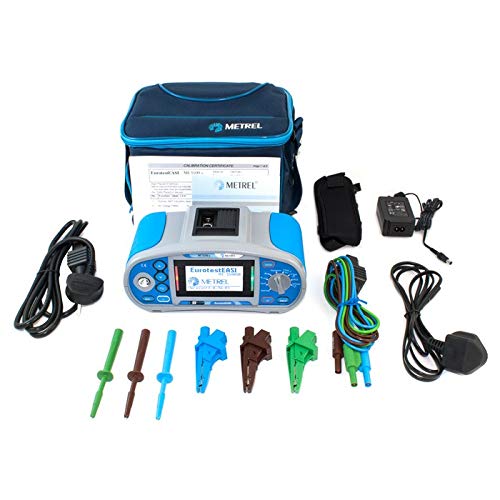
Figure 3: Front panel of the Metrel MI 3100 SE EurotestEASI showing display and controls.
5.3. Insulation Resistance Measurement
- Select the INSULATION function using the rotary switch.
- Connect the test leads to the circuit under test.
- Press the TEST button to initiate the measurement.
- Read the insulation resistance value on the display.
5.4. Continuity Measurement
- Select the CONTINUITY function.
- Connect the test leads to the conductor.
- Press the TEST button.
- Observe the resistance reading and audible indication for continuity.
5.5. RCD Testing
- Select the RCD function.
- Set the desired RCD type and rated tripping current.
- Connect the test leads to the RCD protected circuit.
- Press the TEST button to perform the RCD trip test.
5.6. TRMS Voltage Measurement
- Select the VOLTAGE function.
- Connect the test leads to the voltage source.
- The TRMS voltage will be displayed automatically.
6. Maintenance
- Cleaning: Clean the instrument's casing with a soft, damp cloth. Do not use abrasive cleaners or solvents.
- Battery Replacement: Replace batteries when the low battery indicator appears on the display. Use only specified AA batteries.
- Calibration: Regular calibration by an authorized service center is recommended to ensure continued accuracy and compliance with standards.
- Storage: Store the instrument in a dry, cool place, away from direct sunlight and extreme temperatures. Remove batteries if storing for extended periods.
7. Troubleshooting
| Problem | Possible Cause | Solution |
|---|---|---|
| Instrument does not power on | Dead or incorrectly installed batteries | Replace batteries or check polarity |
| Inaccurate readings | Poor lead connection, uncalibrated device, environmental factors | Check lead connections, consider professional calibration, ensure stable environment |
| Display shows error message | Measurement outside range, internal fault | Refer to specific error codes in the detailed manual or contact support |
8. Specifications
| Parameter | Value |
|---|---|
| Model | MI 3100SE |
| Batteries | 6 AA batteries (included) |
| Item Weight | 1300 Grams |
| Parcel Dimensions | 30 x 12 x 11 cm |
| Manufacturer | Metrel |
| ASIN | B07SYM988M |
| GTIN | 03831063423058 |
9. Warranty and Support
The Metrel MI 3100 SE EurotestEASI comes with a manufacturer's warranty. For specific warranty terms and conditions, please refer to the warranty card included with your product or visit the official Metrel website. For technical support, service, or inquiries, please contact your authorized Metrel distributor or service center.