
Introduction
This manual provides comprehensive instructions for the Beyution AK59-00146A Replacement Remote Control. This remote is designed to function as a direct replacement for original Samsung Blu-Ray DVD Player remotes, ensuring seamless operation with compatible models. Please read this manual thoroughly before use to ensure proper setup and functionality.
Package Contents
- 1 x Beyution AK59-00146A Replacement Remote Control
Note: Batteries are not included and must be purchased separately.
Setup
1. Battery Installation
- Locate the battery compartment on the back of the remote control.
- Slide the battery compartment cover downwards to open it.
- Insert two (2) AAA alkaline batteries, ensuring the positive (+) and negative (-) terminals align correctly with the markings inside the compartment.
- Slide the battery compartment cover back into place until it clicks securely.

Figure 1: Battery compartment with cover removed, showing slots for two AAA batteries.
Important: Use only new alkaline batteries. Rechargeable batteries may not provide sufficient power for optimal performance. Ensure no objects are blocking the front of your Blu-Ray DVD player, as this remote operates using infrared (IR) technology.
Operating Instructions
The Beyution AK59-00146A remote control is pre-programmed to work with compatible Samsung Blu-Ray DVD Players. No additional programming is required. Simply point the remote at your device and press the desired button.
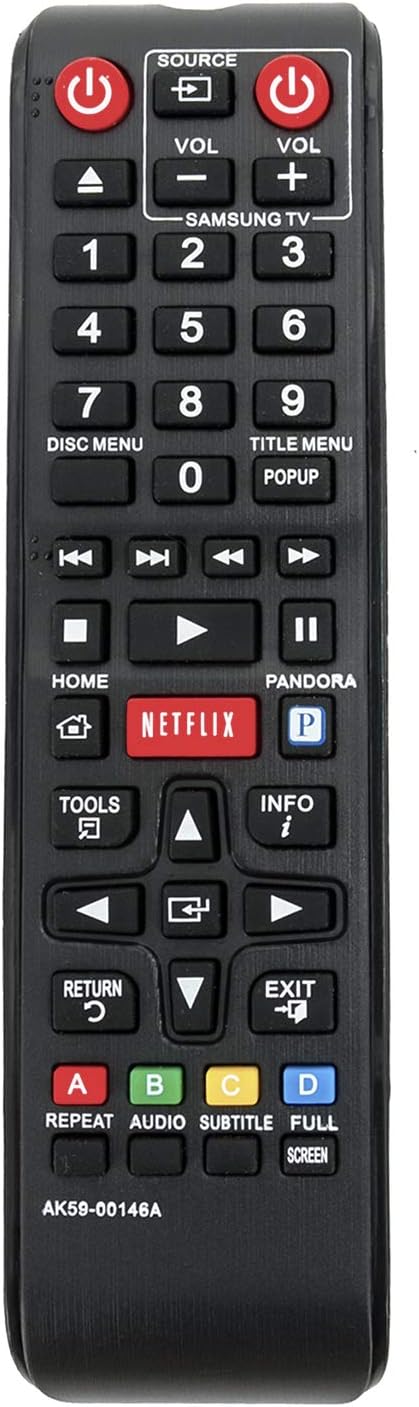
Figure 2: Front view of the remote control with button layout.
Key Functions:
| Button | Function |
|---|---|
| POWER | Turns the Blu-Ray DVD Player on or off. |
| SOURCE | Selects the input source on the connected display. |
| VOL +/- | Adjusts the volume of the connected audio system or TV. |
| Number Buttons (0-9) | Direct selection of tracks, chapters, or inputting numbers. |
| DISC MENU | Accesses the main menu of a loaded disc. |
| TITLE MENU | Accesses the title menu of a loaded disc. |
| PLAY / PAUSE | Starts or pauses playback. |
| STOP | Stops playback. |
| REWIND / FAST FORWARD | Rewinds or fast forwards playback. |
| SKIP BACK / SKIP FORWARD | Skips to the previous or next track/chapter. |
| HOME | Returns to the main home screen of the Blu-Ray player. |
| NETFLIX / PANDORA | Direct access buttons for Netflix and Pandora streaming services (requires internet connection and subscription). |
| TOOLS | Accesses additional options or settings. |
| INFO | Displays information about the current content. |
| Directional Pad (Up/Down/Left/Right) | Navigates through menus and options. |
| ENTER | Confirms selections. |
| RETURN | Goes back to the previous screen or menu. |
| EXIT | Exits the current menu or application. |
| Color Buttons (A, B, C, D) | Context-sensitive functions within menus or applications. |
| REPEAT | Repeats playback of a track, chapter, or disc. |
| AUDIO | Selects audio tracks or languages. |
| SUBTITLE | Selects subtitle tracks or languages. |
| FULL SCREEN | Adjusts screen display mode. |
Maintenance
- Cleaning: Wipe the remote control with a soft, dry cloth. Do not use liquid cleaners or abrasive materials.
- Battery Replacement: Replace batteries when the remote's response becomes sluggish or stops working. Always replace both batteries at the same time with new alkaline batteries.
- Storage: If the remote will not be used for an extended period, remove the batteries to prevent leakage and potential damage.
Troubleshooting
| Problem | Solution |
|---|---|
| Remote is not responding. |
|
| Some buttons do not work. |
|
| Remote works intermittently. |
|
If the issue persists after trying these solutions, please contact customer support for further assistance.
Specifications
- Model: AK59-00146A
- Brand: Beyution
- Compatibility: Samsung Blu-Ray DVD Players (BDE5300, BDE5300ZA, BDE5400, BDE5400ZA, BDE5900, BDEM53, BDEM53C, BDEM53ZA, BDEM57C, BDEM59C, BDEM59CZA, BDES6000, BD-E5300, BD-E5300/ZA, BD-E5400, BD-E5400/ZA, BD-E5900, BD-EM53, BD-EM53C, BD-EM53/ZA, BD-EM57C, BD-EM59C, BD-EM59C/ZA, BD-ES6000)
- Connectivity Technology: Infrared (IR)
- Power Source: 2 x AAA Alkaline Batteries (not included)
- Product Dimensions: 7 x 2 x 0.65 inches (approximately)
- Item Weight: 2.39 ounces (approximately, without batteries)
Warranty and Support
For warranty information or technical support, please refer to the retailer's return policy or contact the manufacturer directly. Ensure you have your purchase details and product model number (AK59-00146A) available when seeking assistance.