
Manfrotto MKBFRA4GTXP-BH
Manfrotto Befree GT XPRO Aluminium Tripod Instruction Manual
Model: MKBFRA4GTXP-BH
Introduction
The Manfrotto Befree GT XPRO Aluminium Tripod (Model MKBFRA4GTXP-BH) is designed for photographers requiring a portable yet versatile support solution. This tripod features a robust aluminium construction, a 496 Centre Ball Head, and a unique 90-degree column mechanism, making it suitable for various photography styles, including macro and overhead shots.
This manual provides essential information for the safe and effective use, maintenance, and troubleshooting of your Manfrotto Befree GT XPRO Aluminium Tripod.
Product Overview
The Manfrotto Befree GT XPRO Aluminium Tripod combines portability with advanced features for professional use. Key components include:
- 496 Centre Ball Head: Provides precise camera positioning with three independent controls for ball lock, friction control, and panoramic movement.
- 90-Degree Column Mechanism: Allows the center column to be rotated horizontally, enabling ground-level and overhead shooting.
- Twist Lock System (M-Lock): Ensures rapid and secure leg adjustments.
- 200PL-PRO Plate: High-quality aluminium plate compatible with Manfrotto RC2 and Arca-Swiss type head attachments, featuring rubber inserts for enhanced grip.
- Easy Link Attachment: A threaded port for attaching accessories like lights or external monitors.

Figure 1: Manfrotto Befree GT XPRO Aluminium Tripod with a camera attached.
Setup
1. Unpacking and Initial Inspection
Carefully remove all components from the packaging. Verify that all parts are present and undamaged. The package should include the tripod, a carry bag, and an Allen key tool for adjustments.

Figure 2: The Manfrotto Befree GT XPRO Aluminium Tripod in its compact, folded state.
2. Attaching the Quick Release Plate to your Camera
The 200PL-PRO quick release plate is essential for mounting your camera. Attach this plate to the bottom of your camera using the screw provided. Ensure it is securely tightened.

Figure 3: The 496 Ball Head with the 200PL-PRO plate, compatible with Manfrotto RC2 and Arca-Swiss systems.
3. Extending the Tripod Legs
- Release the M-Lock twist locks on each leg section by rotating them counter-clockwise.
- Extend each leg section to your desired height.
- Rotate the M-Lock twist locks clockwise to secure the leg sections.

Figure 4: Detail of the M-Lock twist lock system for quick and secure leg extension.
4. Adjusting Leg Angles
Each leg features an independent angle selector. Pull down the catch near the top of each leg to adjust its angle. This allows for stable positioning on uneven terrain or for achieving low-angle shots.
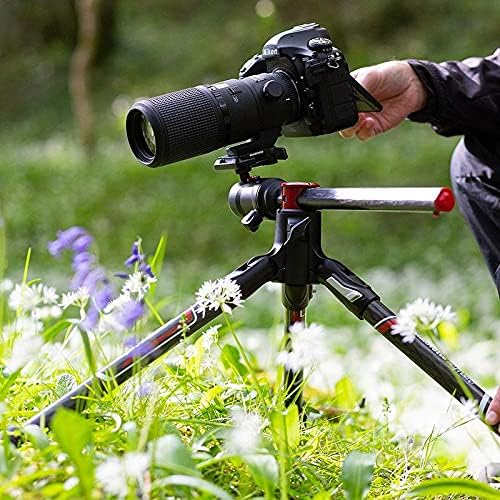
Figure 5: Tripod configured for macro photography, demonstrating flexible leg angles.
Operating Instructions
1. Mounting Your Camera
With the quick release plate attached to your camera, open the quick release clamp on the 496 ball head. Insert the plate with your camera into the clamp and close the lever firmly until it clicks, ensuring the camera is securely mounted.
2. Adjusting the Ball Head
- Ball Lock: Use the main ergonomic knob to lock or unlock the ball head for tilting and panning movements.
- Friction Control: A smaller knob allows you to adjust the friction of the ball movement, providing smoother control for heavier cameras or precise adjustments.
- Panoramic Lock: An independent knob enables 360-degree horizontal rotation while keeping the camera level, ideal for panoramic shots.
3. Using the 90-Degree Column
To engage the 90-degree column for overhead or ground-level shots:
- Loosen the center column locking knob.
- Press the release button located at the base of the center column.
- Pull the center column upwards and then rotate it 90 degrees to a horizontal position.
- Secure the center column by tightening the locking knob.

Figure 6: The 90-degree column in horizontal position, facilitating overhead photography.
4. Attaching Accessories (Easy Link)
The Easy Link attachment point on the tripod's spider allows you to connect external accessories such as LED lights, reflectors, or articulated arms. Simply screw the accessory into the threaded port.

Figure 7: The Easy Link attachment for connecting various photographic accessories.
Maintenance
- Cleaning: Wipe down the tripod with a soft, damp cloth after each use, especially if used in dusty or sandy environments. Avoid harsh chemicals.
- Lubrication: Periodically check leg locks and moving parts for smooth operation. Do not over-lubricate; use a dry lubricant if necessary.
- Tightening: Use the provided Allen key tool to tighten any screws or bolts that may become loose over time due to regular use.
- Storage: Store the tripod in its dedicated carry bag in a dry, cool place to protect it from dust and moisture.
Troubleshooting
| Problem | Possible Cause | Solution |
|---|---|---|
| Leg sections not locking securely. | Twist locks not fully engaged or internal mechanism dirty. | Ensure twist locks are fully tightened. Clean leg sections and locking mechanisms. |
| Ball head movement is stiff or too loose. | Friction control knob incorrectly set. | Adjust the friction control knob to achieve desired tension. Ensure main ball lock is fully released for movement. |
| Camera not securely mounted to ball head. | Quick release plate not properly seated or clamp not fully closed. | Ensure the quick release plate is correctly inserted and the clamp lever is fully closed and clicked into place. |
| Center column difficult to rotate 90 degrees. | Locking knob not fully loosened or release button not pressed. | Fully loosen the center column locking knob and ensure the release button is pressed before rotating. |
Specifications
| Feature | Detail |
|---|---|
| Brand | Manfrotto |
| Model Name | Befree GT XPRO Aluminum tripod |
| Model Number | MKBFRA4GTXP-BH |
| Material | Aluminum |
| Item Weight | Approx. 1.76 Kilograms (Note: The provided data lists 0.1 kg, which is likely an error. Actual weight is closer to 1.76 kg.) |
| Weight Limit (Payload) | 12 kg (26.46 Pounds) |
| Maximum Height | 164 cm (64.6 Inches) |
| Minimum Height | 9 Centimeters |
| Folded Size | 43 cm (16.9 inches) |
| Number of Leg Sections | 4 |
| Tripod Head Type | Ball Heads (Manfrotto 496 Centre Ball Head) |
| Special Feature | 90-degree column, Macro Photography, Portable |
| Plate Compatibility | Manfrotto RC2, Arca-Swiss |

Figure 8: Visual representation of the tripod's dimensions and 12 kg (26.46 lbs) payload capacity.
Warranty and Support
Manfrotto products are manufactured to high quality standards and are guaranteed against defects in materials and workmanship. For specific warranty details, registration, and support, please refer to the official Manfrotto website or contact their customer service. Keep your proof of purchase for warranty claims.
For further assistance, visit the Manfrotto official website.
Related documentsMKBFRA4GTXP-BH


Ask a question about this manual
Ask about setup, troubleshooting, compatibility, parts, safety, or missing instructions. Manuals+ will review the question and use this page’s manual context to help answer it.