
1. Introduction
The Kingsmith WalkingPad R1 Pro is a versatile 2-in-1 foldable exercise machine designed for both walking and running. Its innovative 180-degree folding technology allows for easy storage in compact spaces. This manual provides essential information for the safe and effective use, setup, operation, and maintenance of your WalkingPad R1 Pro.
2. Safety Information
Please read all safety instructions carefully before using the Kingsmith WalkingPad R1 Pro. Failure to follow these instructions may result in injury or damage to the product.
- Ensure the WalkingPad is placed on a flat, stable surface.
- Keep children and pets away from the equipment during operation.
- Do not use the WalkingPad if you weigh more than the maximum capacity of 110 kg.
- Wear appropriate athletic footwear.
- Always hold the handrails when starting or stopping the machine, especially when using it in running mode.
- In case of emergency, press the stop button immediately.
- Unplug the power cord when not in use or before cleaning/maintenance.
- Consult a physician before starting any new exercise program.
3. Package Contents
Verify that all components are present in the package:
- Kingsmith WalkingPad R1 Pro Unit
- Remote Control Device
- Remote Control Lanyard
- Power Cord
- User Manual
4. Setup
4.1 Unfolding the WalkingPad
- Place the folded WalkingPad on a clear, flat surface.
- Gently lift the rear section of the WalkingPad until it locks into place, forming the walking/running deck.
- For running mode, raise the handrails until they click securely into their upright position. Ensure both sides are locked.
- For walking mode (under desk), the handrails can remain folded down.
Image 1: WalkingPad R1 Pro in unfolded position with handrails up.

This image shows the Kingsmith WalkingPad R1 Pro fully unfolded with its handrails in the upright position, indicating it is ready for use in either walking or running mode. The sleek design and compact footprint are visible.
4.2 Power Connection
- Connect the power cord to the WalkingPad's power input port.
- Plug the other end of the power cord into a standard electrical outlet.
- The LED display on the WalkingPad will illuminate, indicating it is powered on.
5. Operating Instructions
5.1 Modes of Operation (Walking vs. Running)
The R1 Pro features a dual-mode design:
- Walking Mode: Handrails are folded down. Maximum speed is typically lower in this mode (e.g., up to 6 km/h). Ideal for light exercise or office use.
- Running Mode: Handrails are in the upright position. Allows for higher speeds (up to 10 km/h). Provides stability for running workouts.
Image 2: Person running on the Kingsmith WalkingPad R1 Pro.

This image illustrates a user actively running on the Kingsmith WalkingPad R1 Pro, highlighting its capability for higher intensity workouts when the handrails are extended.
5.2 Using the Remote Control
The included remote control allows you to start, stop, and adjust the speed of the WalkingPad.
- Start/Stop Button: Press to begin or end your workout.
- Speed Adjustment: Use the '+' and '-' buttons to increase or decrease the speed. The R1 Pro also features adaptive speed control, which can automatically adjust speed based on your pace.
5.3 LED Display
The integrated LED display shows important workout data such as speed, time, distance, and calories burned.
6. Maintenance
Regular maintenance ensures the longevity and optimal performance of your WalkingPad R1 Pro.
- Cleaning: Wipe down the WalkingPad with a damp cloth after each use. Do not use abrasive cleaners.
- Lubrication: Periodically lubricate the running belt according to the manufacturer's recommendations (refer to specific instructions in the full manual if provided).
- Belt Adjustment: Ensure the running belt is centered and properly tensioned. Adjust if necessary following the detailed instructions in the complete product manual.
7. Troubleshooting
If you encounter issues with your WalkingPad R1 Pro, refer to the following common problems and solutions:
| Problem | Possible Cause | Solution |
|---|---|---|
| WalkingPad does not power on | Power cord not connected, outlet issue | Check power cord connection, try a different outlet. |
| Running belt slips or is off-center | Belt tension or alignment issue | Adjust belt tension and alignment as per the detailed instructions in the full manual. |
| Unusual noise during operation | Lack of lubrication, loose parts | Lubricate the running belt. Check for and tighten any loose components. |
For persistent issues, please contact customer support.
8. Specifications
Key technical specifications for the Kingsmith WalkingPad R1 Pro:
- Model: R1 Pro (TRR1F)
- Brand: WalkingPad (Kingsmith)
- Motor: Brushless Motor, 1.25 HP
- Speed Range: 0.5 - 10 km/h
- Maximum User Weight: 110 kg
- Material: Aluminum Frame, Metallic Fibers
- Product Dimensions (Unfolded): Approximately 91.44 x 60.96 x 17.78 cm (36 x 24 x 7 inches)
- Folded Dimensions: 951mm (L) x 675mm (W) x 152mm (H)
- Net Weight: 34 kg
- Ultra-Slim Design: 57 mm (2.24 inches) from the ground
- Features: Foldable, Dual Mode (Walking/Running), EML Injection Panel, Adaptive Speed Control, Mirage LED Lighting, Comfortable Transport Wheels
- Power Source: Wired Electric
- Color: Black, Metallic Gray
Image 3: Kingsmith WalkingPad R1 Pro highlighting its foldable and portable design.
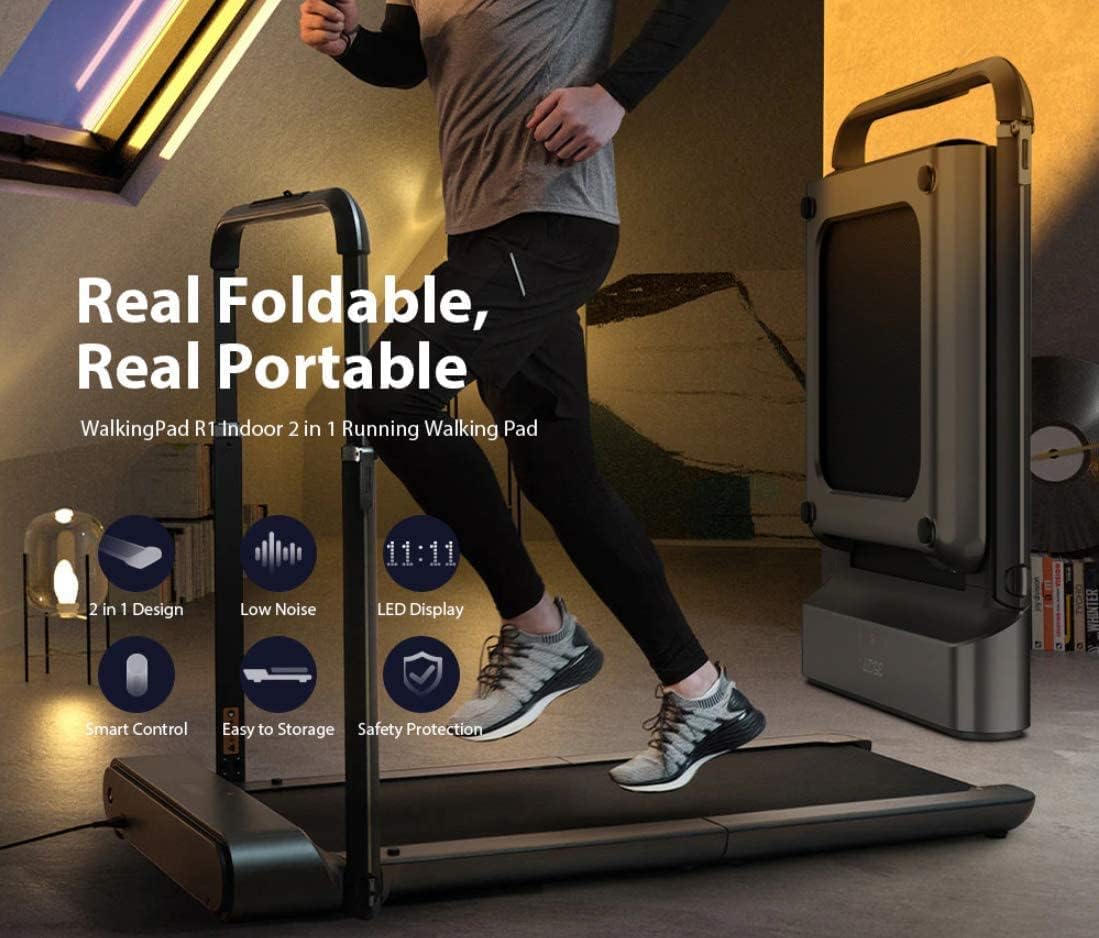
This image visually emphasizes the key features of the Kingsmith WalkingPad R1 Pro, including its real foldable and portable nature, 2-in-1 design, low noise operation, LED display, smart control, easy storage, and safety protection.
9. Warranty and Support
For warranty information, technical support, or service inquiries, please refer to the official Kingsmith or WalkingPad website or contact your local distributor. Keep your purchase receipt as proof of purchase.


