
ROCAM ROCAM 1008I BLUE
ROCAM Extra Loud Alarm Clock with Bed Shaker User Manual
Model: ROCAM 1008I BLUE
Product Overview
The ROCAM Extra Loud Alarm Clock with Bed Shaker is designed to provide a reliable and versatile wake-up experience, especially for heavy sleepers, individuals with hearing impairment, or those who prefer a silent wake-up. It features a large 7-inch LED display with adjustable brightness, a powerful wired bed shaker, an extra loud alarm, 7 selectable night light colors, and dual USB charging ports for convenience. This manual provides detailed instructions for setup, operation, maintenance, and troubleshooting.

Image: ROCAM Alarm Clock with Bed Shaker and a smartphone charging via its USB port, showcasing the large display and colorful night light options.
Package Contents
Before you begin, please ensure all items are present in the package:
- 1 x ROCAM Alarm Clock (Model: 1008I BLUE)
- 1 x Wired Bed Shaker
- 1 x Power Adapter
- 1 x User Manual (this document)

Image: Visual representation of the alarm clock, bed shaker, power adapter, and user manual included in the product package.
Setup
- Power Connection: Connect the provided power adapter to the DC IN port on the back of the alarm clock and plug it into a standard wall outlet. The display will light up.
- Battery Backup (Optional but Recommended): For battery backup functionality, open the battery compartment on the back of the clock and insert 2 x AAA batteries (not included). This ensures time and alarm settings are maintained during a power outage.
- Connect Bed Shaker: Plug the wired bed shaker into the dedicated "VIB" port on the back of the alarm clock. Place the shaker under your pillow or mattress for silent, vibrating alerts.

Image: Detailed view of the alarm clock's rear panel, highlighting the power input, USB charging ports, alarm settings, and battery compartment.
Operating Instructions
1. Setting Time
- Press the SET TIME button on the back of the clock.
- Use the HOUR and MIN buttons on the top to adjust the time.
- Press SET TIME again to confirm and exit time setting mode.
- To switch between 12-hour and 24-hour format, use the TIME FORMAT slider on the back.
- For Daylight Saving Time (DST), press and hold the SET TIME button for a few seconds. The DST indicator will light up, and the time will adjust by one hour. Repeat to turn off DST.
2. Setting Alarm
- Press the SET ALARM button on the back.
- Use the HOUR and MIN buttons on the top to set your desired alarm time.
- Press SET ALARM again to confirm.
- Alarm Mode Selection: Use the BUZZ/VIB slider on the back to choose your wake-up mode:
- BUZZ: Loud alarm sound only.
- VIB: Powerful bed shaker only.
- BUZZ/VIB: Both alarm sound and bed shaker combined.
- Alarm Volume Adjustment: Use the ALARM VOLUME slider to set the desired loudness (Low, Med, High).
- To turn the alarm ON or OFF, use the ALARM ON/OFF switch.

Image: Illustration of the three distinct wake-up modes: powerful vibrator only, loud alarm sound only, and a combination of vibration and buzzer.
Video: Demonstrates the ROCAM CR1008I Alarm Clock's features, including the bed shaker, alarm sound, adjustable volume, and various settings on the back panel. This video is provided by the seller.
3. Snooze Function
When the alarm sounds, press the large SNOOZE button on the top of the clock to get an additional 9 minutes of sleep. The alarm will sound again after 9 minutes. To completely turn off the alarm for the day, press the red ALARM PAUSE button on the back.
4. Display Brightness Dimmer
The display brightness can be adjusted from 0% to 100% using the DIMMER slider on the back of the clock. Slide it to your preferred comfort level for day or night viewing.

Image: Displays the alarm clock display at various brightness levels, from 0% (dim) to 100% (bright), controlled by the dimmer slider.
5. 7-Color Night Light
The alarm clock features a built-in night light with 7 selectable colors. Press the SNOOZE/LIGHT button on the top to cycle through the colors. Press and hold the SNOOZE/LIGHT button to turn the night light off.
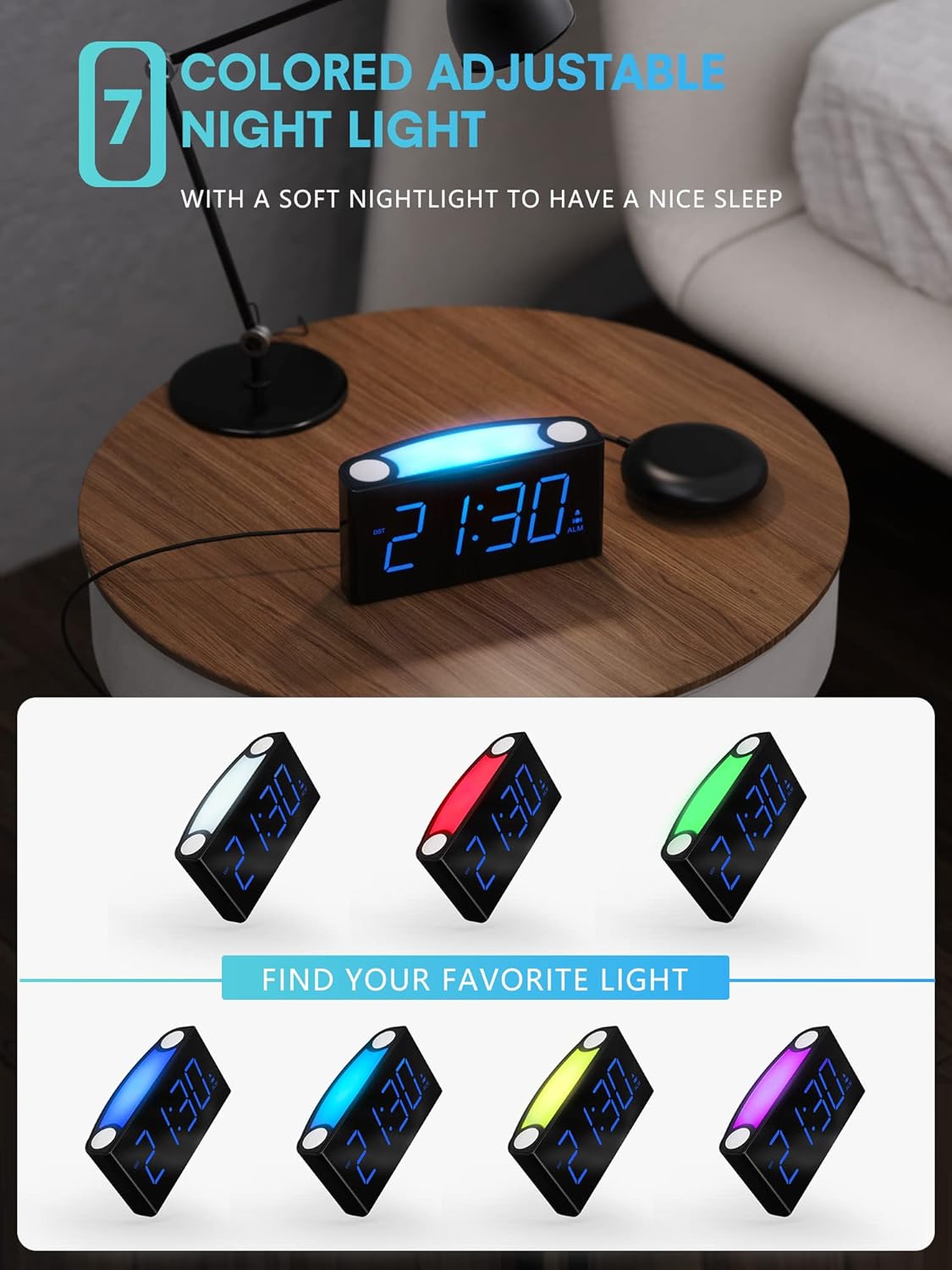
Image: Displays the alarm clock with its top light bar illuminated in different colors, illustrating the 7-color night light feature.
6. Dual USB Charging Ports
The clock is equipped with dual USB charging ports (USB-A and USB-C) on the back. These ports allow you to conveniently charge your smartphone, tablet, or other USB-powered devices directly from the alarm clock.

Image: The back of the alarm clock showing a smartphone and wireless earbuds charging simultaneously via the dual USB-A and USB-C ports.
Maintenance
- Cleaning: Use a soft, dry cloth to clean the surface of the alarm clock. Avoid using abrasive cleaners or solvents.
- Battery Replacement: If using battery backup, replace the AAA batteries annually or when the display shows signs of dimming during a power outage. Ensure correct polarity when inserting new batteries.
- Storage: If storing the clock for an extended period, remove the backup batteries to prevent leakage.
Troubleshooting
| Problem | Possible Cause | Solution |
|---|---|---|
| Clock display is off or dim. | No power, power outage, dimmer set too low. | Check power adapter connection. Adjust the DIMMER slider. Ensure backup batteries are installed and functional during power outages. |
| Alarm does not sound/vibrate. | Alarm OFF, volume too low, incorrect alarm mode. | Ensure ALARM ON/OFF switch is ON. Adjust ALARM VOLUME. Verify BUZZ/VIB slider is set to desired mode. |
| USB charging not working. | Cable issue, device not compatible, clock not powered. | Try a different USB cable. Ensure the clock is powered via the adapter. Check device compatibility. |
| Time is incorrect after power outage. | No backup batteries or batteries are dead. | Install fresh AAA batteries for backup. |
Specifications
- Brand: ROCAM
- Model Number: ROCAM 1008I BLUE
- Display Type: Digital LED
- Product Dimensions: 6.5"W x 3.1"H
- Power Source: Corded Electric
- Backup Battery: 2 x AAA (not included)
- Special Features: Loud Alarm, Bed Shaker, Large Display, Adjustable Brightness (0-100%), 7-Color Night Light, Dual USB Charging Ports (USB-A, USB-C), Snooze Function, 12/24 Hour Format, DST Setting.
- Material: Acrylonitrile Butadiene Styrene (ABS) Plastic
- Item Weight: 7.7 ounces

Image: Diagram showing the dimensions of the ROCAM Alarm Clock, including width and height.
Warranty Information
ROCAM provides the following warranty for this product:
- 30-Days Refund Policy: Full refund within 30 days of purchase.
- 3-Months Replacement Guarantee: Product replacement for defects within 3 months of purchase.
- 12-Months Warranty: General warranty covering manufacturing defects for 12 months from the date of purchase.
Please retain your proof of purchase for warranty claims.
Customer Support
For any questions, technical assistance, or warranty claims, please contact ROCAM customer support. Refer to the product packaging or the official ROCAM website for the most up-to-date contact information.
We are committed to providing excellent service and support for your ROCAM product.
Related documentsROCAM 1008I BLUE

Ask a question about this manual
Ask about setup, troubleshooting, compatibility, parts, safety, or missing instructions. Manuals+ will review the question and use this page’s manual context to help answer it.