
Minetom fairy-mini-light
Minetom Color Changing Fairy String Lights User Manual
Model: fairy-mini-light | Brand: Minetom
1. Introduction
This manual provides instructions for the safe and effective use of your Minetom Color Changing Fairy String Lights. Please read this manual thoroughly before installation and operation, and retain it for future reference.

Image 1: Overview of Minetom Color Changing Fairy String Lights, including the 33 ft string, USB plug, power adapter, and remote control.
2. Package Contents
Verify that all items listed below are included in your package:
- 1 × Minetom USB-plug 33ft 100 LED Color Changing Fairy String Lights
- 1 × Remote Control
- 1 × UL-listed Power Adapter
- 1 × User Manual (this document)
3. Safety Information
Please observe the following safety precautions:
- Ensure the power adapter is UL-listed and used with a compatible power source.
- The string lights are IP67 waterproof (excluding the USB connector). Do not submerge the USB connector or power adapter in water.
- Do not attempt to modify or repair the lights or components. Contact customer support for assistance.
- Keep the lights away from open flames or extreme heat sources.
- Avoid excessive pulling or bending of the wire to prevent damage.
- The lights remain cool to the touch during operation, reducing overheating risk.
4. Setup
Follow these steps to set up your Minetom Fairy String Lights:
- Unpack the Lights: Carefully uncoil the string lights from their packaging. The 4-strand silver wire is designed for durability and flexibility.
- Choose a Power Source: The lights can be powered via the included UL-listed power adapter or directly through a USB port.
- Using the Power Adapter: Connect the USB plug of the string lights to the included power adapter, then plug the adapter into a standard wall socket.
- Using a USB Port: Plug the USB connector directly into a compatible USB hub, power bank, laptop, or TV USB port.
- Position the Lights: Arrange the lights as desired. The flexible silver wire allows for various shapes and positions.
- Remote Control Preparation: Before first use, remove the plastic tab from the remote control's battery compartment.

Image 2: Illustration of power options including power strip, wall socket, power bank, and laptop.
5. Operating Instructions
Your Minetom Fairy String Lights can be controlled using the integrated button on the USB plug or the included remote control.
5.1. Control Button on USB Plug
The button on the USB plug allows basic control:
- Short Press: Cycles through different colors and light modes.
- Long Press: Turns the lights On/Off.
5.2. Remote Control Functions
The remote control offers comprehensive control over the lights. Ensure the remote is pointed towards the USB receiver for optimal functionality.
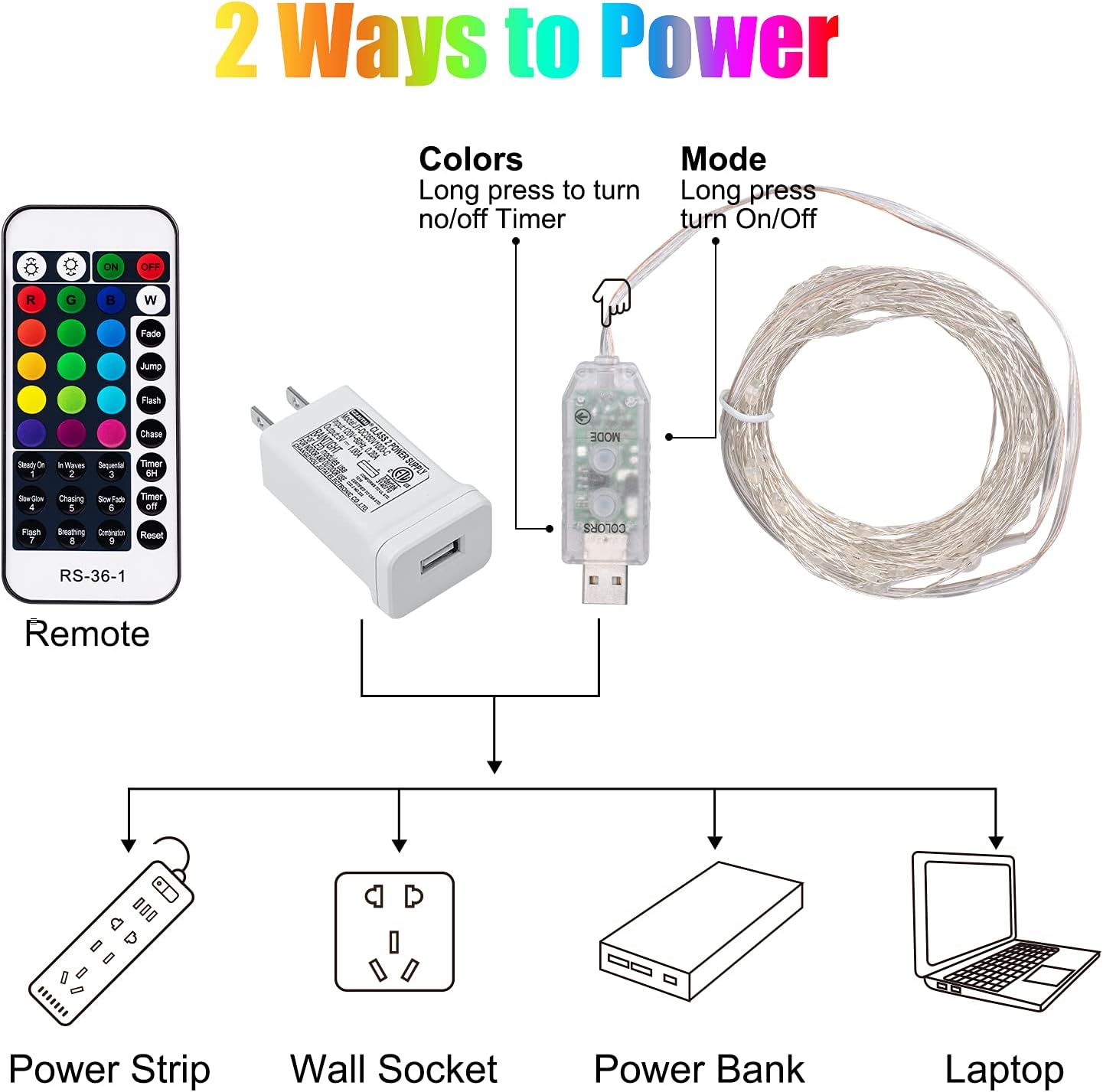
Image 3: Detailed view of the remote control, indicating buttons for power, brightness, color selection, mode selection, and timer functions.
- ON/OFF: Turns the lights on or off.
- Brightness +/-: Adjusts the light intensity. There are multiple brightness levels.
- Color Selection (16 Colors): Press any of the 16 color buttons to select a static color.
- Mode Selection (13 Modes): Choose from various dynamic lighting effects:
- 4 Color Cycle Modes: Fade, Jump, Flash, Chase.
- 9 Monochrome Light Modes: Steady On, In Waves, Sequential, Slow Glow, Chasing, Slow Fade, Twinkle/Flash, Breathing, Combination.
- Timer 6H: Activates a 6-hour on, 18-hour off cycle. The lights will automatically turn on for 6 hours and then off for 18 hours, repeating daily.
- Timer OFF: Deactivates the timer function.
- Reset: Resets the lights to their default settings.

Image 4: Visual representation of adjustable brightness settings (45%, 75%, 100%).

Image 5: Examples of the 16 available static colors for the string lights.
6. Maintenance
To ensure the longevity and optimal performance of your string lights:
- Cleaning: Gently wipe the lights with a soft, dry cloth. Do not use harsh chemicals or abrasive cleaners.
- Storage: When not in use, carefully coil the lights to prevent tangling. Store them in a cool, dry place away from direct sunlight.
- Remote Battery Replacement: The remote uses a replaceable CR2025 battery. To replace, slide open the battery compartment on the back of the remote, insert a new CR2025 battery with the correct polarity, and close the compartment.
7. Troubleshooting
If you encounter issues with your Minetom Fairy String Lights, refer to the following common solutions:
| Problem | Possible Cause | Solution |
|---|---|---|
| Lights do not turn on. | No power, loose connection, remote battery depleted. | Ensure the USB plug is securely connected to a power source. Check if the power adapter is plugged into a live outlet. Replace the remote control battery if necessary. |
| Remote control is not working. | Plastic tab not removed, remote battery depleted, remote not pointed at receiver. | Remove the plastic tab from the remote. Replace the CR2025 battery. Point the remote directly at the USB receiver on the light string. |
| Lights are tangled. | Improper handling or storage. | Carefully untangle the wires. For future storage, reel the lights neatly. |
| Some LEDs are not lighting up. | Damaged wire or LED. | Inspect the wire for visible damage. If damage is present, discontinue use and contact customer support. |
8. Specifications
| Feature | Detail |
|---|---|
| Model Number | fairy-mini-light |
| Light Length | 33 Feet (approx. 10 meters) |
| Number of LEDs | 100 |
| Wire Material | Copper (4-strand silver wire) |
| Light Colors | 16 Solid Colors |
| Lighting Modes | 13 (including 4 color cycle modes and 9 monochrome modes) |
| Power Source | USB (5V) or UL-listed Power Adapter (120V) |
| Wattage | 5 watts |
| Water Resistance | IP67 (lights only, USB connector not waterproof) |
| Controller Type | Remote Control (IR) and USB button |
| Timer Function | 6 hours ON / 18 hours OFF |
| Remote Battery | CR2025 (replaceable) |
9. Warranty and Support
For warranty information and customer support, please refer to the documentation included in your product packaging or visit the official Minetom website. If you have any questions or require assistance, please contact Minetom customer service.
Ask a question about this manual
Ask about setup, troubleshooting, compatibility, parts, safety, or missing instructions. Manuals+ will review the question and use this page’s manual context to help answer it.