
1. Product Overview
The Retekess TD006 is a 4-key waterproof call button designed for use in service environments such as restaurants, cafes, bars, banks, and factories. It functions as a table transmitter, allowing customers to easily request service. This device is compatible with Retekess T114 and T128 watch receivers (sold separately).
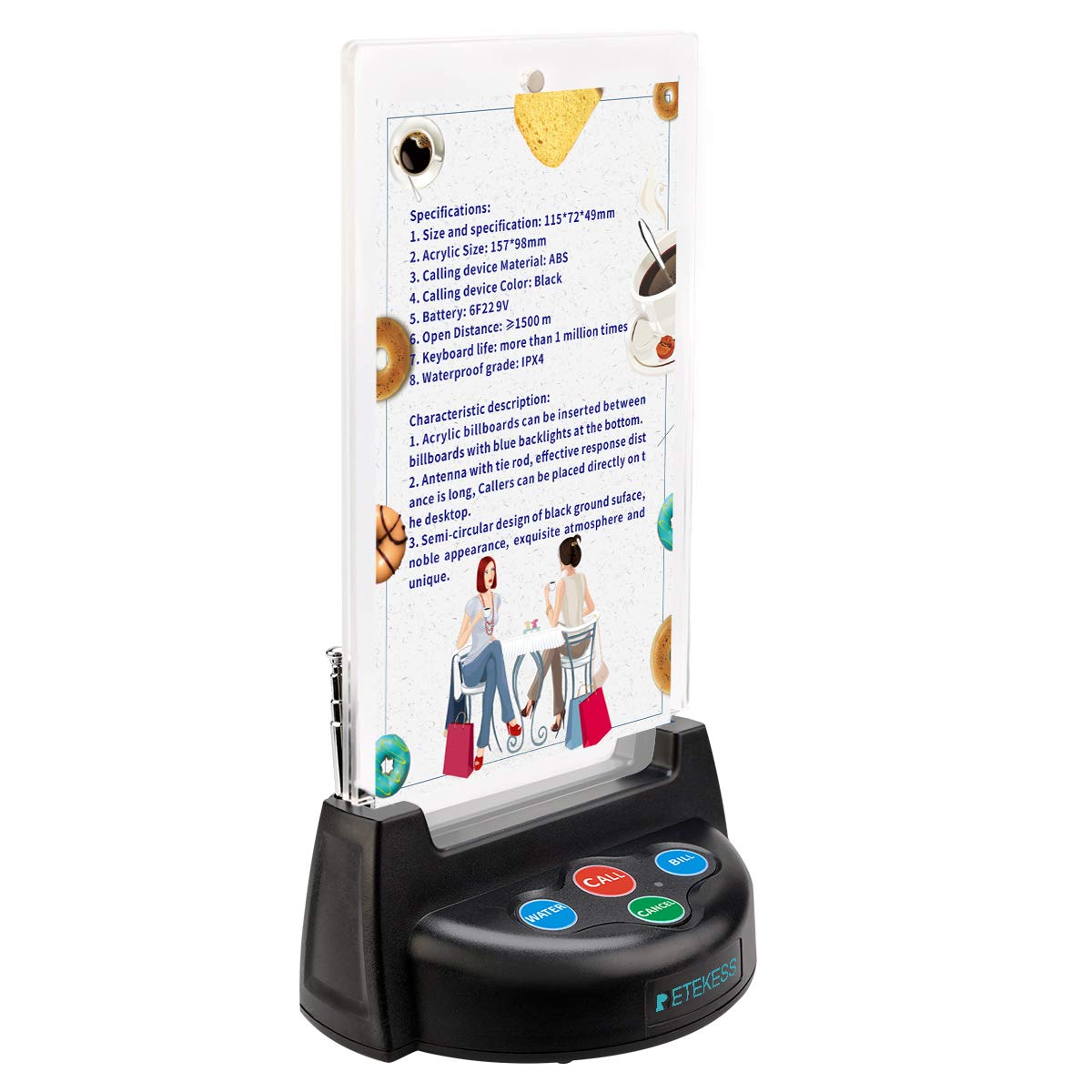
Figure 1: Front view of the Retekess TD006 Pager System with its antenna extended.
2. Key Features
- 4-Key Functionality: Features 'Call', 'Cancel', 'Water', and 'Bill' buttons for comprehensive service requests.
- Customizable Display: Includes two transparent plastic plates with magnets, allowing users to freely change the internal card paper for menus or advertisements.
- Long Battery Life: Equipped with a built-in 12V/23A battery, providing over 20,000 launches for extended standby time and reduced battery replacement frequency.
- Extended Range: An external antenna enables a transmission range of up to 300 meters (open space) and strong wall penetration, capable of transmitting through 10-15 walls in typical environments.
- Receiver Compatibility: Designed to work exclusively with Retekess T114 screen receivers and T128 watch receivers. A single button can activate one or multiple T128 watch receivers simultaneously.
- Waterproof Design: The call button features a waterproof construction, protecting it from spills and splashes.
3. Setup Instructions
3.1 Battery Installation
The TD006 pager system comes with a pre-installed 12V/23A battery. No initial battery installation is typically required. For battery replacement, refer to the maintenance section.
3.2 Customizing the Display Card
The pager features a transparent acrylic holder for displaying custom cards. To insert or change a card:
- Gently separate the two transparent plastic plates at the top. They are held together by magnets.
- Insert your desired menu, advertisement, or instruction card between the two plates.
- Ensure the card is properly aligned and the plates are securely re-attached by the magnets.

Figure 2: Illustration of inserting a custom card into the pager's magnetic acrylic display.
3.3 Pairing with Receivers (T114/T128)
The TD006 call button must be paired with a compatible Retekess T114 screen receiver or T128 watch receiver to function. Refer to the instruction manual of your specific receiver model for detailed pairing procedures. Generally, the process involves putting the receiver into pairing mode and then pressing the desired button on the TD006 transmitter.

Figure 3: The TD006 pager is compatible with T128 watch pagers and T114 screen receivers. Receivers are not included.
4. Operating Instructions
Once the TD006 call button is set up and paired with a receiver, operation is straightforward:
- Call Button (Red): Press this button to request general service. The paired receiver(s) will display the table number and alert the staff.
- Water Button (Blue): Press this button to specifically request water service.
- Bill Button (Blue): Press this button to request the bill.
- Cancel Button (Green): Press this button to cancel a previous service request.

Figure 4: A user pressing one of the service request buttons on the TD006 pager.
Video 1: This video demonstrates how to use call buttons in various service scenarios, providing a visual guide to the pager system's operation.
5. Maintenance
5.1 Cleaning
The TD006 call button is waterproof. To clean, wipe the surface with a damp cloth. Avoid using harsh chemicals or abrasive cleaners that could damage the device.
5.2 Battery Replacement
The TD006 uses a 12V/23A battery. When the transmission range decreases or the indicator light fails to illuminate upon button press, it may be time to replace the battery. To replace:
- Locate the battery compartment, typically on the underside or rear of the device.
- Open the compartment using a small screwdriver if necessary.
- Remove the old 12V/23A battery.
- Insert a new 12V/23A battery, ensuring correct polarity.
- Close the battery compartment securely.

Figure 5: The 12V/23A battery provides approximately 12 months of operation under normal use.
6. Troubleshooting
| Problem | Possible Cause | Solution |
|---|---|---|
| Pager button does not transmit signal. | Low or dead battery. | Replace the 12V/23A battery. |
| Receiver does not respond to button press. | Pager not paired with receiver. | Refer to receiver manual for pairing instructions. |
| Signal range is shorter than expected. | Obstructions (thick walls, metal structures) or interference. | Ensure antenna is fully extended. Reposition pager or receiver to minimize obstructions. |
| Buttons are unresponsive or stuck. | Debris or liquid under the button. | Clean the button area. If issue persists, contact support. |
7. Specifications
- Model Number: FF9460A (TD006)
- Product Dimensions: 6.22 x 3.94 x 1.93 inches
- Item Weight: 11.5 ounces
- Manufacturer: Retekess
- Battery: 1 x 12V/23A battery (included)
- Transmission Range: Up to 300 meters (open space)
- Compatibility: Retekess T114 and T128 receivers
8. Warranty and Support
For warranty information, please refer to the documentation provided with your purchase or visit the official Retekess website. For technical support, troubleshooting assistance, or to inquire about compatible receivers and accessories, please contact Retekess customer service through their official channels.
Online Resources:
- Retekess Official Website: www.retekess.com
- Amazon Store: Retekess Store on Amazon


