
Hayward W3RC9990CUB
Hayward TigerShark QC Robotic Pool Cleaner Instruction Manual
Model: W3RC9990CUB
1. Introduction
This manual provides essential information for the safe and efficient operation and maintenance of your Hayward TigerShark QC Robotic Pool Cleaner. Please read all instructions carefully before using the cleaner to ensure optimal performance and longevity of the product.
The Hayward TigerShark QC is designed for in-ground pools up to 20 x 40 ft, offering advanced cleaning of the pool floor, walls, coves, and waterline. It features an exclusive 90-minute Quick Clean cycle for rapid cleaning and a standard 4-hour complete cycle.

Image 1.1: Front view of the Hayward TigerShark QC Robotic Pool Cleaner.
2. Safety Information
Always observe the following safety precautions to reduce the risk of injury or damage:
- Read and follow all instructions in this manual and on the cleaner itself.
- Do not operate the cleaner if the power cord is damaged. Contact customer support for replacement.
- Ensure the power supply is connected to a grounded outlet.
- Never enter the pool while the cleaner is operating.
- Always disconnect the power supply before performing any maintenance or cleaning tasks.
- Keep the power supply unit away from the pool edge to prevent it from falling into the water.
- This appliance is not intended for use by persons with reduced physical, sensory or mental capabilities, or lack of experience and knowledge, unless they have been given supervision or instruction concerning use of the appliance by a person responsible for their safety.
3. Product Overview
The Hayward TigerShark QC Robotic Pool Cleaner is an automatic pool vacuum designed for efficient and thorough cleaning. Key features include:
- Microprocessor-Based Technology: Ensures comprehensive coverage of pool surfaces.
- Quick Clean Cycle: An exclusive 90-minute cycle for fast cleaning.
- Complete Cycle: A standard 4-hour cycle for thorough cleaning.
- On-Board Pump: Provides powerful vacuum suction for debris pickup.
- Simple Filter Cartridge: Easy to access and clean for hassle-free maintenance.
- Independent Operation: Runs separately from the pool's filtration system, requiring no extra hoses or pumps.
- Energy Efficient: Powered by an efficient 24-volt motor.

Image 3.1: The TigerShark QC effectively cleans pool floor, walls, coves, and waterline.
4. Setup
Follow these steps to set up your Hayward TigerShark QC Robotic Pool Cleaner:
- Unpack the Cleaner: Carefully remove the cleaner and its components from the packaging.
- Connect Power Supply: Connect the floating cable from the cleaner to the power supply unit. Ensure the connection is secure.
- Position Power Supply: Place the power supply unit at least 10 feet (3 meters) from the edge of the pool. Ensure it is in a dry, shaded area and connected to a properly grounded 115-volt outlet.
- Place Cleaner in Pool: Gently lower the cleaner into the pool. Allow it to sink to the bottom. Ensure the floating cable is untangled and has enough slack to reach all areas of the pool.

Image 4.1: The cleaner can be easily transported and set up using a caddy (sold separately).

Image 4.2: The cleaner operates without charging, connecting directly to a power source.
5. Operating Instructions
Once the cleaner is properly set up and submerged in the pool, you can begin the cleaning cycle.
- Select Cleaning Cycle: The TigerShark QC offers two cleaning modes:
- Quick Clean (90 minutes): Ideal for a rapid touch-up of the pool floor, walls, coves, and waterline.
- Complete Cycle (4 hours): For a thorough cleaning of the entire pool.
- Start Cleaning: Press the appropriate button on the power supply unit to start the desired cleaning cycle. The cleaner will begin its programmed cleaning pattern.
- Monitor Operation: Allow the cleaner to complete its cycle. It will automatically shut off once the cycle is finished.
- Retrieve Cleaner: After the cycle is complete and the cleaner has shut off, gently pull the floating cable to bring the cleaner to the surface. Use the handle to lift it out of the water. Avoid pulling the cleaner out of the water by its cable.

Image 5.1: The cleaner offers both a 90-minute Quick Clean and a 4-hour complete cycle.
6. Maintenance
Regular maintenance ensures the longevity and optimal performance of your pool cleaner.
- Empty and Rinse Filter Cartridge: After each cleaning cycle, or as needed, remove the filter cartridge from the cleaner. Open the cleaner, remove the cartridge, and rinse it thoroughly with a garden hose to remove all debris. Ensure the cartridge is clean before reinserting it.
- Rinse Cleaner: After removing the filter, rinse the exterior of the cleaner with clean water to remove any pool chemicals or debris.
- Inspect Cable: Periodically inspect the floating cable for any tangles or damage. Untangle the cable as needed to prevent kinks.
- Storage: When not in use, store the cleaner in a cool, dry place, away from direct sunlight and extreme temperatures. Ensure the cable is neatly coiled to prevent damage.
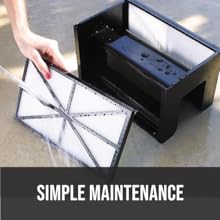
Image 6.1: The filter cartridge is easily removed and rinsed for simple maintenance.
7. Troubleshooting
If you encounter issues with your Hayward TigerShark QC, refer to the following common troubleshooting steps:
| Problem | Possible Cause | Solution |
|---|---|---|
| Cleaner does not start | No power to the unit; loose cable connection; power supply malfunction. | Check power outlet; ensure all cables are securely connected; test power supply. |
| Poor cleaning performance | Clogged filter cartridge; debris blocking intake; worn brushes. | Clean filter cartridge thoroughly; check for and remove obstructions; inspect brushes for wear and replace if necessary. |
| Cleaner does not climb walls | Clogged filter; air in cleaner; pool water chemistry imbalance (e.g., high calcium). | Clean filter; remove cleaner from water, tilt to release air, and re-submerge; check pool water chemistry. |
| Cable tangles frequently | Improper cable deployment; cleaner operating too long in one area. | Ensure cable is fully extended and untangled before starting; consider using a cable swivel (if not built-in) or adjusting cleaning patterns. |
If the problem persists after attempting these solutions, please contact Hayward Customer Support.
8. Specifications
| Feature | Specification |
|---|---|
| Model Number | W3RC9990CUB |
| Power Source | 115 Volts (Hydraulic Powered) |
| Item Weight | 21.5 Pounds |
| Hose/Cord Length | 55 Feet |
| Control Method | Touch |
| Product Dimensions (L x W x H) | 19.7" x 19.7" x 21" |
| Material | ABS Plastic |
| Color | Blue |
| Installation Type | Self-Installation |

Image 8.1: Key dimensions and weight of the TigerShark QC cleaner.
9. Warranty Information
The Hayward TigerShark QC Robotic Pool Cleaner comes with a Limited Warranty. Please refer to the warranty card included with your product for specific terms, conditions, and duration of coverage. Keep your proof of purchase for warranty claims.
10. Customer Support
For technical assistance, replacement parts, or warranty inquiries, please contact Hayward Customer Support:
- Website: Visit the official Hayward website for support resources and contact information.
- Phone: Refer to your product packaging or the Hayward website for the most current customer service phone numbers.
When contacting support, please have your product model number (W3RC9990CUB) and serial number ready.
Related documentsW3RC9990CUB


Ask a question about this manual
Ask about setup, troubleshooting, compatibility, parts, safety, or missing instructions. Manuals+ will review the question and use this page’s manual context to help answer it.