
PRITECH Universal Remote Control (Compatible with LG)
Pritech Universal Remote Control (Compatible with LG) - User Manual
Model: Universal Remote Control (Compatible with LG)
Product Overview
The Pritech Universal TV Remote Control is designed as an ideal replacement for your old or faulty remote. This convenient control allows you to operate your television as if it were the original remote. Simply insert the batteries, and it's ready to use.
Key Features:
- Perfect replacement for your existing TV remote.
- Guaranteed to work with all TV brands.
- Made from durable ABS material.
- Features soft plastic buttons for comfortable use.
- Lightweight and ergonomic design.
- Operating range of up to 10 meters.

Image: Pritech Universal Remote Control highlighting its compatibility with LG, high performance, 8-meter range, comfortable design, and quick access buttons.
Setup and Installation
The Pritech Universal Remote Control is designed for immediate use without complex setup. Follow these simple steps to begin using your remote.
1. Battery Installation
The remote requires AAA batteries (not supplied). Ensure correct polarity when inserting the batteries.
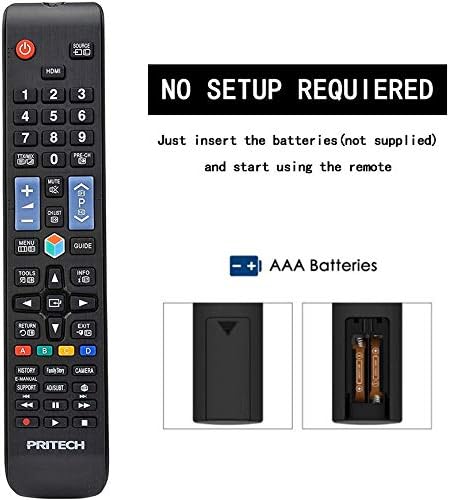
Image: A diagram illustrating the "NO SETUP REQUIRED" feature and the location for AAA battery insertion in the remote control.
- Remove Battery Cover: Gently slide down the battery cover located on the back of the remote control.
- Insert Batteries: Insert two AAA batteries, ensuring the positive (+) and negative (-) ends align with the markings inside the battery compartment.
- Replace Battery Cover: Slide the battery cover back into place until it clicks securely.

Image: A four-panel visual guide demonstrating the steps for battery installation: 1. Removing the battery cover, 2. Distinguishing positive and negative electrodes, 3. Snapping batteries into place, and 4. Ready to control your TV.
2. Initial Use
Once batteries are installed, the remote is ready to operate your LG compatible television. No programming or code entry is typically required.
Operating Instructions
This universal remote control provides all the essential functions of your original LG TV remote. Familiarize yourself with the button layout for optimal use.

Image: A clear front view of the Pritech Universal Remote Control, showing all buttons and their labels, including power, input, channel, volume, navigation, and smart TV functions.
Common Functions:
- Power Button (●): Turns the TV on or off.
- Input/Source: Switches between different video inputs (HDMI, AV, etc.).
- Channel Up/Down (▲/▼): Changes TV channels.
- Volume Up/Down (+/-): Adjusts the sound volume.
- Mute: Silences the TV audio.
- Number Buttons (0-9): Directly enter channel numbers.
- Navigation Pad (Up, Down, Left, Right, OK): Used to navigate menus and confirm selections.
- Home Button: Accesses the TV's main smart hub or home screen.
- Back/Exit: Returns to the previous screen or exits a menu.
- Smart/My Apps: Direct access to smart TV features and installed applications.
For specific functions related to your LG TV model, refer to your television's user manual in conjunction with this remote control.
Maintenance and Care
To ensure the longevity and optimal performance of your Pritech Universal Remote Control, follow these maintenance guidelines:
- Cleaning: Use a soft, dry cloth to clean the remote. For stubborn dirt, slightly dampen the cloth with water or a mild cleaning solution. Avoid abrasive cleaners or solvents.
- Battery Replacement: Replace batteries when the remote's response becomes sluggish or stops working. Always replace both batteries at the same time.
- Storage: Store the remote in a cool, dry place away from direct sunlight and extreme temperatures.
- Avoid Drops: While designed to be durable, avoid dropping the remote, as this can damage internal components.
- Liquid Exposure: Keep the remote away from liquids. If it gets wet, remove batteries immediately and allow it to dry completely before reinserting them.
Troubleshooting
If you encounter issues with your Pritech Universal Remote Control, try the following troubleshooting steps:
| Problem | Possible Cause | Solution |
|---|---|---|
| Remote not responding. | Dead or incorrectly inserted batteries. Obstruction between remote and TV. Remote out of range. | Check battery polarity and replace batteries if necessary. Ensure a clear line of sight to the TV's IR receiver. Move closer to the TV (within 10 meters). |
| Some buttons not working. | Dirt or debris under buttons. Internal malfunction. | Clean the remote surface. If problem persists, contact customer support. |
| Remote works intermittently. | Low battery power. Interference. | Replace batteries. Remove any potential sources of infrared interference. |
| Remote does not control TV. | Not compatible with TV model (despite being universal). | While designed for broad compatibility, some specific TV models might not be fully supported. Verify compatibility or contact Pritech support. |
Specifications
| Feature | Detail |
|---|---|
| Brand | PRITECH |
| Model | Universal Remote Control (Compatible with LG) |
| Color | Black (Compatible with LG design) |
| Connectivity Technology | Infrared |
| Compatible Devices | Television (specifically designed for LG compatibility) |
| Maximum Range | 10 Meters |
| Material | ABS Plastic |
| Power Source | 2 x AAA Batteries (not included) |
| ASIN | B07SRPZYWC |
| Manufacturer | Pritech |
Warranty and Support
Pritech offers a 2-year warranty on this universal remote control. This warranty covers manufacturing defects and ensures the product functions as described.
For warranty claims, technical support, or further assistance, please contact Pritech customer service through their official website or the retailer where the product was purchased. Keep your proof of purchase for warranty validation.
Note: The warranty does not cover damage caused by misuse, accidents, unauthorized modifications, or normal wear and tear.
Ask a question about this manual
Ask about setup, troubleshooting, compatibility, parts, safety, or missing instructions. Manuals+ will review the question and use this page’s manual context to help answer it.