
Introduction
Welcome to the Showlite LB-427 LED RGB Lighting Kit. This manual provides essential information for the safe and efficient operation of your lighting system. Please read it thoroughly before use to ensure proper setup and functionality.
Safety Instructions
To prevent damage or injury, observe the following safety precautions:
- Always connect the unit to a grounded power outlet.
- Do not expose the device to rain or moisture.
- Ensure proper ventilation to prevent overheating. Maintain adequate space around the unit.
- Do not open the housing; refer all servicing to qualified personnel.
- Avoid direct eye exposure to the light source, as it can cause discomfort.
- Disconnect from power before cleaning or maintenance procedures.
Package Contents
The Showlite LB-427 LED RGB Lighting Kit includes the following components:
- 1x Showlite LB-427 LED Bar with 4 PAR Spots
- 1x Tripod Stand
- 1x Wireless Foot Pedal
- 1x Remote Control
- 1x Transport Bag
- 1x Power Cable
- 1x User Manual (this document)

Image: The included transport bag for the Showlite LB-427 lighting kit.
Setup
1. Assembling the Tripod Stand
Unfold the tripod legs and extend the central pole to the desired height. Ensure all locking mechanisms are securely fastened to maintain stability.

Image: The adjustable tripod stand.
2. Mounting the LED Bar
Attach the LED bar to the top of the tripod stand. Verify that it is securely fastened to prevent accidental detachment during operation.
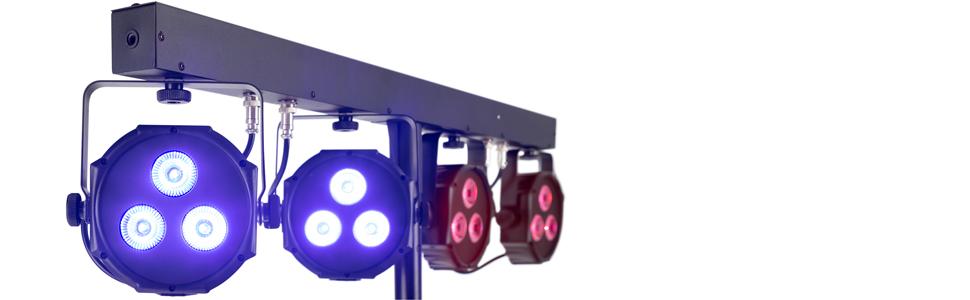
Image: The LED lighting bar mounted on the tripod stand.
3. Power Connection
Connect the provided power cable to the "POWER INPUT" on the rear of the LED bar. Then, plug the other end into a suitable grounded power outlet (100-240VAC, 50/60Hz).

Image: Detail of the power input and DMX ports on the rear panel.
4. Connecting the Foot Pedal (Optional)
If using the wireless foot pedal, ensure it is powered on and paired according to the instructions in the "Operating Modes" section. No physical connection is required for the wireless pedal.
Operating Modes
The Showlite LB-427 offers several control options to suit various performance needs:
1. Manual Control (On-Board Display)
Use the MENU, UP, DOWN, and ENTER buttons located on the rear panel to navigate through the settings. This allows you to select desired programs, static colors, or set DMX addresses directly on the unit's display.

Image: The control panel with LED display and navigation buttons.
2. Wireless Foot Pedal Control
The wireless foot pedal provides convenient, hands-free control for quick changes between modes. Ensure the foot pedal is charged and within effective range of the LED bar.
- AUTO: Activates automatic program sequences, cycling through various light patterns and colors.
- MUSIC: Engages sound-activated mode, where the lights react dynamically to ambient music or sound.
- COLOR: Cycles through a selection of static color presets.
- BLACKOUT: Instantly turns off all lights.

Image: The wireless foot pedal for mode selection.
3. DMX 512 Control
For advanced and precise control, connect an external DMX controller. This allows for integration into larger lighting setups.
- Connect a DMX cable from your DMX controller's output to the "DMX IN" port on the LB-427.
- If connecting multiple units, use the "DMX OUT" port to daisy-chain to the next fixture.
- Refer to the DMX channel chart (typically found in a separate DMX guide or product sheet) for specific channel functions and values.

Image: The rear panel showing DMX input and output ports.
4. Remote Control
The included IR remote control provides basic functions such as mode selection, color changes, and blackout. For optimal reception, point the remote towards the front of the LED bar where the IR receiver is located.
Maintenance
Cleaning
Regularly clean the lenses and housing with a soft, lint-free cloth. Do not use abrasive cleaners or solvents, as these can damage the finish or optical components.
Storage
When not in use, store the lighting kit in the provided transport bag. Keep it in a dry, dust-free environment to protect components from damage.
Troubleshooting
If you encounter issues with your Showlite LB-427, refer to the table below for common problems and solutions:
| Problem | Possible Cause | Solution |
|---|---|---|
| No power | Power cable disconnected, faulty power outlet, blown fuse. | Check power cable connection, try a different power outlet, inspect and replace the fuse if necessary. |
| Lights not responding to foot pedal/remote | Batteries low/dead, unit out of range, signal interference. | Replace batteries in the controller, move closer to the unit, check for obstructions or other wireless devices causing interference. |
| DMX control not working | Incorrect DMX address, faulty DMX cable, incorrect DMX mode selected on the unit. | Verify the DMX address setting, check DMX cable for damage, ensure DMX mode is active on the unit's display. |
| Unit overheating | Blocked ventilation openings. | Ensure all ventilation vents are clear and the unit has adequate airflow around it. Do not operate in enclosed spaces. |
Specifications
Key technical specifications for the Showlite LB-427 LED RGB Lighting Kit:
| Feature | Detail |
|---|---|
| Model Number | LB-427 (Manufacturer Reference: 00062865) |
| Light Source | 4x PAR Spots, each with 3x 9W RGB LEDs |
| Control Modes | DMX 512, Wireless Foot Pedal, Manual (On-Board), Remote Control |
| Power Input | 100-240VAC, 50/60Hz |
| ASIN | B07SQCYVL4 |
Warranty and Support
For detailed warranty information and technical support, please refer to the documentation provided with your original purchase. It is recommended to keep your proof of purchase for any warranty claims or service requests. You may also contact Showlite customer service directly for assistance.

