
FULAIM MX11
FULAIM Wireless Lavalier Microphone System MX11 User Manual
Model: MX11
1. Product Overview
The FULAIM MX11 is a professional-grade UHF wireless lavalier microphone system designed for high-quality audio recording with smartphones, DSLR cameras, and other compatible devices. It features a compact and portable design, real-time audio monitoring, and anti-interference capabilities, making it ideal for interviews, vlogging, video recording, and live broadcasts.

The system includes a receiver unit (RX) and a transmitter unit (TX), both equipped with essential controls and ports for seamless operation. The omnidirectional lavalier microphone captures clear audio, and the system's UHF technology ensures stable signal transmission over a significant range.
2. What's in the Box
Upon opening the package, ensure all the following components are present:
- 1 x FULAIM MX11 Receiver (RX)
- 1 x FULAIM MX11 Transmitter (TX)
- 1 x Omnidirectional Lavalier Microphone with clip and foam pop shield
- 1 x Mini Tripod
- 1 x Phone Holder (integrated with receiver mount)
- 1 x 3.5mm TRS-TRRS Audio Cable (for smartphones)
- 1 x 3.5mm TRS-TRS Audio Cable (for cameras)
- 2 x Micro USB Charging Cables
- 1 x Customized Storage Case
- 1 x User Manual (this document)

3. Setup Guide
Follow these steps to set up your FULAIM MX11 Wireless Lavalier Microphone System:
3.1 Charging the Devices
Both the receiver and transmitter units are powered by built-in Lithium-Ion batteries. Before first use, fully charge both units using the provided Micro USB cables and a standard 5V USB power adapter (not included).
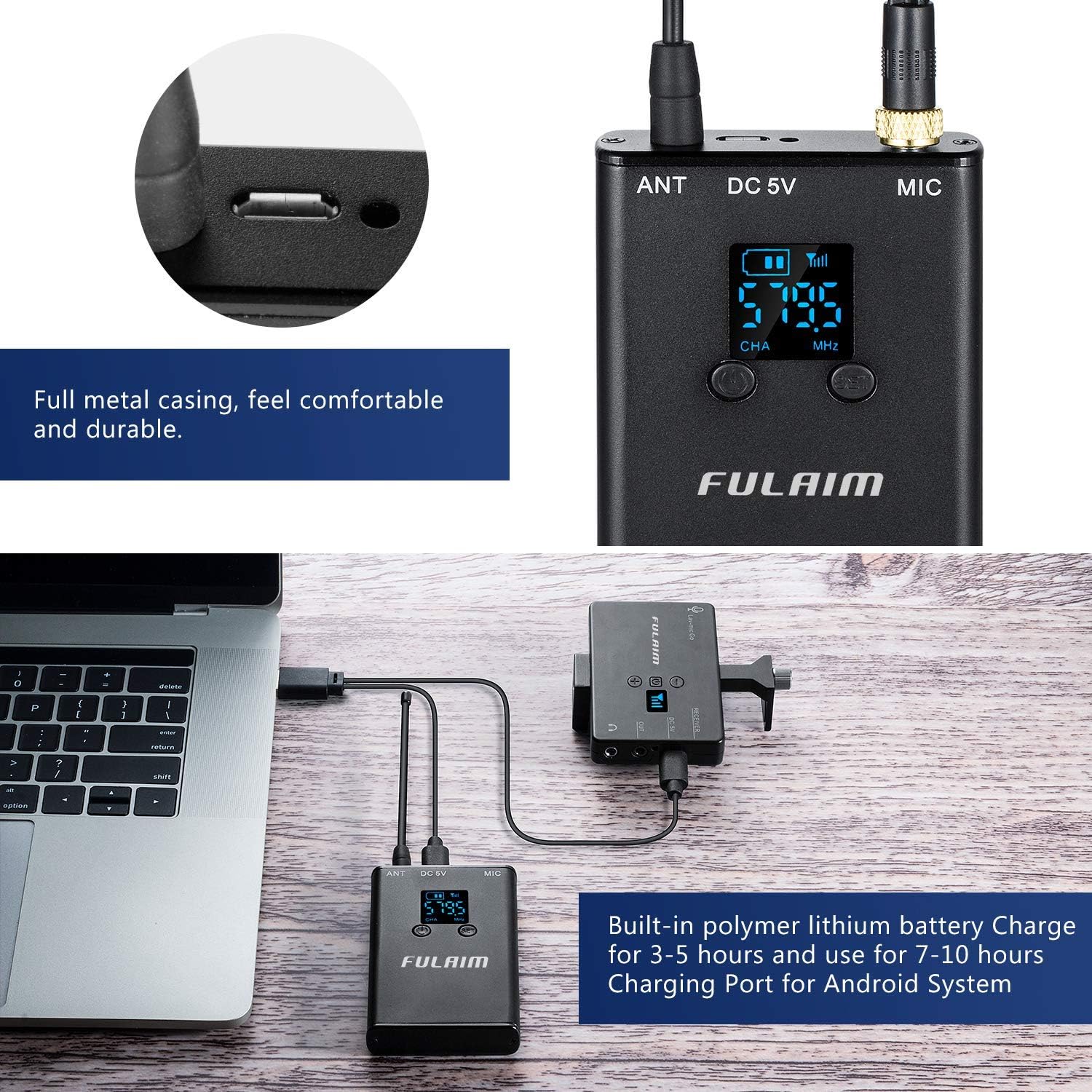
A full charge typically takes 3-5 hours and provides 7-10 hours of runtime.
3.2 Assembling the Receiver with Phone/Camera
- Install Phone/Camera: Secure your smartphone or DSLR camera into the phone holder/cold shoe mount on the receiver unit. Ensure it is firmly seated.
- Attach Tripod (Optional): Screw the mini tripod onto the 1/4" threaded hole at the bottom of the receiver unit for stable placement.
- Connect Audio Cable:
- For Smartphones: Use the 3.5mm TRS-TRRS audio cable. Plug the TRS end into the receiver's "OUT" jack and the TRRS end into your smartphone's 3.5mm audio jack. Note: For iPhone 7 or above, you may need an original Lightning to 3.5mm jack adapter (not included).
- For DSLR Cameras: Use the 3.5mm TRS-TRS audio cable. Plug one end into the receiver's "OUT" jack and the other end into your camera's microphone input jack.
- Connect Lavalier Microphone to Transmitter: Plug the lavalier microphone's 3.5mm jack into the "MIC" input socket on the transmitter unit. Ensure the connection is secure.
4. Operating Instructions
4.1 Powering On/Off
- To Power On: Press and hold the Power/CH Setting Button on both the receiver and transmitter until the LCD display lights up.
- To Power Off: Press and hold the Power/CH Setting Button on both units until the LCD display turns off.
The blue working indicator light on the receiver will illuminate when it successfully pairs with the transmitter.
4.2 Pairing and Channel Selection
The FULAIM MX11 system typically pairs automatically upon powering on. If pairing does not occur or if you experience interference, you can manually change the channel:
- Press the CH Setting Button on the transmitter to cycle through the available UHF channels. The receiver will automatically synchronize with the transmitter's selected channel.
- The system offers 20 selectable UHF channels (Frequency Range: 570-579.5MHz and 580-589.5MHz) to minimize interference.

4.3 Adjusting Volume
Use the Volume "+" and "-" buttons on the receiver to adjust the audio output level to your recording device. Monitor the audio through headphones for optimal sound levels.
4.4 Real-time Audio Monitoring
The receiver unit features a 3.5mm real-time monitor headset jack. Plug in your headphones to monitor the audio being captured by the lavalier microphone in real-time. This allows you to detect any abnormalities in the audio signal and adjust settings as needed.

4.5 Wearing the Microphone and Transmitter
- Attach the lavalier microphone to your clothing, typically near the collar or lapel, using the integrated clip.
- The transmitter unit can be clipped to a belt, pocket, or waistband using its sturdy metal clip. Ensure the antenna is not obstructed for optimal signal transmission.
The foam pop shield on the lavalier microphone helps to soften vocal plosives and reduce wind noise, ensuring clearer audio recordings.

5. Maintenance
- Cleaning: Use a soft, dry cloth to clean the exterior of the receiver and transmitter units. Do not use liquid cleaners or solvents.
- Storage: When not in use, store the system in its customized storage case to protect it from dust, moisture, and physical damage.
- Battery Care: To prolong battery life, avoid fully discharging the units frequently. Recharge them regularly, especially if storing for extended periods.
- Cable Management: Handle all cables with care. Avoid sharp bends or excessive pulling to prevent internal wire damage.
6. Troubleshooting
| Problem | Possible Cause | Solution |
|---|---|---|
| No audio output |
|
|
| Poor audio quality / Interference |
|
|
| Low recording volume |
|
|
| Short battery life |
|
|

7. Specifications
| Feature | Detail |
|---|---|
| Model | MX11 |
| Brand | FULAIM |
| Microphone Form Factor | Microphone System (Lavalier) |
| Polar Pattern | Omnidirectional |
| Connectivity Technology | Wireless (UHF) |
| Connector Type | 3.5 mm Jack |
| Number of Channels | 20 |
| UHF Frequency Range | 570-579.5MHz, 580-589.5MHz (as per video) |
| Audio Frequency Response | 0.03 kHz - 18 kHz |
| Signal-to-Noise Ratio (SNR) | 96 dB |
| Max Operating Distance | 196 feet (60 meters) in open outdoor areas |
| Power Source | Battery Powered (Built-in Lithium Ion) |
| Charging Port | Micro USB 5V |
| Battery Runtime | Up to 7-10 hours |
| Material | Metal (casing) |
| Compatible Devices | Camera, Smartphone (iOS & Android), PC, Tablets |
| Item Weight | 3.52 ounces (0.1 Kilograms) |
| Operating Temperature | -20°C to +55°C |
| Storage Temperature | -20°C to +55°C |

8. Warranty and Support
For warranty information, technical support, or service inquiries, please refer to the contact details provided on the FULAIM official website or the product packaging. Keep your purchase receipt as proof of purchase for warranty claims.
You can also visit the FULAIM Store on Amazon for more product information and support: FULAIM Amazon Store.
Related documentsMX11


Ask a question about this manual
Ask about setup, troubleshooting, compatibility, parts, safety, or missing instructions. Manuals+ will review the question and use this page’s manual context to help answer it.