
Protimeter BLD7751L
Protimeter BLD7751L Hygromaster L with Short QuikStick Humidity Sensor Instruction Manual
Model: BLD7751L
Introduction
This manual provides comprehensive instructions for the safe and effective use of the Protimeter BLD7751L Hygromaster L, a handheld hygrometer designed for accurate measurement of humidity and temperature. It features a simple-to-use interface and offers fast response with high accuracy. Please read this manual thoroughly before operating the device.
Package Contents
Upon opening the package, verify that all components are present:
- Protimeter BLD7751L Hygromaster L Meter
- Short QuikStick Humidity Sensor (POL8751)
- Protective Carrying Case
- 9V Battery
- Small Phillips Screwdriver
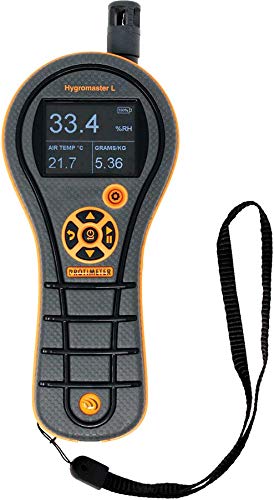
Figure 1: Protimeter BLD7751L Hygromaster L device. This image displays the handheld meter with its digital screen showing various readings, including temperature, air temperature, and specific humidity, along with the attached Short QuikStick Humidity Sensor.

Figure 2: Protective Carrying Case. This black case features the Protimeter logo and is designed to safely store the Hygromaster L meter and its accessories.
Setup and Initial Use
1. Battery Installation
- Locate the battery compartment on the back of the Hygromaster L.
- Use the provided small Phillips screwdriver to open the battery compartment cover.
- Insert the 9V battery, ensuring correct polarity.
- Replace the battery compartment cover and secure it with the screw.
2. Sensor Attachment
The Short QuikStick Humidity Sensor (POL8751) is designed for easy attachment. Gently insert the sensor into the designated port at the top of the Hygromaster L unit until it is securely connected.

Figure 3: Device Information Screen. This image shows the Hygromaster L's display with system information, including model number, build version, calibration date, and connected probe details, confirming the QuikStick sensor is recognized.
Operating Instructions
Powering On/Off
Press and hold the power button (typically located centrally on the control panel) to turn the device on or off.
Basic Measurements
Once powered on, the Hygromaster L will automatically begin displaying readings for:
- Relative Humidity (0-100% RH)
- Air Temperature
- Dewpoint Temperature
- Specific Humidity (GPP, g/Kg)
Allow a few moments for the readings to stabilize, especially when moving the device between environments with different humidity or temperature levels. The device offers a fast response time for efficient data acquisition. It is recommended for general measurement and applications, such as flood damage restoration.
Navigating Menus and Settings
Use the directional buttons on the control panel to navigate through menus and adjust settings. The central button typically acts as a selection or confirmation button.

Figure 4: Settings Menu. This image shows the Hygromaster L's settings interface, allowing users to configure units, display brightness, auto-off function, buzzer, and access calibration and device information.
Changing Units
Access the 'Units' option in the settings menu to switch between Celsius and Fahrenheit for temperature readings, and other relevant units for humidity measurements.
Maintenance
Sensor Care
The Short QuikStick Humidity Sensor (POL8751) is replaceable. To ensure accurate readings, keep the sensor clean and free from dust or debris. Avoid exposing the sensor to harsh chemicals or extreme physical impact.
Battery Replacement
When the battery indicator on the display shows low power, replace the 9V battery following the installation steps outlined in the "Setup and Initial Use" section.
Cleaning the Device
Wipe the exterior of the Hygromaster L with a soft, damp cloth. Do not use abrasive cleaners or immerse the device in water.
Troubleshooting
| Problem | Possible Cause | Solution |
|---|---|---|
| Device does not power on. | Dead or incorrectly installed battery. | Replace the 9V battery, ensuring correct polarity. |
| Inaccurate or fluctuating readings. | Dirty or damaged sensor; sensor not fully connected; device not stabilized. | Clean the sensor. Ensure the sensor is securely attached. Allow time for readings to stabilize in a new environment. Consider replacing the sensor (POL8751) if damage is suspected. |
| Display is dim or unreadable. | Low battery; brightness setting too low. | Replace the 9V battery. Adjust display brightness in the settings menu. |
Specifications
- Model: BLD7751L
- Sensor Type: Short QuikStick Humidity Sensor (POL8751)
- Humidity Range: 0-100% RH
- Measurements: Relative Humidity, Air Temperature, Dewpoint, Specific Humidity (GPP, g/Kg)
- Power Source: 1 x 9V Battery (included)
- Package Dimensions: 9.21 x 6.42 x 3.7 inches
- Item Weight: 15.84 ounces
- Manufacturer: Protimeter
- Date First Available: June 4, 2019
- Battery Description: Alkaline
- Mounting Type: Tabletop
- Upper Temperature Rating: 100 Degrees Celsius
Warranty Information
For detailed warranty information regarding your Protimeter BLD7751L Hygromaster L, please refer to the warranty card included with your product or visit the official Protimeter website. Keep your proof of purchase for warranty claims.
Customer Support
If you require further assistance or have questions not covered in this manual, please contact Protimeter customer support. Contact details can typically be found on the manufacturer's website or on the product packaging.
Protimeter Website: Visit the Protimeter Store on Amazon
Related documentsBLD7751L


Ask a question about this manual
Ask about setup, troubleshooting, compatibility, parts, safety, or missing instructions. Manuals+ will review the question and use this page’s manual context to help answer it.